These notes organize Redis into a structured set of mind maps for systematic study, covering core data structures, typical use cases, recurring problems, performance tuning, persistence, cluster modes, submodules, and a brief look at the kernel startup path.
The main areas include:
- core data types and where they fit
- analysis of common issues
- performance optimization
- persistence
- cluster modes
- submodules
Core concepts
Data types and typical scenarios
Basic data types
- string
- Binary-safe, so it can store any kind of data.
-
A single key can hold up to 512 MB.
-
hash
- A collection of field-value pairs.
-
Well suited for storing, reading, and updating user attributes.
-
list
- Implemented as a linked list (specifically a doubly linked list).
-
Useful for features such as latest-message feeds, for example a social timeline, and also for message queues.
-
set
- Implemented using a hash table, with no duplicate elements.
- Good for cases that depend on uniqueness, such as counting all distinct IPs that visited a site.
-
Also useful in friend recommendation: intersect tags, and if the overlap exceeds a threshold, a recommendation can be made.
-
sorted sets
- Add a score to each Set element, and elements are ordered by that score.
-
Commonly used for leaderboards and weighted message queues.
-
bitmaps
- Store
0or1as bit values in a map-like structure. -
Can be used for user check-ins, online-status statistics across millions of users, and deduplication across tens of millions of consumers.
-
HyperLogLogs
- Accept multiple input elements and return an estimated cardinality.
Common use cases
Redis is often used for:
- caching data
- latest-message ranking and feed-style features such as social timelines
- message queues and weighted message queues
- finding mutual friends
- friend recommendations based on tag intersections that exceed a threshold
- leaderboards
- user check-ins
- online-status statistics for millions of users
- deduplication across tens of millions of consumers
- distributed locks
Common issue analysis
Client-side errors
Could not get a resource from the pool
Possible causes include:
- connection leakage, where borrowed connections are not returned to the pool
- concurrency that is too high for the configured maximum pool size
- slow commands being executed
Unexpected end of stream
Possible causes include:
- a
Jedisobject or apipelineobject being accessed by multiple threads - the client buffer being full
Redis uses different client buffers:
- normal client buffer: used for ordinary commands such as
get,set,mset,hgetall,zrange, and similar operations - slave client buffer: used to receive write commands from the master node during replication
- pub/sub buffer: pub/sub is not treated as ordinary commands, so it uses a separate buffer
ERR illegal address
- the configured IP address or port is incorrect
ERR max number of clients reached
Possible causes include:
- the Redis instance has exceeded its configured
maxclients - the server-side
maxclientsetting is too small - too many client connection pools, or pools that are too large
- client-side connection leakage, while the server does not close idle connections on a schedule
java.net.SocketTimeoutException: Read timed out
Possible causes include:
- read/write timeout values are set too aggressively
- slow queries or Redis-side blocking
- unstable network conditions
NOAUTH Authentication required
- the client did not send a password
OOM command not allowed when used memory > 'maxmemory'
- the Redis instance has run out of writable memory
- increase
maxmemory; values larger than 10 GB are not recommended
LOADING Redis is loading the dataset in memory
- when Redis is loading a persistence file into memory, normal read/write operations are not available
java.net.SocketTimeoutException: connect timed out
Possible causes include:
- connection timeout is set too short
tcp-backlogis full, causing new connections to fail- network connectivity between client and server is abnormal
Please close pipeline or multi block before calling this method.
- use
pipeline.syncAndReturnAll()to handle it
Server-side errors
psync scheduled to be closed ASAP for overcoming of output buffer limits
- set
client-output-buffer-limit slavetoclient-output-buffer-limit slave 0 0 0
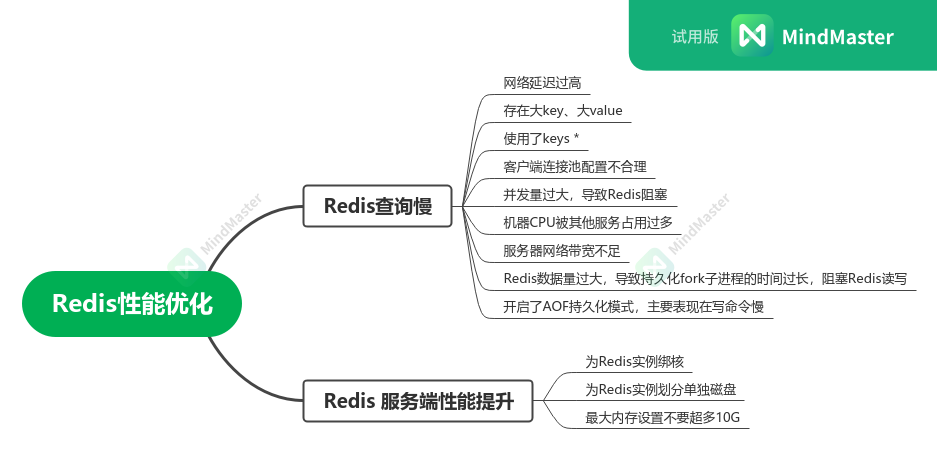
Performance optimization
Mind map:
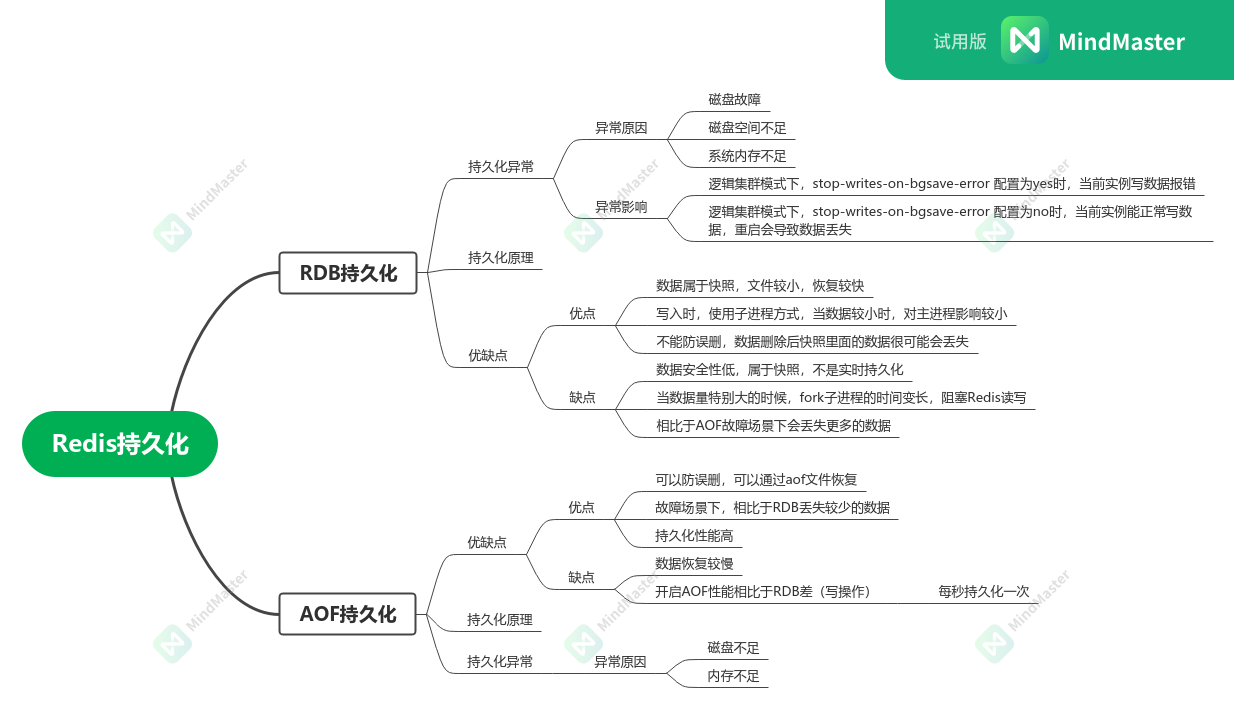
Persistence
Mind map:
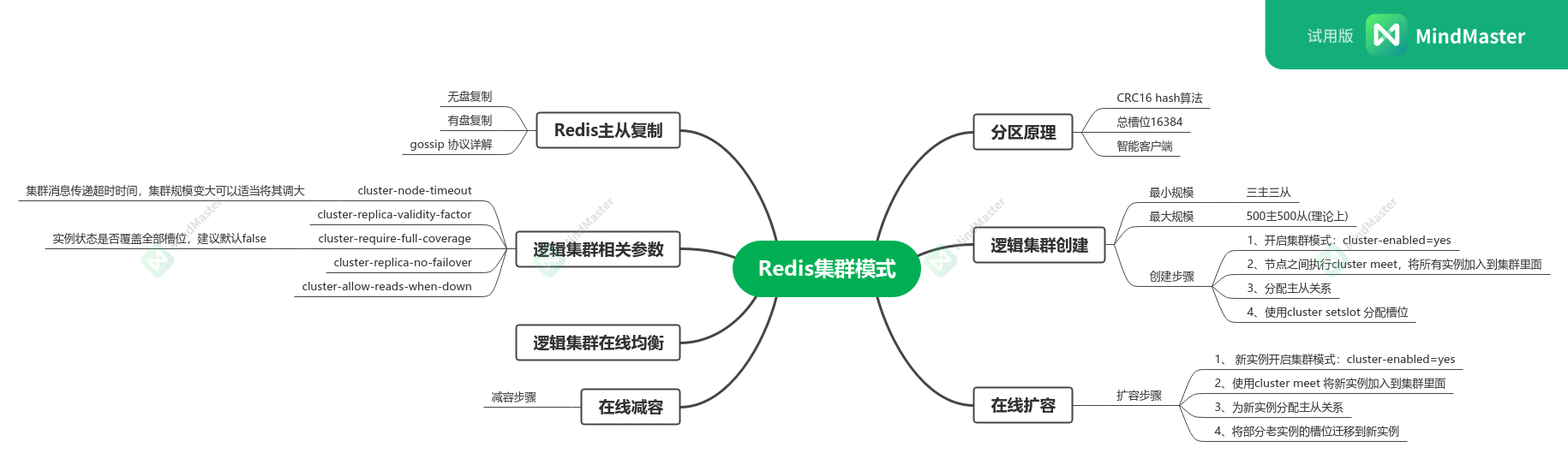
Cluster modes
Mind map:
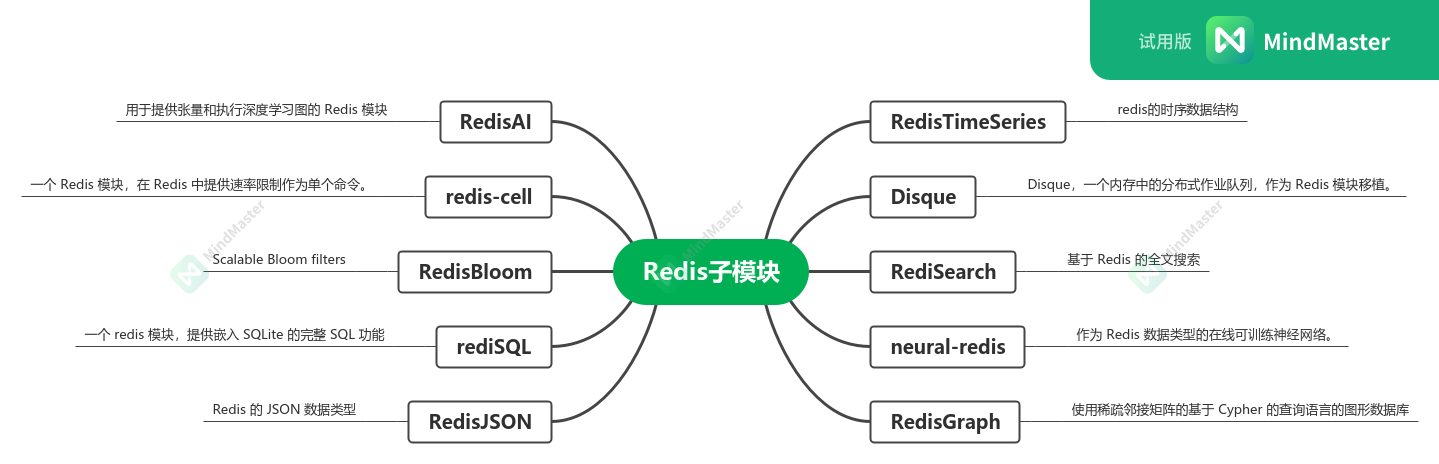
Submodules
Mind map:
Redis internals
The kernel-level section currently includes:
- the kernel startup process
Kernel startup process
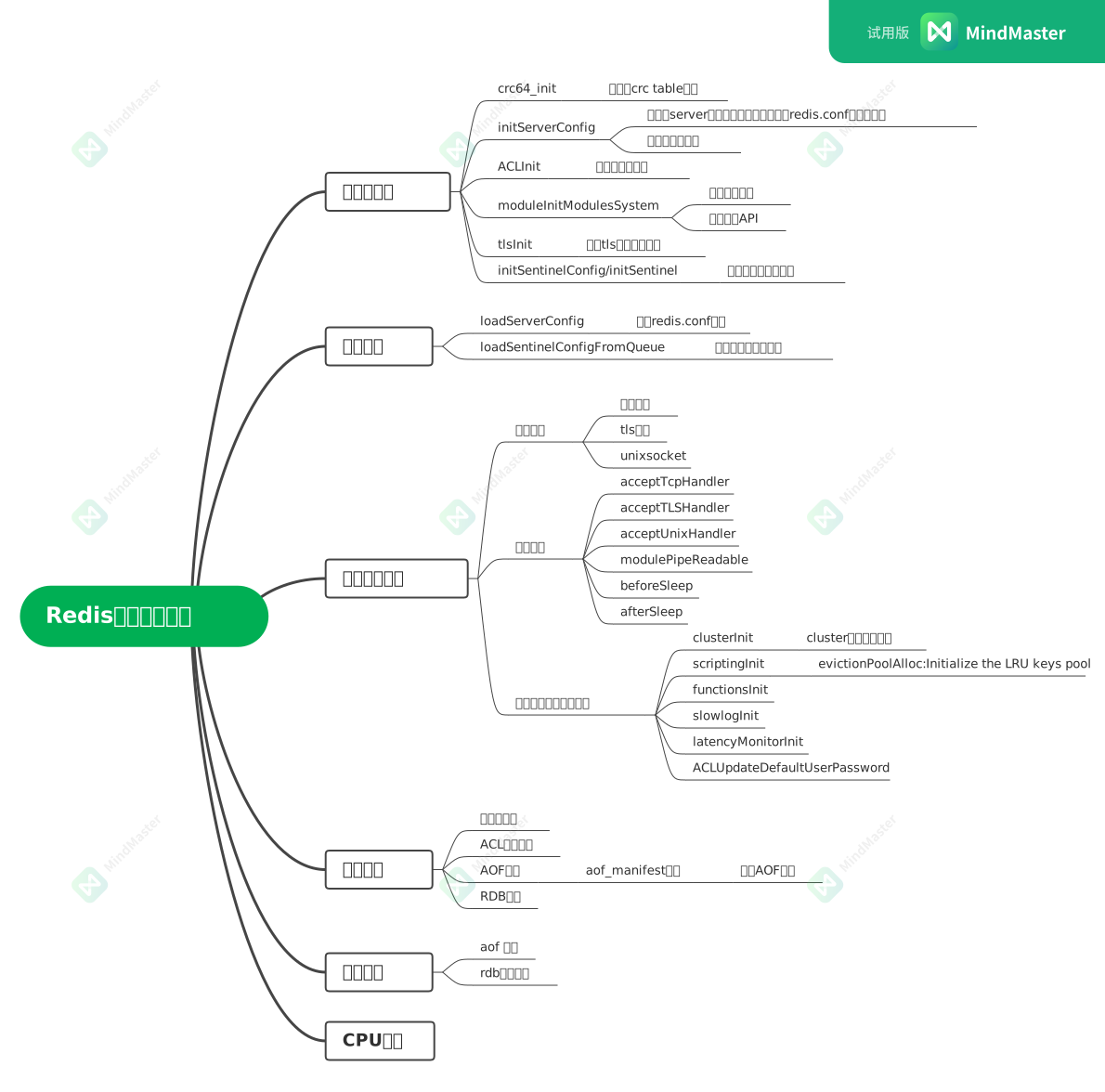
The kernel portion can be expanded further into more detailed notes based on the material in the mind maps.