Sending files through an application server before they reach S3 is still common: client → server → S3. It works, but every upload consumes server CPU, memory, and bandwidth; large files also need disk space. When the server does not need to process the file, the browser can send it to S3 directly: client → S3. There are two practical ways to do that with S3, and both can be backed by Go code.
Presigned PUT URLs
The server asks S3 to sign a URL for a specific object key. The URL has an expiry and lets the browser send the file as a binary stream with an HTTP PUT. This pattern fits a single large file particularly well.
The temporary URL is exposed to the browser, so the server still controls the risk:
- The object key is fixed at signing time, so the client can only write to the intended location.
- A sensible timeout should be set. After it passes, S3 stops accepting the upload and does not keep the file.
- Content-Type and Content-Length can be included in the signature. If the uploaded content does not match, S3 returns 403.
The following Go program demonstrates getting an upload presigned URL, uploading via PUT, and generating a download presigned URL after success.
package main

import (
    "bytes"
    "fmt"
    "net/http"
    "time"

    "github.com/aws/aws-sdk-go/aws"
    "github.com/aws/aws-sdk-go/aws/credentials"
    "github.com/aws/aws-sdk-go/aws/session"
    "github.com/aws/aws-sdk-go/service/s3"
)

// GenerateUploadPresignedURL creates a presigned URL for uploading.
func GenerateUploadPresignedURL(svc *s3.S3, bucketName, objectKey string, expiration time.Duration) (string, error) {
    req, _ := svc.PutObjectRequest(&s3.PutObjectInput{
        Bucket: aws.String(bucketName),
        Key:    aws.String(objectKey),
        // ContentType:   aws.String("text/plain"), // "application/json"
        // ContentLength: aws.Int64(19),
    })

    // Generate presigned URL
    signedURL, err := req.Presign(expiration)
    if err != nil {
        return "", fmt.Errorf("error generating upload presigned URL: %w", err)
    }
    return signedURL, nil
}

// UploadContentToS3 uploads content to S3 using the provided presigned URL.
func UploadContentToS3(signedURL, content, contentType string) error {
    req, err := http.NewRequest("PUT", signedURL, bytes.NewBuffer([]byte(content)))
    if err != nil {
        return fmt.Errorf("error creating PUT request: %w", err)
    }
    req.Header.Set("Content-Type", contentType)

    client := &http.Client{}
    resp, err := client.Do(req)
    if err != nil {
        return fmt.Errorf("error executing PUT request: %w", err)
    }
    defer resp.Body.Close()

    if resp.StatusCode != http.StatusOK {
        return fmt.Errorf("upload failed with status code %d", resp.StatusCode)
    }

    fmt.Println("Content uploaded successfully")
    return nil
}

// GenerateDownloadPresignedURL creates a presigned URL for downloading.
func GenerateDownloadPresignedURL(svc *s3.S3, bucketName, objectKey string, expiration time.Duration) (string, error) {
    req, _ := svc.GetObjectRequest(&s3.GetObjectInput{
        Bucket: aws.String(bucketName),
        Key:    aws.String(objectKey),
    })

    // Generate presigned URL
    signedURL, err := req.Presign(expiration)
    if err != nil {
        return "", fmt.Errorf("error generating download presigned URL: %w", err)
    }
    return signedURL, nil
}

func GetContent() string {
    CNTimeLocation, err := time.LoadLocation("Asia/Shanghai")
    if err != nil {
        panic(err)
    }
    return time.Now().In(CNTimeLocation).Format("2006-01-02 15:04:05")
}

func main() {
    const (
        region     = "cn-northwest-1"
        bucketName = "<your-bucket-name>"
        objectKey  = "<s3-object-target-key>"
        expiration = 15 * time.Minute // URL expiration time
        accessKey  = "<your-access-key>"
        secretKey  = "<your-secret-key>"
    )

    // Initialize session with credentials
    sess, err := session.NewSession(&aws.Config{
        Region: aws.String(region),
        Credentials: credentials.NewStaticCredentials(
            accessKey, secretKey, "",
        ),
    })
    if err != nil {
        fmt.Printf("Error creating AWS session: %v\n", err)
        return
    }

    svc := s3.New(sess)

    // Generate and print upload presigned URL
    uploadURL, err := GenerateUploadPresignedURL(svc, bucketName, objectKey, expiration)
    if err != nil {
        fmt.Printf("Error generating upload presigned URL: %v\n", err)
        return
    }
    fmt.Printf("Upload URL: %s\n", uploadURL)

    // Upload content to S3
    content := GetContent()
    contentType := "text/plain"
    if err := UploadContentToS3(uploadURL, content, contentType); err != nil {
        fmt.Printf("Error uploading content: %v\n", err)
        return
    }

    // Generate and print download presigned URL
    downloadURL, err := GenerateDownloadPresignedURL(svc, bucketName, objectKey, expiration)
    if err != nil {
        fmt.Printf("Error generating download presigned URL: %v\n", err)
        return
    }
    fmt.Printf("Download URL: %s\n", downloadURL)
}
Output:

A PUT presigned URL is only for uploads; it cannot be used to download or view the object. The separate GET signed URL in the code is what allows viewing or downloading.

A typical browser flow: the user selects a file → the frontend calculates Content-Type, Content-Length, Content-MD5, and related values and submits them to the server → the server returns a presigned URL → the client uploads to S3 → the client notifies the server when the upload succeeds.
POST Policies and Form Fields
This second approach relies on a feature specific to AWS S3. The client gets more flexibility, and the server can grant a broader but still constrained set of permissions.
The server produces form fields such as X-Amz-Date and X-Amz-Signature, along with a policy. The client includes those fields when it POSTs a multipart form to S3.
Compared with a presigned PUT URL, the signature and form fields can be reused during their validity period. That makes the POST form pattern better suited to uploading multiple files.
S3 itself does not support batch uploads. For multiple files, the client submits the form repeatedly, which works well for many small files. The presigned URL approach is clumsier in that scenario: every file needs a fresh request to the server, and the client cannot choose its own key path. The POST form is flexible, but because it uses AWS-specific policy behavior, it is not portable to S3-compatible storage services.
The server can constrain uploads with a policy. For example, it can require files to be between 1 and 50 MB and restrict Content-Type to image/*, while also setting a reasonable expiry.
The policy below describes the conditions an upload must satisfy for S3's presigned POST protocol:
{ "expiration": "2015-12-30T12:00:00.000Z",
  "conditions": [
    {"bucket": "sigv4examplebucket"},
    ["starts-with", "$key", "user/user1/"],
    {"acl": "public-read"},
    {"success_action_redirect": "http://sigv4examplebucket.s3.amazonaws.com/successful_upload.html"},
    ["starts-with", "$Content-Type", "image/"],
    {"x-amz-meta-uuid": "14365123651274"},
    {"x-amz-server-side-encryption": "AES256"},
    ["starts-with", "$x-amz-meta-tag", ""],

    {"x-amz-credential": "AKIAIOSFODNN7EXAMPLE/20151229/us-east-1/s3/aws4_request"},
    {"x-amz-algorithm": "AWS4-HMAC-SHA256"},
    {"x-amz-date": "20151229T000000Z" }
  ]
}
Reference: https://docs.aws.amazon.com/AmazonS3/latest/API/sigv4-post-example.html
The Go implementation uses aws-sdk-go-v2. The form fields determine where the file goes and what is uploaded.
package main

import (
    "context"
    "crypto/hmac"
    "crypto/sha256"
    "encoding/base64"
    "encoding/hex"
    "encoding/json"
    "fmt"
    "log"
    "path/filepath"
    "time"

    "github.com/aws/aws-sdk-go-v2/aws"
    "github.com/aws/aws-sdk-go-v2/config"
    "github.com/aws/aws-sdk-go-v2/credentials"
)

// AWS configuration constants
const (
    Region     = "cn-northwest-1"
    BucketName = "<your-bucket-name>"
    AccessKey  = "<your-access-key>"
    SecretKey  = "<your-secret-key>"
)

func main() {
    // Load AWS configuration
    cfg, err := loadAWSConfig(context.TODO())
    if err != nil {
        log.Fatalf("unable to load SDK config: %v", err)
    }

    // Define the object key
    keyPrefix := "s3-web-upload"

    // Set time values
    timeStamp := time.Now().UTC()
    shortDate, amzDate := formatDates(timeStamp)

    // Create the AWS credential string
    credential := fmt.Sprintf("%s/%s/%s/s3/aws4_request", AccessKey, shortDate, Region)

    // Create the policy
    expiration := timeStamp.Add(15 * time.Minute)
    policy := createPolicy(BucketName, keyPrefix, credential, amzDate, expiration)

    // Retrieve signing credentials
    creds, err := cfg.Credentials.Retrieve(context.TODO())
    if err != nil {
        log.Fatalf("unable to retrieve credentials: %v", err)
    }

    // Sign the policy
    signature, err := generateSignature(policy, creds, Region, shortDate)
    if err != nil {
        log.Fatalf("unable to sign policy: %v", err)
    }

    // Print the necessary fields for POST request
    printPostFields(BucketName, policy, creds, signature, credential, amzDate)

    // Generate and print the CURL command, upload txt
    objectKey := "s3-web-upload/test03-post-form/hello.txt"
    curlCommand := generateCURLCommand(BucketName, objectKey, "text/plain", policy, credential, amzDate, signature)
    fmt.Println("\nCURL Command:")
    fmt.Println(curlCommand)

    // Generate and print the CURL command, upload jpg
    objectKey = "s3-web-upload/test03-post-form/hello.jpg"
    curlCommand = generateCURLCommand(BucketName, objectKey, "image/jpeg", policy, credential, amzDate, signature)
    fmt.Println("\nCURL Command:")
    fmt.Println(curlCommand)
}

// loadAWSConfig loads AWS configuration using provided credentials and region
func loadAWSConfig(ctx context.Context) (aws.Config, error) {
    return config.LoadDefaultConfig(ctx,
        config.WithRegion(Region),
        config.WithCredentialsProvider(credentials.NewStaticCredentialsProvider(AccessKey, SecretKey, "")),
    )
}

// formatDates generates formatted date strings for use in AWS policies and signatures
func formatDates(timeStamp time.Time) (shortDate, amzDate string) {
    shortDate = timeStamp.Format("20060102")
    amzDate = timeStamp.Format("20060102T150405Z")
    return
}

type s3PostPolicy struct {
    Expiration string        `json:"expiration"`
    Conditions []interface{} `json:"conditions"`
}

// createPolicy generates a base64 encoded JSON policy document with given conditions
func createPolicy(bucket, keyPrefix, credential, amzDate string, expiration time.Time) string {
    conditions := []interface{}{
        map[string]string{"bucket": bucket},
        map[string]string{"x-amz-algorithm": "AWS4-HMAC-SHA256"},
        map[string]string{"x-amz-credential": credential},
        map[string]string{"x-amz-date": amzDate},
        []interface{}{"content-length-range", 0, 10485760}, // 10MB
        []interface{}{"starts-with", "$key", keyPrefix},
        []interface{}{"starts-with", "$Content-Type", ""}, // e.g. image/
    }

    policy := s3PostPolicy{
        Expiration: expiration.UTC().Format(time.RFC3339),
        Conditions: conditions,
    }

    policyBytes, _ := json.Marshal(policy)
    return base64.StdEncoding.EncodeToString(policyBytes)
}

// generateSignature creates an AWS v4 signature for the provided policy
func generateSignature(policy string, creds aws.Credentials, region, date string) (string, error) {
    signingKey := deriveSigningKey(creds.SecretAccessKey, date, region, "s3")
    signature := hmacSHA256(signingKey, policy)
    return hex.EncodeToString(signature), nil
}

// deriveSigningKey derives the signing key used for AWS signature v4
func deriveSigningKey(secret, date, region, service string) []byte {
    kDate := hmacSHA256([]byte("AWS4"+secret), date)
    kRegion := hmacSHA256(kDate, region)
    kService := hmacSHA256(kRegion, service)
    return hmacSHA256(kService, "aws4_request")
}

// hmacSHA256 performs HMAC-SHA256 hashing algorithm with given key and data
func hmacSHA256(key []byte, data string) []byte {
    h := hmac.New(sha256.New, key)
    h.Write([]byte(data))
    return h.Sum(nil)
}

// printPostFields displays the constructed fields needed for S3 POST requests
func printPostFields(bucketName, policy string, creds aws.Credentials, signature, credential, amzDate string) {
    fmt.Printf("URL: https://%s.s3.%s.amazonaws.com.cn\n", bucketName, Region)
    fmt.Println("Fields:")
    //fmt.Printf("Key: %s\n", key)
    fmt.Printf("AWSAccessKeyId: %s\n", creds.AccessKeyID)
    fmt.Printf("Policy: %s\n", policy)
    fmt.Printf("x-amz-signature: %s\n", signature)
    fmt.Printf("x-amz-credential: %s\n", credential)
    fmt.Printf("x-amz-algorithm: AWS4-HMAC-SHA256\n")
    fmt.Printf("x-amz-date: %s\n", amzDate)
}

// generateCURLCommand generates a CURL command for uploading a file to S3
func generateCURLCommand(bucketName, key, contentType, policy, credential, amzDate, signature string) string {
    filename := filepath.Base(key)
    curlTemplate := `curl -X POST \
  -F "key=%s" \
  -F "Content-Type=%s" \
  -F "X-Amz-Credential=%s" \
  -F "X-Amz-Algorithm=AWS4-HMAC-SHA256" \
  -F "X-Amz-Date=%s" \
  -F "Policy=%s" \
  -F "X-Amz-Signature=%s" \
  -F "file=@%s" \
  https://%s.s3.%s.amazonaws.com.cn/`

    return fmt.Sprintf(curlTemplate, key, contentType, credential, amzDate, policy, signature, filename, bucketName, Region)
}
Output:
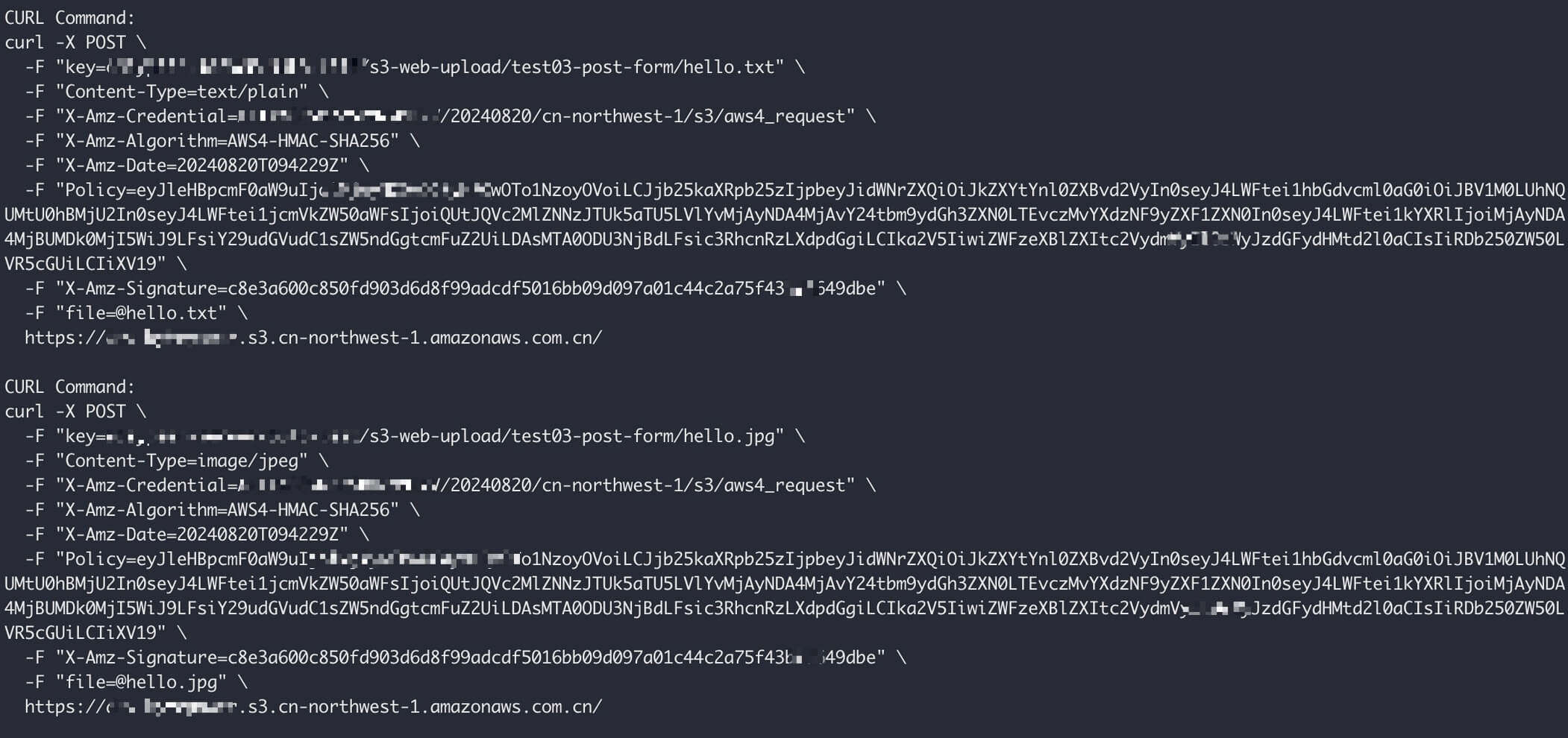
Running the two generated curl commands uploads hello.txt and hello.jpg from the current directory (prepare the files first). If S3 returns no error, the upload succeeded; otherwise S3 reports the reason.
A typical browser flow: the user selects files → the client gets the URL and form fields from the server → the client uploads to S3 (looping for multiple files) → the client sends upload success information back to the server.
For further reading, see AWS's examples for browser-based uploads with HTTP POST and Signature Version 4.