LangChain 核心组件之 Agent
经过了一番 LangChain 的学习之后,我们开始跟随 LangChain 的官方文档系统性的学习。首先是它的核心组件,包括 Agents, Models,
Messages, Tools, Short-term memory, Streaming, 和 Structured output. 现在从 Agents
开始。
创建 Agent
create_agent 是可用于正式产品中创建 Agent 的函数, 它返回的是一个 langgraph.graph.state.CompiledStateGraph 对象,而非一个 XxxAgent
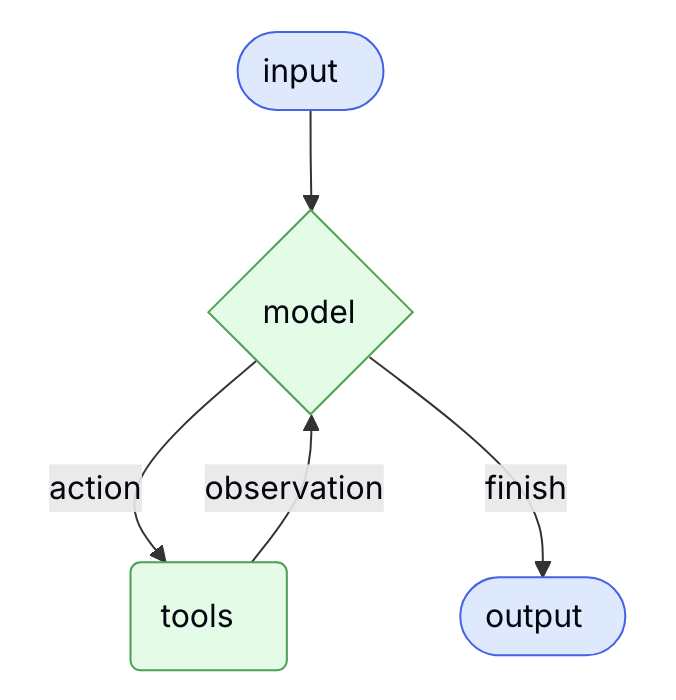
样的东西。所以它创建的是一个状态图,图吗,就有顶点和边,Agent 就是这个图中移动,比如在 Model 和 Tools 之间往复, 或在中间加入的互动的(Human-in-the-loop).
LangGraph 把与模型,工具,以及人的交互做成一个图还是很表意的,下面是来源于官方文档的表示 Agent 的状态图。
比如下面的代码
1agent = create_agent(
2    "ollama:gemma4:e4b",
3    tools=[get_weather],
4)
查看 agent.nodes 就能看到它的三个节点分别是 __start__, model, 和 tools. agent.get_graph().edges 可看到有四个边,分别为
- __start__ --> model, conditional=False
- model --> end, conditional=True
- model --> tools, conditional=True
- tools --> model, conditional=True
这实际上已经把前面的那个状态图描述出来了。
在继续进一步了解 Model 之前有必要知道 create_agent() 方法的原型
 1def create_agent(
 2    model: str | BaseChatModel,
 3    tools: Sequence[BaseTool | Callable[..., Any] | dict[str, Any]] | None = None,
 4    *,
 5    system_prompt: str | SystemMessage | None = None,
 6    middleware: Sequence[AgentMiddleware[StateT_co, ContextT]] = (),
 7    response_format: ResponseFormat[ResponseT] | type[ResponseT] | dict[str, Any] | None = None,
 8    state_schema: type[AgentState[ResponseT]] | None = None,
 9    context_schema: type[ContextT] | None = None,
10    checkpointer: Checkpointer | None = None,
11    store: BaseStore | None = None,
12    interrupt_before: list[str] | None = None,
13    interrupt_after: list[str] | None = None,
14    debug: bool = False,
15    name: str | None = None,
16    cache: BaseCache[Any] | None = None,
17) -> CompiledStateGraph[
18    AgentState[ResponseT], ContextT, _InputAgentState, _OutputAgentState[ResponseT]
19]
* 处主要是使用模型的参数,例如, api_key, temperature,
max_tokens, timeout, max_reties
每个 Agent 可以有一个名称,用 name 参数指定,在多 Agent 的场景下,可以方便的识别和管理。
动态模型
Model 是 Agent 的核心,没了 Model 什么也不是,它分静态和动态的 Model, 动态模型即能按条件动态的选择适合于干某类事的特定的模型。静态模型就是
创建 Agent 时直接指定的模型。接下来演示如何动态的选择模型,例如本地有两个 Ollama 下载的模型
1ollama list
2NAME           ID              SIZE      MODIFIED
3llama3.2:1b    baf6a787fdff    1.3 GB    31 seconds ago
4gemma4:e4b     c6eb396dbd59    9.6 GB    3 days ago
现在的需求是,复杂的问题用 gemma4:e4b 回答, 简单问题,如 hello, how are you 用小模型 llama3.2:1b, 这种降智处理可以快速给出回答外,
也可以为模型提供商节约成本。
以下例子根据官方代码进行改编的
 1from langchain.chat_models import init_chat_model
 2from langchain.agents import create_agent
 3from langchain.agents.middleware import wrap_model_call, ModelRequest, ModelResponse
 4from langchain_core.messages import AIMessage
 5
 6basic_model = init_chat_model(model="ollama:llama3.2:1b")
 7advanced_model = init_chat_model(model="ollama:gemma4:e4b")
 8
 9@wrap_model_call
10def dynamic_model_selection(request: ModelRequest, handler) -> ModelResponse:
11    """Choose model based on conversation complexity."""
12    # message_count = len(request.state["messages"])
13    message_length = len(request.messages[-1].content)
14    model = advanced_model if message_length > 10 else basic_model
15    return handler(request.override(model=model))
16
17agent = create_agent(
18    model=basic_model,  # Default model
19    middleware=[dynamic_model_selection]
20)
21
22def chat(question: str) -> None:
23    result = agent.invoke({"messages": {"role": "user", "content": question}})
24    for message in result["messages"]:
25        if isinstance(message, AIMessage):
26            print(f"model: {message.response_metadata['model']}\nanswer: {message.content}")
27
28
29chat("hello")
30print("--------------")
31chat("write python code to shutdown an ec2 instance")
LangChain 依靠 middleware,在其中根据问题或上下文特征来选择适当模型的,以上代码执行后输出为
model: llama3.2:1b
answer: Hello. Is there something I can help you with or would you like to chat?
--------------
model: gemma4:e4b
answer: To write Python code that shuts down an EC2 instance, you need to use the AWS SDK for Python, which is calledboto3.
This code assumes you have already:
......
问题为 hello 模型选择 ollama:llama3.2:1b, 要它写代码时换到了 gemma4:e4b 模型。
注:如果在 init_chat_model() 创建模型时绑定了工具的话,则动态模型不能与结构化输出同时使用,此时应该在 create_agent() 时绑定工具。
大语言模型发展到现在 Tools 是必不可少的,没有工具就像早期的 ChatGPT 只能基于训练时的知识来回答问题,对于问询天气,订票之类的根本无能为力,
也就成不了现在的所谓的智能体。LangChain 支持工具方面,多个工具逐个触发,可并发调用工具; 像动态模型一样,工具也可以动态的, 这就可以根据应用场景
动态的发送工具列表给模型,不用每次把所有的工具送给大模型,节约 Token; 工具调用有重试和错误处理机制; 状态可跨越不同的工具调用。
静态工具的使用很简单,不再讲述,这边看 LangChain 如何支持动态工具调用,我们可以根据用户权限,特性标记或会话阶段来选择不同的工具集。动态选择
工具有两种种方式
- 创建 Agent 时预注册所有的工具,在每次交互时用
middleware过滤出当前会话需要的工具 - 不预注册动态的工具,每次与 LLM 交互时也是用
middelware直接选择需要的工具
下面体验第一种方式,根据用户角色来过滤工具, 演示代码
 1from langchain.agents import create_agent
 2from langchain.agents.middleware import wrap_model_call, ModelRequest, ModelResponse
 3from typing import Callable, Literal
 4
 5from langchain_core.tools import tool
 6from pydantic import BaseModel
 7
 8
 9@tool
10def read(filepath: str) -> str:
11    """Read file data by filepath."""
12    return f"Read {filepath}"
13
14
15@tool
16def update(filepath: str, new_content: str) -> str:
17    """Update file data by filepath and new content."""
18    return f"Updated {filepath}"
19
20
21@tool
22def write(filepath: str, content: str) -> str:
23    """Write file data with filepath and content."""
24    return f"Writing {filepath} with content: {content}"
25
26
27class Context(BaseModel):
28    user_role: Literal["admin", "editor", "viewer"]
29
30
31@wrap_model_call
32def context_based_tools(
33        request: ModelRequest,
34        handler: Callable[[ModelRequest], ModelResponse]
35) -> ModelResponse:
36    user_role = request.runtime.context.user_role
37
38    if user_role == "editor":
39        tools = [t for t in request.tools if t.name == "update"]
40        request = request.override(tools=tools)
41    elif user_role == "viewer":
42        tools = [t for t in request.tools if t.name == "read"]
43        request = request.override(tools=tools)
44
45    return handler(request)
46
47
48agent = create_agent(
49    model="ollama:gemma4:e4b",
50    tools=[read, update, write],
51    middleware=[context_based_tools],
52    context_schema=Context
53)
54
55question = "create a file and put content xyz"
56
57agent.invoke({"messages": [{"role": "user", "content": question}]},
58             context=Context(user_role="admin"))
59
60agent.invoke({"messages": [{"role": "user", "content": question}]},
61             context=Context(user_role="editor"))
62
63agent.invoke({"messages": [{"role": "user", "content": question}]},
64             context=Context(user_role="viewer"))
user_role 为 admin, editor 和 viewer 时,这三个请求分别向模型发送提示词中 tools 分别如下
user_role = "admin"
 1{
 2  "tools": [ {
 3      "type": "function",
 4      "function": { "name": "read", "description": "Read file data by filepath.",
 5        "parameters": { "type": "object", "required": [ "filepath" ],
 6          "properties": { "filepath": { "type": "string" } }
 7        } } },
 8    {
 9      "type": "function",
10      "function": { "name": "update", "description": "Update file data by filepath and new content.",
11        "parameters": { "type": "object", "required": [ "filepath", "new_content" ],
12          "properties": { "filepath": { "type": "string" }, "new_content": { "type": "string" } }
13        } } },
14    {
15      "type": "function",
16      "function": { "name": "write", "description": "Write file data with filepath and content.",
17        "parameters": { "type": "object", "required": [ "filepath", "content" ],
18          "properties": { "filepath": { "type": "string" }, "content": { "type": "string" } }
19        } } }
20  ]
21}
user_role = "editor"
1{
2  "tools": [ {
3      "type": "function",
4      "function": { "name": "update", "description": "Update file data by filepath and new content.",
5        "parameters": { "type": "object", "required": [ "filepath", "new_content" ],
6          "properties": { "filepath": { "type": "string" }, "new_content": { "type": "string" } }
7        } } }
8  ]
9}
user_role = "viewer"
1{
2  "tools": [ {
3      "type": "function",
4      "function": { "name": "read", "description": "Read file data by filepath.",
5        "parameters": { "type": "object", "required": [ "filepath" ],
6          "properties": { "filepath": { "type": "string" } }
7        } } }
8  ]
9}
LangChain 的 Tools 调用遵循了 ReAct 循环模型,即 Reasoning/Acting 循环。
工具调用的异常处理
仍然是用 middleware, 这次配置 @wrap_tool_call 装饰器,下面是演示代码
 1from langchain.agents import create_agent
 2from langchain.agents.middleware import wrap_tool_call
 3from langchain_core.messages import ToolMessage
 4
 5from langchain_core.tools import tool
 6
 7
 8@tool
 9def read(filepath: str) -> str:
10    """Read file data by filepath."""
11    raise FileNotFoundError(f"File {filepath} not found")
12
13
14@wrap_tool_call
15def handle_tool_errors(request, handler):
16    """Handle tool execution errors with custom messages."""
17    try:
18        return handler(request)
19    except Exception as e:
20        return ToolMessage(
21            content=f"Tool error: Please check your input and try again. ({str(e)})",
22            tool_call_id=request.tool_call["id"]
23        )
24
25
26agent = create_agent(
27    model="ollama:gemma4:e4b",
28    tools=[read],
29    middleware=[handle_tool_errors]
30)
31
32result = agent.invoke(
33    {"messages": [{"role": "user", "content": "read file /abc.log and explain the content"}]},
34)
35
36for message in result["messages"]:
37    print(f"{type(message)}: {message.tool_calls if isinstance(message, AIMessage) else ""}: {message.content}")
调用方法 read(filepath) 时报出异常, 看下这时 Agent 会如何处理, 打印出上面的所有消息
1<class 'langchain_core.messages.human.HumanMessage'>: : read file /abc.log and explain the content
2<class 'langchain_core.messages.ai.AIMessage'>: [{'name': 'read', 'args': {'name': '/abc.log'}, 'id': 'e733af10-fd95-48fa-b12d-b8224fb4291e', 'type': 'tool_call'}]:
3<class 'langchain_core.messages.tool.ToolMessage'>: : Tool error: Please check your input and try again. (File /abc.log not found)
4<class 'langchain_core.messages.ai.AIMessage'>: []: I was unable to read the file `/abc.log` because the system returned an error stating that the file was not found.
中间的 ToolMessage 报告了 Tool error. 也就是每个工具方法都由 @wrap_tool_call 装饰的拦截器来调用,有异常直接返回 ToolMessage,
也相当于模型请求本地进行的方法调用结束了,只不过以异常的方式结束的。
系统提示词(System Prompt)
系统提示词是考验一个人或 Agent 使用 AI, 或实现代理所爆发出来的的功力所在方,像 OpenClaw 的系统提示词参考 就非常庞大。
这里不是学习如何写系统提示词,当然我们也可以问 AI 帮我们生成所需的系统提示词,一切皆可 AI。而要讲的是系统提示词也可以动态,创建 agent
时不指系统提示词,也像 Model, Tools 那样可以根据条件动态选择相匹配的系统提示词。
 1class Context(TypedDict):
 2    user_role: str
 3
 4@dynamic_prompt
 5def user_role_prompt(request: ModelRequest) -> str:
 6    """Generate system prompt based on user role."""
 7    user_role = request.runtime.context.get("user_role", "user")
 8    base_prompt = "You are a helpful assistant."
 9
10    if user_role == "expert":
11        return f"{base_prompt} Provide detailed technical responses."
12    elif user_role == "beginner":
13        return f"{base_prompt} Explain concepts simply and avoid jargon."
14
15    return base_prompt
16
17agent = create_agent(
18    model="...",
19    middleware=[user_role_prompt],
20    context_schema=Context
21)
结构化输出
在 create_agent() 时用 response_format=TollStrategy(CustomModel) 指定一个自定义的模型类,用于对 LLM 的输出进行格式化,并作为
消息返回给 Agent 的使用者,它本质上是一个 Tool.
我们借鉴官方的例子
 1from pydantic import BaseModel
 2from langchain.agents import create_agent
 3from langchain.agents.structured_output import ToolStrategy
 4
 5
 6class ContactInfo(BaseModel):
 7    name: str
 8    email: str
 9    phone: str
10
11    def __str__(self):
12        return f"ContactInfo(name={self.name}, email={self.email}, phone={self.phone})"
13
14agent = create_agent(
15    model="ollama:gemma4:e4b",
16    response_format=ToolStrategy(ContactInfo)
17)
18
19result = agent.invoke({
20    "messages": [{"role": "user", "content": "Extract contact info from: John Doe, [email protected], (555) 123-4567"}]
21})
22
23print(result["structured_response"])
24
25for message in result["messages"]:
26    print(f"{type(message)}: {message.tool_calls if isinstance(message, AIMessage) else ""}: {message.content}")
使用了 response_format=ToolStrategy(ContactInfo) 之后,返回的 result 就有两个字段 messages 和 structured_response.
result["structured_response"] 的内容就是一个 ContactInfo 实例, 输出结果为
1ContactInfo(name=John Doe, [email protected], phone=(555) 123-4567)
2<class 'langchain_core.messages.human.HumanMessage'>: : Extract contact info from: John Doe, [email protected], (555) 123-4567
3<class 'langchain_core.messages.ai.AIMessage'>: [{'name': 'ContactInfo', 'args': {'email': '[email protected]', 'name': 'John Doe', 'phone': '(555) 123-4567'}, 'id': 'e0201c29-21f8-45ac-9b2f-537616e56b2e', 'type': 'tool_call'}]:
4<class 'langchain_core.messages.tool.ToolMessage'>: : Returning structured response: ContactInfo(name=John Doe, [email protected], phone=(555) 123-4567)
为什么说格式化输出本质上是一个 Tool,我们看它实际上向 LLM 发送了下面的工具提示词
 1{
 2  "model": "gemma4:e4b", "stream": true, "options": {}, "messages": [{ "role": "user",
 3      "content": "Extract contact info from: John Doe, [email protected], (555) 123-4567"
 4    }],
 5  "tools": [ {
 6      "type": "function",
 7      "function": { "name": "ContactInfo", "description": "",
 8        "parameters": {
 9          "type": "object",
10          "required": [ "name", "email", "phone" ],
11          "properties": {
12            "name": { "type": "string" },
13            "email": { "type": "string" },
14            "phone": { "type": "string" }
15          } } } } ] }
注:以上 JSON 数据对不重要的信息进行了折叠
如果是一个无法正确格式化的消息会出现什么状况呢? 把问题换成
Extract contact info from: hello
这会让 LLM 一直 thinking, 并回答
I could not find any contact information (name, email, or phone number) in the text "hello". Please provide the text you would like me to extract from.
陷入了一个几乎是与 LLM 交互的死循环, 从方法 agent_inoke() 中退不出来,因为我们在 create_agent() 时默认的 recursion_limit 是 9999,
{'configurable': {}, 'metadata': {'ls_integration': 'langchain_create_agent'}, 'recursion_limit': 9999}
要么在创建 agent 是修改 recursion_limit 值,或在 agent.invoke() 时设定该值,invoke() 调用改成
1result = agent.invoke({
2    "messages": [{"role": "user", "content": "Extract contact info from: hello"}],
3},
4    config={"recursion_limit": 50}
5)
这样的话达到与 LLM 的交互次数上限 50 后就会报告异常退出 invoke() 调用
1raise GraphRecursionError(msg)
2langgraph.errors.GraphRecursionError: Recursion limit of 50 reached without hitting a stop condition. You can increase the limit by setting the `recursion_limit` config key.
3For troubleshooting, visit: https://docs.langchain.com/oss/python/langgraph/errors/GRAPH_RECURSION_LIMIT
实际应用中需根据工具数量来决定 recursion_limit 的值,工具越多,循环的可能性越大,值也要相应的增大。
ProviderStrategy 使用模型自己的结构化输出方式,模型没有这一能力的话会使用 ToolStrategy
1agent = create_agent(
2    model="ollama:gemma4:e4b",
3    response_format=ProviderStrategy(ContactInfo)
4)
与 ToolStrategy 的区别是不需要依赖于工具调用,使用 ProviderStrategy 后发送给大模型的的提示词是
 1{
 2  "model": "gemma4:e4b", "stream": true, "options": {},
 3  "format": {
 4    "properties": {
 5      "name": { "title": "Name", "type": "string" },
 6      "email": { "title": "Email", "type": "string" },
 7      "phone": { "title": "Phone", "type": "string" }
 8    },
 9    "required": [ "name", "email", "phone"
10    ],
11    "title": "ContactInfo",
12    "type": "object"
13  },
14  "messages": [ { "role": "user", "content": "Extract contact info from: John Doe, [email protected], (555) 123-4567" } ],
15  "tools": []
16}
不再需要 tools, 而是发送了 format,测试了 ollama:gemma4:e4b 模型,可以支持,这样就省去了一次 ToolMessage 的调用,相当于省了
一个消息来回,所以整个通信过程就一个 HumanMessage 和一个 AIMessage 就完事了,AIMessage 中直接输出格式化后的消息
1ContactInfo(name=John Doe, [email protected], phone=(555) 123-4567)
2<class 'langchain_core.messages.human.HumanMessage'>: : Extract contact info from: John Doe, [email protected], (555) 123-4567
3<class 'langchain_core.messages.ai.AIMessage'>: []: {
4  "name": "John Doe",
5  "email": "[email protected]",
6  "phone": "(555) 123-4567"
7}
Agent 状态(Agent State)
LangChain 的技术文档 Agents/Memory 好像不是关于记忆的内容,
而是有关 AgentState 的,比如默认的 AgentState 有三个字段 messages, jump_to, 和 structured_response. 我们调用
agent.invoke() 时通常用 {"messages": [...]} 发送消息,通过定制 AgentState 可以附更多的信息, 但是有什么用途呢?
LangChain 提供两种方式来使用定制的 AgentState
- 通过
middleware来使用AgentState(这种方式稍复杂些,但是首选的,因为状态能与相应的 Tools 关联) - 通过
create_agent的state_schema参数使用AgentState
 1class CustomState(AgentState):
 2    user_preferences: dict
 3
 4class CustomMiddleware(AgentMiddleware):
 5    state_schema = CustomState
 6
 7    def before_model(self, state: CustomState, runtime: Runtime) -> dict[str, Any] | None:
 8        print("message ", state["messages"][-1].content)  # message hello
 9        print("task_type" , state["user_preferences"].get("task_type")) # task_type simple
10
11agent = create_agent(
12    model="ollama:gemma4:e4b",
13    middleware=[CustomMiddleware()]
14)
15
16result = agent.invoke({
17    "messages": [{"role": "user", "content": "hello"}],
18    "user_preferences": {"task_type": "simple"}, # 这是基于 `CustomState` 附加的信息
19})
通过对请求数据的分析,user_preferences 也只是让 middleware 看到,并不会发送到大语言模型去。
Streaming 流式交互
我们除了调用 agent.invoke() 等与模型交互全部完成后得到最后的结果,也可以在与模型交互过程中 通过 agent.stream() 来获取流式交互的结果.
在基于 model = init_chat_model() 创建的 model 与 LLM 模型交互时,我们用过 model.stream(),agent.stream() 也有相应的功能,
即 stream_mode="messages" 时与 model.stream() 等效.
1for chunk, metadata in agent.stream(
2        {"messages": [{"role": "user", "content": "python code to read s3 object"}]},
3        stream_mode="messages"):
4    print(chunk.content, end="", flush=True)
这与 model.stream() 是一样的效果,最后一个 AIMessage 回复一个一个 token 输出。stream_mode 的取值有 values, updates,
checkpoints, tasks, debug, messages, custom, 默认值为像是 updates. 不同 stream_mode 下 agent.stream()
返回值的格式不一样,需因时读取数据。
Middleware 中单件
LangChain 的 middleware 可以参考 Node.js 框架 Express 的 middleware, 在 LangChain 中 middleware 可执行许多的定制功能,如
- 根据
AgentState在调用模型前定制消息,向上下文中注入信息 - 修改或校验模型的响应信息,比如内容敏感词过滤。LangChain 还要靠 Agent 来做过滤,中国产的模型在模型内部就能过滤
- 处理工具执行异常
- 基于 State 或上下文实现动态的选择模型
- 添加定制的日志,进行监控与分析
[版权声明]
 本文采用 署名-非商业性使用-相同方式共享 4.0 国际 (CC BY-NC-SA 4.0) 进行许可。