Outline
1. Why browsers treat HTTP and HTTPS differently

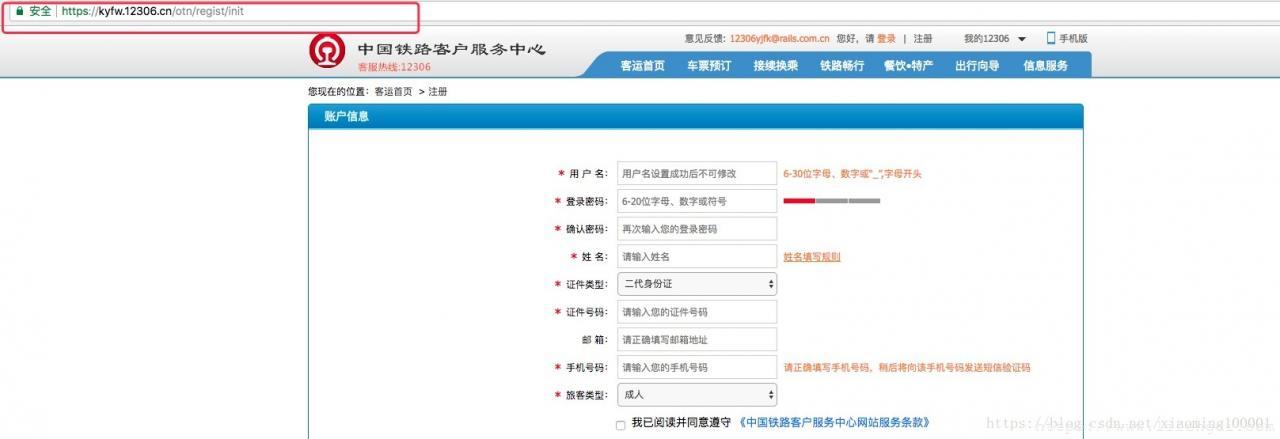
Look at the two browser screenshots above. In the first one, the address uses http://www.12306.cn, and Chrome marks the connection as not secure. In the second one, the address is https://kyfw.12306.cn/otn/regist/init, and the browser shows it as secure.
This difference is not accidental. Starting with Chrome 56, released in January 2017, Chrome began marking HTTP pages that collect passwords or credit card data as “Not secure.” Later, with Chrome 62 in October 2017, HTTP pages containing input fields, as well as all HTTP pages opened in Incognito mode, were also marked as “Not secure.” Around the same period, Apple required all iOS apps to use HTTPS encryption by January 1, 2017.
The reason behind these changes is simple: HTTP transmits data in plain text, while HTTPS adds encryption, identity verification, and integrity protection on top of HTTP.
2. The evolution of HTTP and HTTPS
What is HTTP?
HTTP, or Hypertext Transfer Protocol, is a stateless application-layer protocol based on a request-response model. It is commonly carried over TCP/IP and is one of the most widely used network protocols on the Internet. All World Wide Web documents follow this protocol. HTTP was originally designed to provide a way to publish and receive HTML pages.
Its development can be roughly summarized as follows:
<table> <thead> <tr> <th>Version</th> <th>Year</th> <th>Main features</th> <th>Status</th> </tr> </thead> <tbody> <tr> <td>HTTP/0.9</td> <td>1991</td> <td>Did not involve complex packet transmission; defined a simple client-server communication format; supported only GET requests</td> <td>Not established as an official standard</td> </tr> <tr> <td>HTTP/1.0</td> <td>1996</td> <td>Removed restrictions on transmitted content formats; added methods such as PUT, PATCH, HEAD, OPTIONS, and DELETE</td> <td>Became an official standard</td> </tr> <tr> <td>HTTP/1.1</td> <td>1997</td> <td>Persistent connections, bandwidth savings, Host header, pipelining, chunked transfer encoding</td> <td>The most widely used version before 2015</td> </tr> <tr> <td>HTTP/2</td> <td>2015</td> <td>Multiplexing, server push, header compression, binary protocol, and other improvements</td> <td>Gradually adopted across the market</td> </tr> </tbody> </table>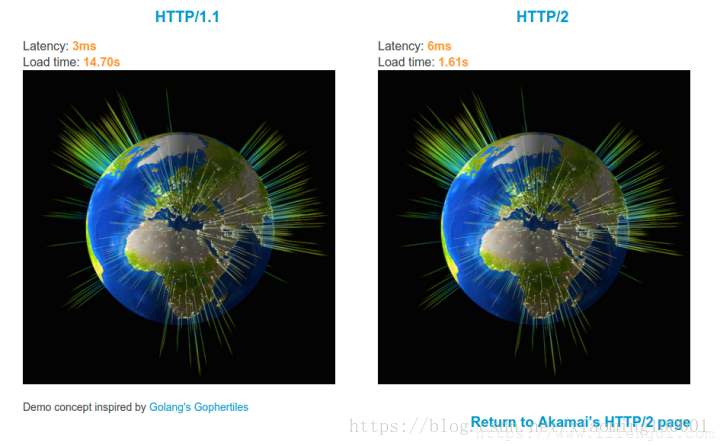
The image above comes from a demonstration in which HTTP/1.1 and HTTP/2 request 379 images at the same time. By comparing the loading time, the performance advantage of HTTP/2 is easy to see.
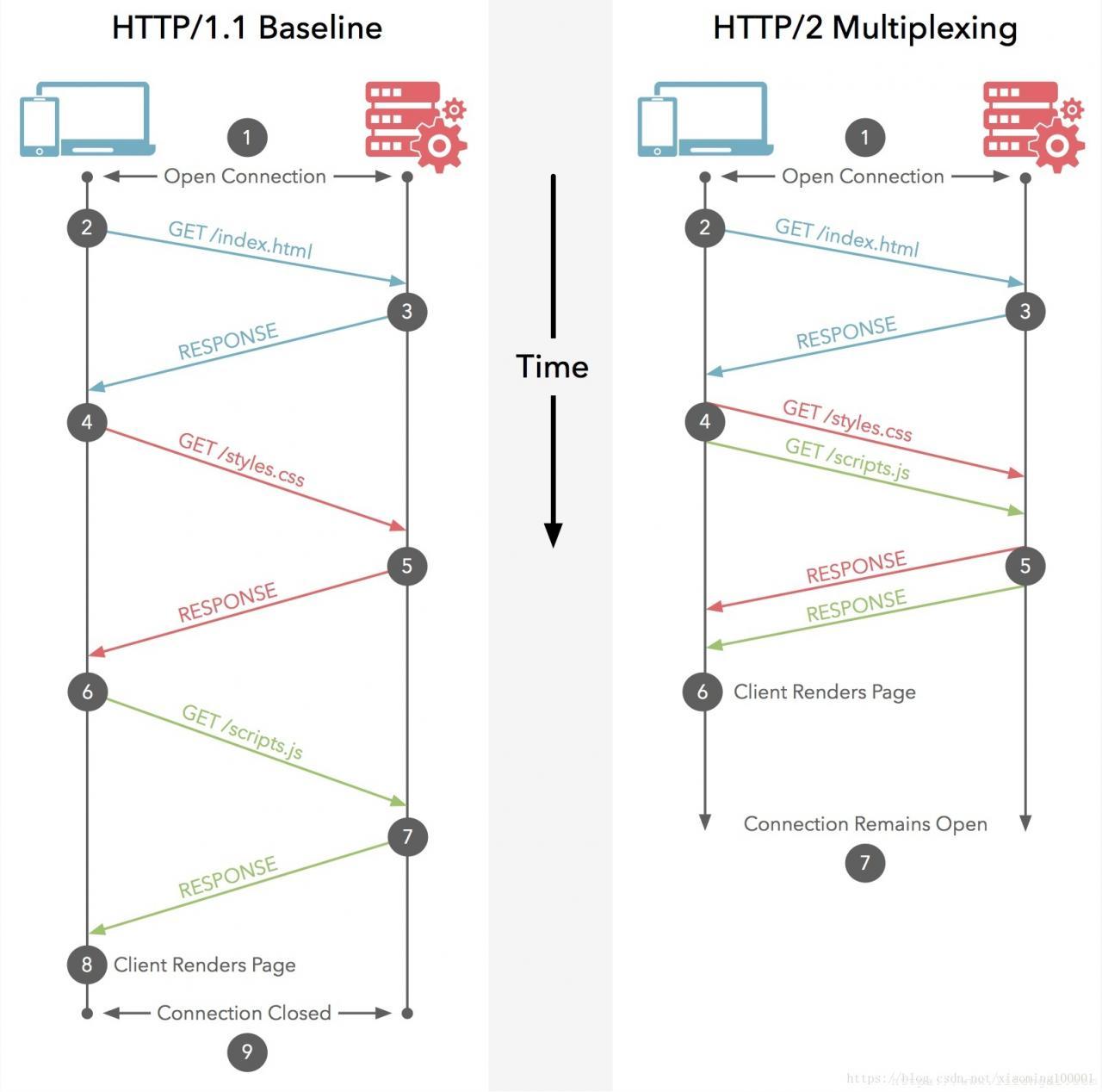
Multiplexing is one of the most important changes in HTTP/2. Multiple request-response messages can be sent through a single HTTP/2 connection. Different request streams share one TCP connection, making parallel transmission possible without relying on many separate TCP connections.
What is HTTPS?
HTTPS can be understood as HTTP wearing an SSL/TLS protective layer. It is a protocol for secure communication over a computer network. The communication still happens through HTTP, but SSL/TLS is used to establish a secure channel and encrypt the transmitted data packets.
The main purpose of HTTPS is to authenticate the website server and protect the privacy and integrity of exchanged data.
TLS is a transport-layer encryption protocol. Its predecessor was SSL, released by Netscape in 1995. In many discussions, SSL and TLS are mentioned together, and the two terms are sometimes used without strict distinction.
3. HTTP versus HTTPS
Characteristics of HTTP
HTTP has several basic characteristics:
- Stateless: The protocol itself does not store client state and has no memory of previous interactions. For example, without additional mechanisms, a user may need to log in repeatedly when visiting a website.
- Connectionless in earlier usage: Before HTTP/1.1, because of its stateless nature, each request often required a new TCP connection, including the TCP three-way handshake and four-way termination. If a client requested the same resource multiple times in a short period, the server could not determine whether it had already responded to that user’s request and had to process each request again, wasting time and traffic.
- Request-response based: The client initiates a request, and the server returns a response.
- Simple, fast, and flexible: HTTP is easy to understand and widely adaptable.
- Plain-text communication: HTTP does not confirm the identity of the communicating party, and it cannot protect data integrity by itself.
A simple packet-capture experiment shows what HTTP transmission looks like:
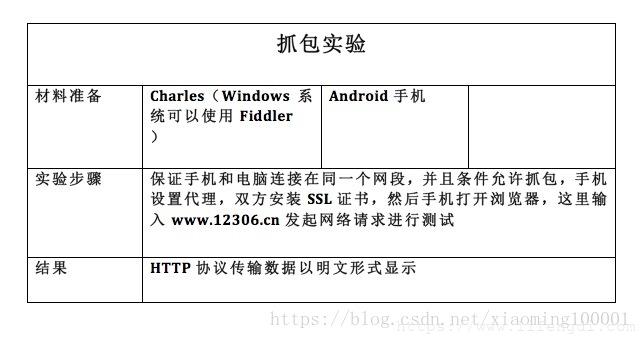
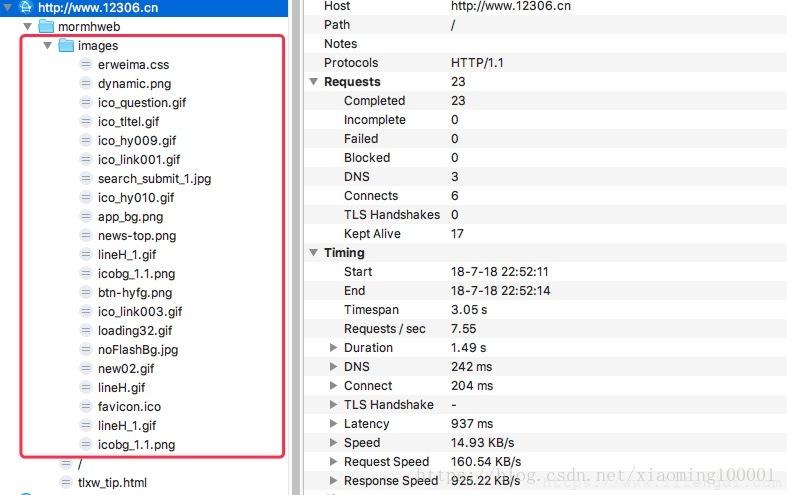
The result is clear: data transmitted through HTTP can be displayed in plain text.
Common approaches to HTTP statelessness
Consider a typical e-commerce scenario. A user may spend a long time browsing products, adding items to a cart, and checking account information. The website needs to preserve the user’s communication state for a period of time. For example, after one login operation, all requests within the next 30 minutes should not require the user to log in again.
Common solutions include:
- Cookie and Session mechanisms: These allow the server and browser to maintain user-related state across multiple HTTP requests.
- HTTP/1.1 persistent connections, also called HTTP keep-alive: As long as neither side explicitly closes the connection, the TCP connection remains open. The request header field
Connection: keep-aliveindicates that a persistent connection is being used.
Characteristics of HTTPS
HTTPS is based on HTTP but uses SSL or TLS to provide encrypted data processing, identity verification, and data integrity protection.
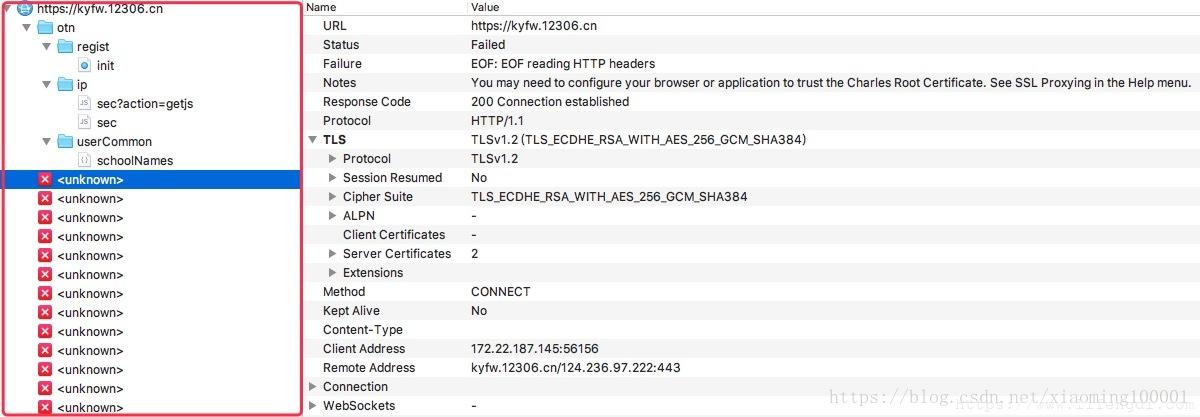
A packet capture of HTTPS traffic shows that the transmitted data is no longer visible as plain text. HTTPS provides three main protections:
- Content encryption: HTTPS uses hybrid encryption, so an intermediary cannot directly read the plaintext content.
- Identity verification: Certificates help verify that the client is connecting to the intended server.
- Data integrity protection: HTTPS helps prevent transmitted content from being impersonated or tampered with by a man-in-the-middle.
Hybrid encryption combines asymmetric encryption and symmetric encryption. The client generates a key for symmetric encryption and uses it to encrypt transmitted data. Then it uses the public key from asymmetric encryption to encrypt that symmetric key. What travels over the network is therefore encrypted content plus the secret key encrypted with the public key. Even if an attacker intercepts the traffic, without the private key they cannot recover the key used to encrypt the plaintext and therefore cannot obtain the original data.
Digital digest means applying a one-way hash function to the original content, turning the plaintext that needs protection into a fixed-length ciphertext-like digest, such as 128 bits. Different plaintext usually produces different digests, the same plaintext always produces the same digest, and the original plaintext cannot be derived from the digest.
Digital signature technology is built on public-key encryption. It combines public-key encryption with digital digests to create practical digital signatures. With digital signatures:
- The receiver can verify the sender’s real identity.
- The sender cannot later deny having sent the message.
- Neither the receiver nor an illegal third party can forge or tamper with the message.
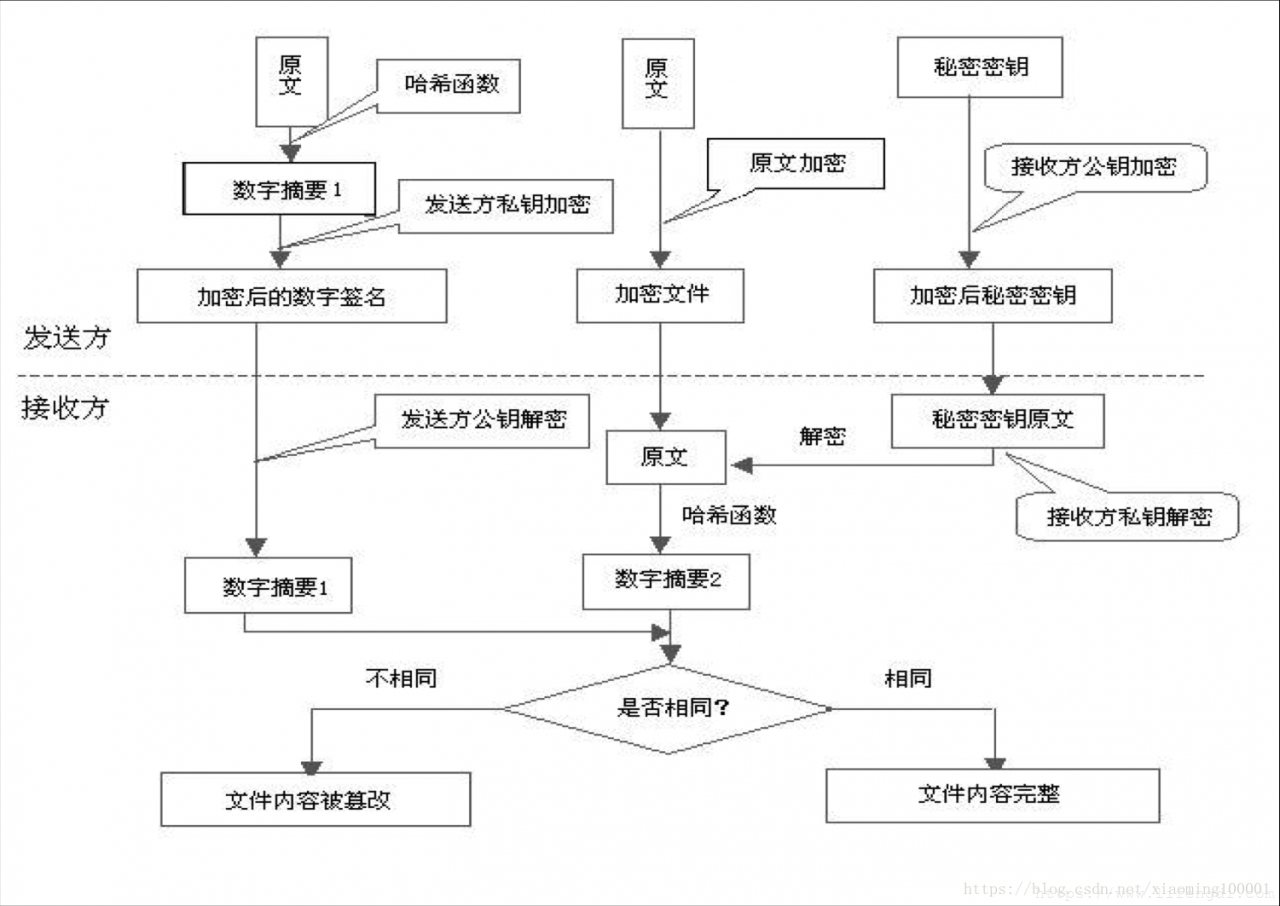
Asymmetric encryption requires a public key for encryption. Where does that public key come from? It is included in a digital certificate. A digital certificate is usually issued by a trusted Certificate Authority, or CA, after the CA verifies the server’s identity. The certificate contains key information, including the public key and owner identification information. The certificate is placed on the server and is used for server identity verification and encrypted data transmission.
4. How HTTP communication is transmitted
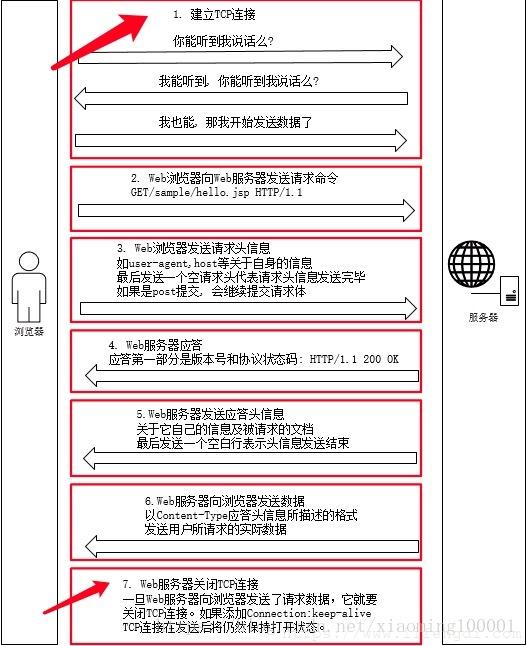
When a user enters a URL and presses Enter, DNS resolves the domain name to the server’s IP address. The server listens for client requests on port 80. A connection is established through the TCP/IP protocol, which can be implemented through sockets. HTTP belongs to the application layer in the TCP/IP model, so the communication process corresponds to data moving down and up the protocol stack.
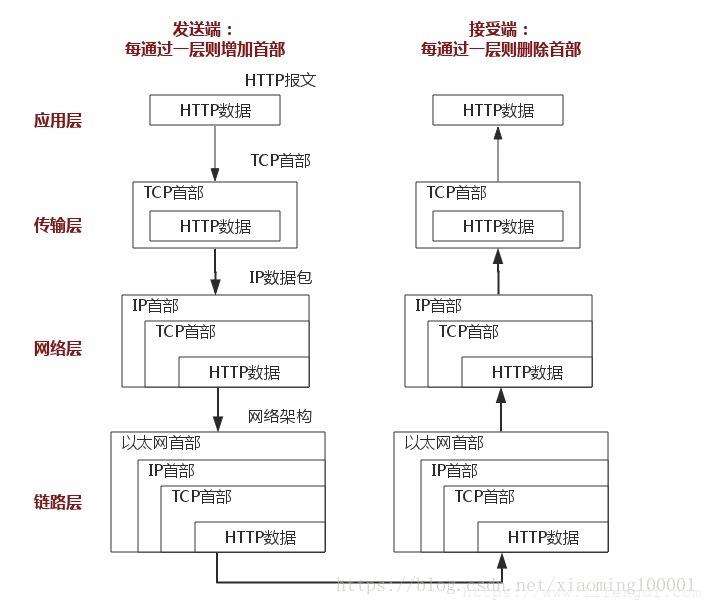
The message is passed from the application layer to the transport layer. At the transport layer, TCP establishes a connection with the server through the three-way handshake and releases the connection through the four-way termination process.
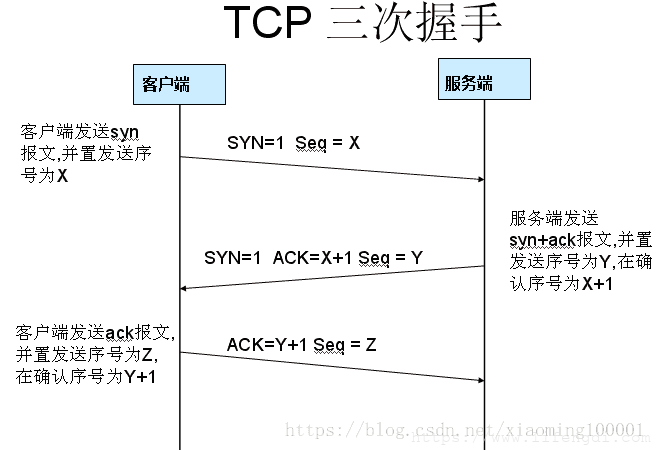
Why is a three-way handshake necessary? It prevents expired connection request segments from suddenly reaching the server and causing errors.
For example, suppose the first connection request segment sent by the client was not lost, but was delayed for a long time at some network node. It finally reaches the server after the previous connection has already been released. This is actually an invalid, outdated segment. However, if the server receives it and mistakenly treats it as a new connection request from the client, it sends back an acknowledgment and agrees to establish a connection.
If there were no three-way handshake, the connection would be considered established as soon as the server sent its acknowledgment. But the client did not actually send a new connection request, so it ignores the server’s acknowledgment and sends no data. The server, meanwhile, believes that a new transport connection has been established and waits for data from the client. In this situation, server resources are wasted for no reason. The three-way handshake avoids this problem.
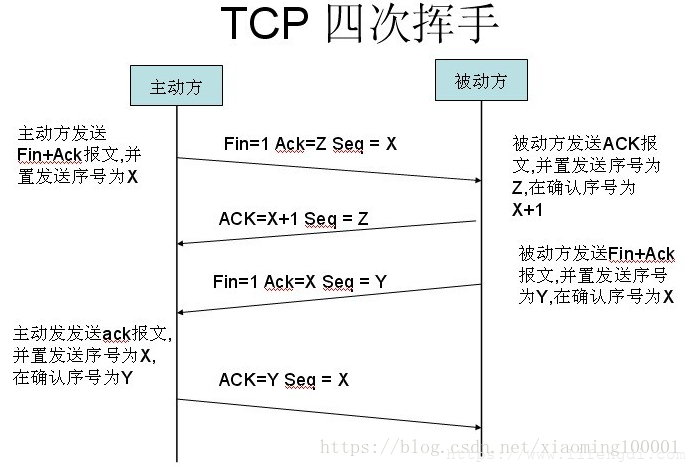
Why does closing a TCP connection require four steps? TCP is full duplex. When the client sends a FIN segment, it only means the client has no more data to send. The client is telling the server that its data has been fully sent, but at this point the client can still receive data from the server.
When the server returns an ACK segment, it means the server knows the client has no more data to send, but the server may still need to send data to the client. Only when the server also sends a FIN segment does it mean the server has no more data to send either. After the client sends back an acknowledgment, both sides can properly terminate the TCP connection.
5. How HTTPS works
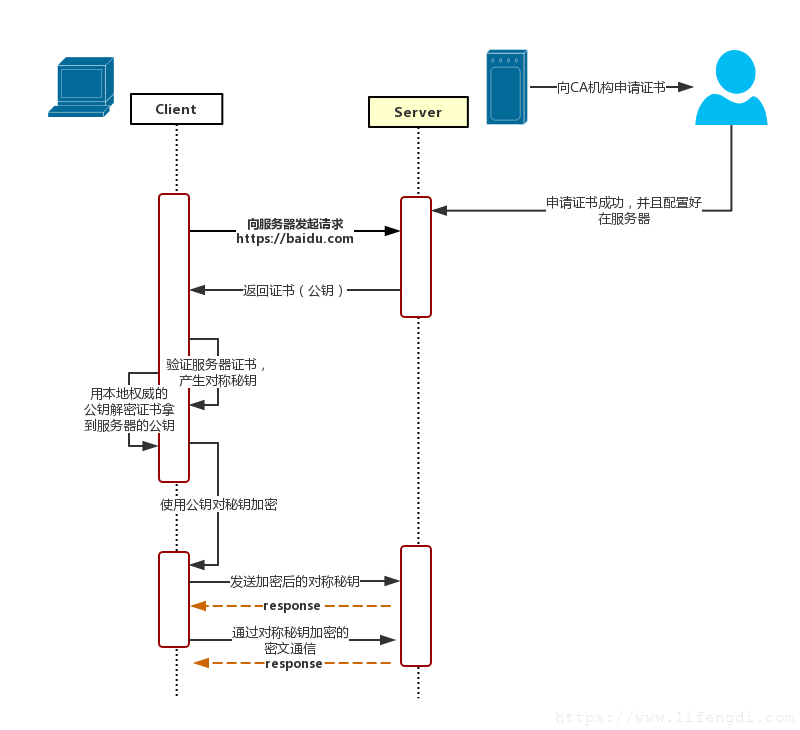
A simplified HTTPS communication process can be described as follows:
- The client sends a request, such as
https://baidu.com, and connects to the server’s port 443. - The server must have a digital certificate. It can create one itself or apply for one from an organization. The difference is that a self-issued certificate requires the client to explicitly trust it before the user can continue visiting, while a certificate issued by a trusted organization usually does not trigger a warning page. This certificate essentially involves a public-private key pair.
- The server sends the certificate to the client. The certificate contains the public key and a lot of other information, such as the issuing authority, expiration time, the server’s public key, the signature of the third-party CA, and the server’s domain information.
- The client parses the certificate. This work is handled by the client’s TLS layer. It first checks whether the public key and certificate are valid, including the issuer and expiration time. If a problem is found, the browser displays a warning that the certificate is abnormal. If the certificate is valid, the client generates a random value, which acts as a secret key, and encrypts that random value with the certificate.
- The client sends the encrypted information. What is transmitted here is the secret key encrypted with the certificate’s public key. The goal is for the server to obtain this key so that later communication between the client and server can be encrypted and decrypted using this random value.
- The server decrypts the encrypted information with its private key and obtains the secret key sent by the client. It then uses this value for symmetric encryption.
- The server transmits encrypted information. The information is encrypted and can be restored by the client.
- The client decrypts the information using the key it generated earlier and obtains the plaintext content.
How can the client know the server’s public key is real?
A key problem in HTTPS is this: how can the client make sure the public key sent by the server is the real public key, rather than a forged one provided by a man-in-the-middle?
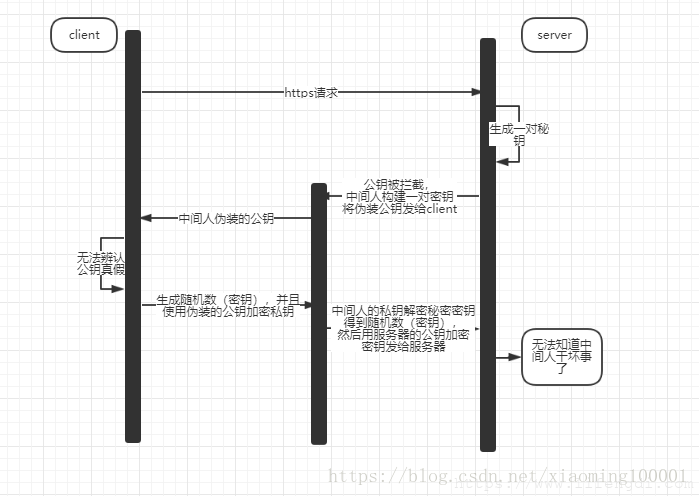
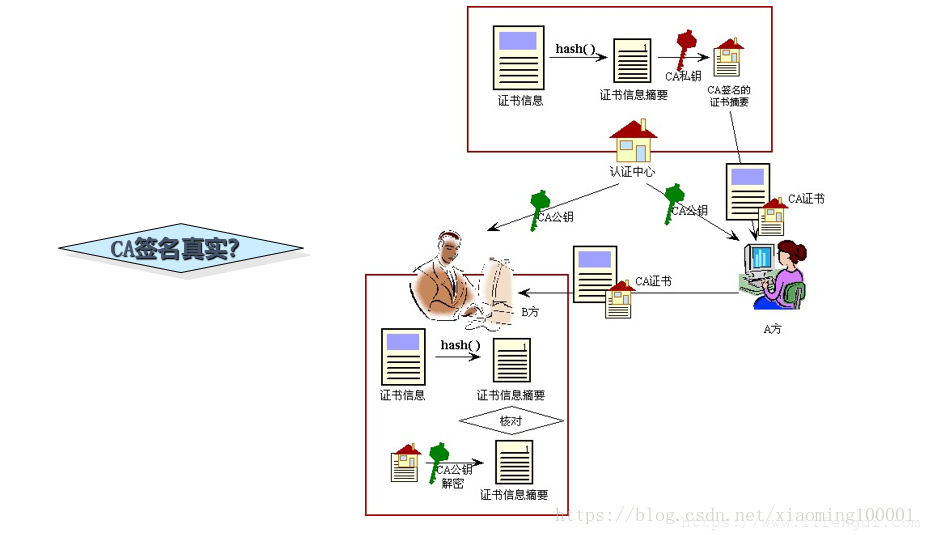
What if the certificate is replaced during transmission?
A digital certificate includes the encrypted server public key, information about the authoritative organization, the server domain name, and certificate content signed with the CA’s private key. The signature is generated by first calculating a digital digest of the certificate content with a hash function, and then encrypting that digest with the private key of the authority. The certificate also includes the signature algorithm and the corresponding domain name.
After the client receives the certificate, it uses the locally configured public key of the trusted authority to verify and parse the certificate. The digital signature can be decrypted with the CA’s public key to obtain the certificate information digest. The client then calculates the digest of the current certificate according to the method described in the certificate and compares it with the received digest.
If the two digests match, it means the certificate was indeed issued for the server and has not been modified by a man-in-the-middle. An attacker may have the authority’s public key and may be able to read or attempt to modify the certificate content, but after modification the attacker would need to sign the certificate again. Without the authority’s private key, they cannot create a valid signature. Forced or random modification would cause the certificate content and certificate signature to mismatch, and the client would reject it.
Could an attacker apply for a certificate that displays the same server information and pretend to be the server? Under normal CA verification rules, this is not feasible. When an attacker requests certification from a CA, the CA requires proof of domain ownership, such as domain WHOIS information or access to the domain management email address. Since the attacker cannot provide proof that they own the target server’s domain, they cannot convince the CA to issue a valid certificate for that domain.
6. Practical considerations
Security considerations
HTTPS improves communication security, but it is not a universal solution to every security problem.
- The protection scope of HTTPS encryption is limited. It does little against certain types of attacks, such as hacker intrusion, denial-of-service attacks, and server hijacking.
- The trust chain behind SSL certificates is not absolutely safe. In particular, if a country or organization can control CA root certificates, man-in-the-middle attacks can still become possible.
A man-in-the-middle attack, often abbreviated as MITM, refers to an attacker intercepting and potentially modifying network communication data. MITM attacks can be passive or active. A passive MITM attack only steals communication data without changing it, while an active MITM attack both steals and modifies the communication data. Common man-in-the-middle attacks often occur on public Wi-Fi networks or public routers.
Cost and performance considerations
HTTPS also comes with practical costs:
- SSL certificates usually need to be purchased or applied for, and certificates with more powerful features tend to cost more.
- SSL certificates often need to be bound to IP addresses. Traditionally, multiple domains could not be bound to the same IP for SSL usage, and IPv4 resources cannot support that kind of consumption. SSL extensions can partially solve this problem, but they are more complicated and require browser and operating system support. Windows XP does not support this extension, and considering its historical installation base, this feature was once of limited practical value.
- According to ACM CoNEXT data, using HTTPS can increase page loading time by nearly 50% and increase power consumption by 10% to 20%.
- HTTPS connection caching is not as efficient as HTTP, which can increase traffic costs.
- HTTPS consumes significantly more server-side resources. Websites with many visitors may need to invest more in infrastructure.
- The HTTPS handshake phase is relatively time-consuming and can affect website response speed and user experience.
A more balanced approach is to apply HTTPS where sensitive information is involved and use HTTP where encryption is less critical. For example, a site may use HTTP on its public homepage while switching to HTTPS for pages involving user information, login, or registration.