MCP Beyond the Hype: How the Model Context Protocol Connects LLMs to Tools and Data
MCP, short for Model Context Protocol, was introduced by Anthropic on November 25, 2024 in Introducing the Model Context Protocol. The protocol defines a standard way for applications and large language models to exchange contextual information. With MCP, developers can expose data, tools, and environments to AI in a consistent format, allowing the model to move beyond answering questions and start executing tasks.
A useful analogy is the Type-C port. Just as Type-C gives a computer a single connector for monitors, keyboards, and headphones, MCP gives language models such as Claude and GPT a standard, secure route to external tools, files, databases, and contextual resources.
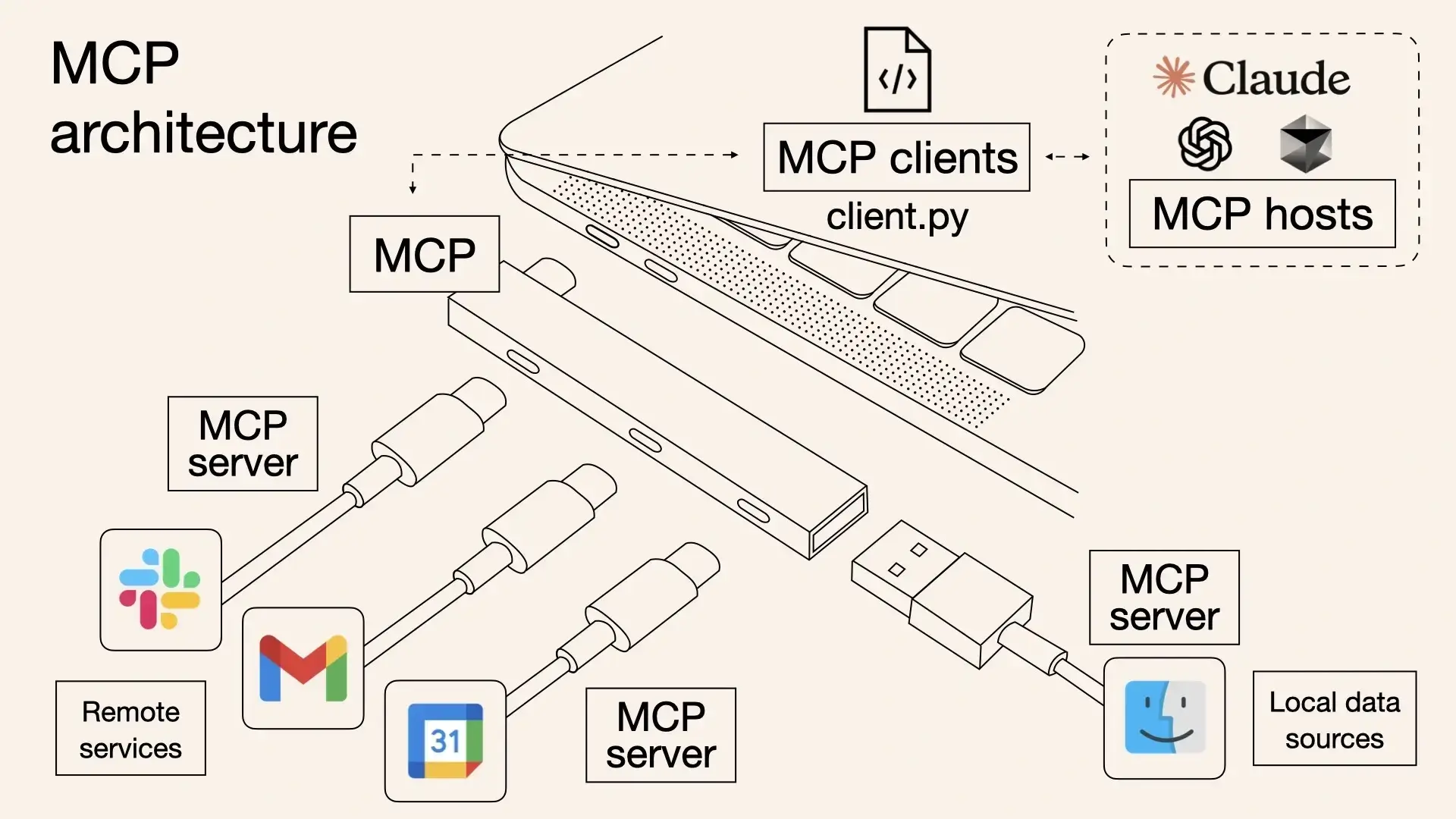
MCP emerged from a key limitation in LLM applications: they often sit apart from external tools and data sources. A central concern for any LLM application is data transfer, meaning how data reaches the model for reasoning. This has been the goal of RAG, fine-tuning, and now MCP.
Why MCP exists
Before MCP, using AI often meant manually gathering and packaging all relevant context, placing it into a prompt, and waiting for the model to respond. In practice, users queried databases, searched the web, copied and pasted content, and then shaped it into a prompt. As tasks became more complex, expectations rose. Users wanted models to access files, databases, and real-time information directly so that responses would be more accurate and context-aware.
Function Calling was a step toward that goal. LLM platforms let models call functions registered by developers, enabling runtime data retrieval or actions and improving automation. But Function Calling has its own limits. OpenAI, Google, Anthropic, and other platforms each offer the capability without a shared standard. Function structures and calling protocols differ, so developers often write and maintain separate integration logic for each platform. This creates fragmentation and repeated work.
MCP addresses that fragmentation by defining a common communication protocol between models and external tools. It acts as a universal plug for the AI world, creating a standardized bridge between the model and the outside environment.
Compared with traditional Function Calling, MCP offers several advantages:
- Standardized interface: developers can connect tools to different models using one format instead of adapting repeatedly.
- Growing ecosystem: many third-party tools, components, and frameworks already support MCP.
- Security and control: tool calls can run locally or in controlled environments, reducing the need to upload sensitive data.
Core concepts
<table> <thead> <tr> <th>Name</th> <th>Type</th> <th>Description</th> </tr> </thead> <tbody> <tr> <td>Tools</td> <td>Callable tools provided by a server</td> <td>Methods exposed by an MCP server, such as searching repositories or fetching weather. Clients use them throughtools/list and tools/call.</td>
</tr>
<tr>
<td>Resources</td>
<td>Readable data provided by a server</td>
<td>Documents, API data, files, and similar content. Clients list and read them through resources/list and resources/read.</td>
</tr>
<tr>
<td>Prompts</td>
<td>Prompt template system</td>
<td>Prompt templates supplied by an MCP server to enrich model prompt construction. Clients access them through prompts/list.</td>
</tr>
<tr>
<td>Sampling</td>
<td>Generation-related capability</td>
<td>An MCP server can request a language model response through sampling/createMessage.</td>
</tr>
<tr>
<td>Roots</td>
<td>File-system mount roots</td>
<td>Used to expose local file-system directories to an MCP server.</td>
</tr>
<tr>
<td>Capabilities</td>
<td>Feature list negotiated during initialization</td>
<td>Client and server negotiate supported features, such as tool list change notifications and resource subscriptions.</td>
</tr>
</tbody>
</table>
MCP architecture and communication
Overall architecture
MCP follows a client-server architecture. A host program such as Claude Desktop can connect to multiple backend services, much like a browser connects to multiple websites.
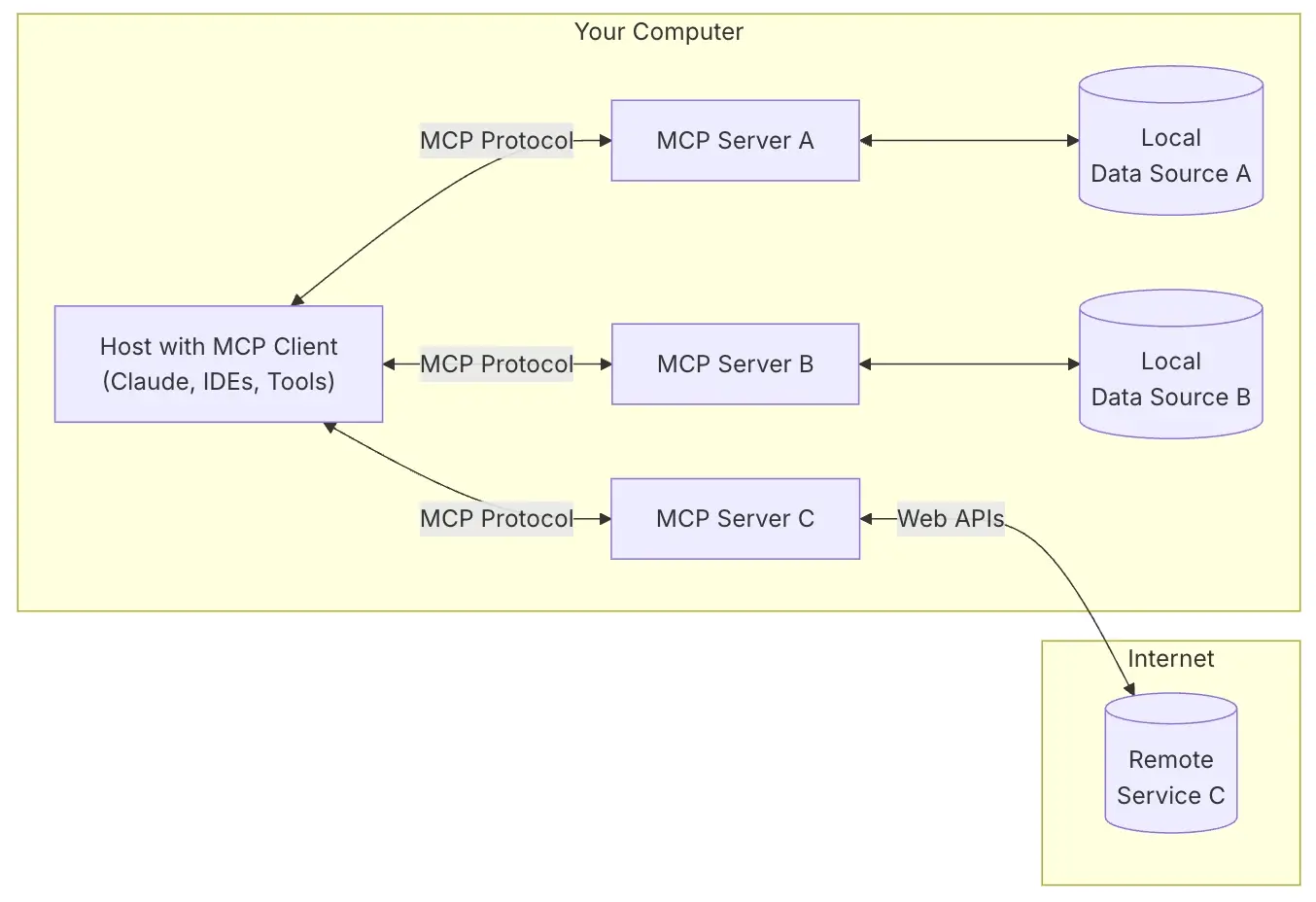
- MCP Hosts: programs such as Claude Desktop, IDEs, or AI tools that want to access data through MCP. The host process acts as a container and coordinator:
- creates and manages multiple client instances
- controls client connection permissions and lifecycle
- enforces security policies and consent requirements
- handles user authorization decisions
- coordinates AI/LLM integration and sampling
- manages context aggregation across clients
- MCP Clients: protocol clients that maintain a 1:1 connection with a server. Each client is created by the host and keeps an isolated server connection:
- establishes a stateful session per server
- handles protocol negotiation and capability exchange
- routes protocol messages in both directions
- manages subscriptions and notifications
- maintains security boundaries between servers The host application creates and manages multiple clients, each with a 1:1 relationship to a specific server.
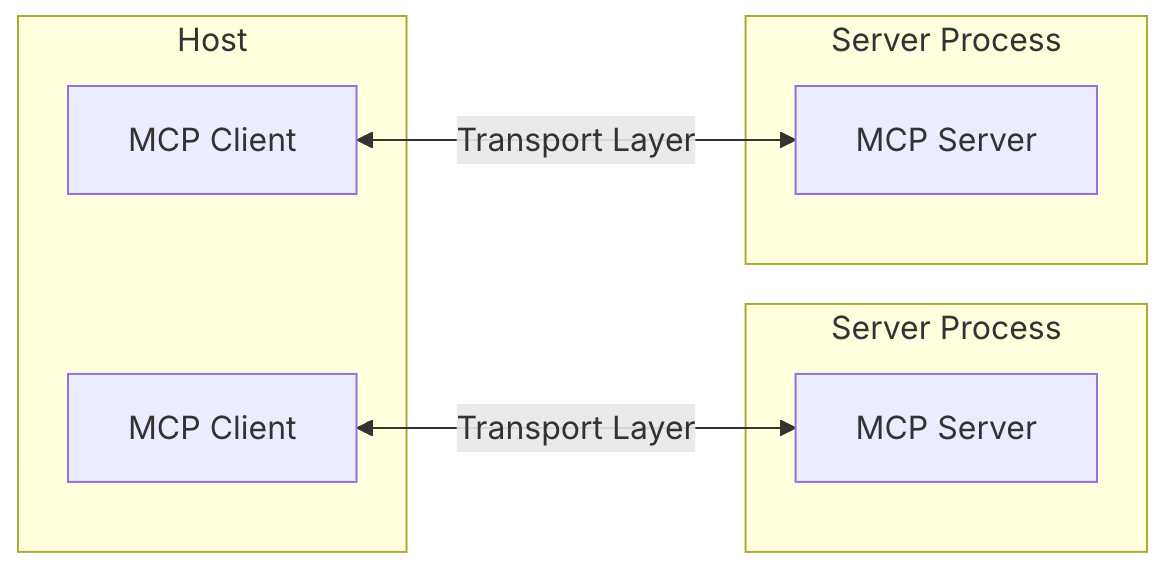
- MCP Servers: lightweight programs that expose specific functionality through the standardized Model Context Protocol. Servers provide specialized context and capabilities:
- expose resources, tools, and prompts through MCP primitives
- operate independently with focused responsibilities
- request sampling through the client interface
- must respect security constraints
- can be local processes or remote services
- Local Data Source: computer files, databases, and services that an MCP server can safely access.
- Remote Services: external internet systems that an MCP server can reach through APIs and similar mechanisms.
At a high level, the flow looks like this:
question → Host → LLM → MCP Client → MCP Server → operation → result → LLM generates answer → display
This design lets LLMs call various data sources and tools flexibly. Developers can focus on building MCP servers, and users get a more intelligent experience without extra learning cost.
Transport protocols
The protocol currently defines two standard transport mechanisms for client-server communication:
- stdio, communication over standard input and standard output
- Streamable HTTP, an HTTP transport that can stream
Clients and servers can also implement custom transports as plugins.
<table> <thead> <tr> <th>Feature</th> <th>stdio</th> <th>Streamable HTTP</th> </tr> </thead> <tbody> <tr> <td>Implementation complexity</td> <td>Simple</td> <td>Medium</td> </tr> <tr> <td>Performance</td> <td>High</td> <td>Medium</td> </tr> <tr> <td>Network support</td> <td>❌</td> <td>✅</td> </tr> <tr> <td>Multiple clients</td> <td>❌</td> <td>✅</td> </tr> <tr> <td>Streaming responses</td> <td>❌</td> <td>✅</td> </tr> <tr> <td>Session management</td> <td>❌</td> <td>✅</td> </tr> <tr> <td>Reconnection</td> <td>❌</td> <td>✅</td> </tr> <tr> <td>Debugging difficulty</td> <td>Low</td> <td>Medium</td> </tr> <tr> <td>Deployment complexity</td> <td>Low</td> <td>Medium</td> </tr> <tr> <td>Suitable scenarios</td> <td>Local tools</td> <td>Web apps / remote services</td> </tr> </tbody> </table>stdio
With stdio transport, the client starts the MCP server as a subprocess. The server reads JSON-RPC messages from standard input (stdin) and writes messages to standard output (stdout). Messages can be JSON-RPC requests, notifications, responses, or batches containing multiple requests and/or notifications.
stdio is the most basic MCP transport. It communicates through standard input and output streams:
sequenceDiagram
    participant Client
    participant Server Process

    Client->>+Server Process: Launch subprocess
    loop Message Exchange
        Client->>Server Process: Write to stdin
        Server Process->>Client: Write to stdout
        Server Process--)Client: Optional logs on stderr
    end
    Client->>Server Process: Close stdin, terminate subprocess
    deactivate Server Process
- Client → Server: sends JSON-RPC messages through stdin
- Server → Client: returns JSON-RPC responses through stdout
- stderr: used for logs and debugging information
Each message is its own JSON line:
{"jsonrpc": "2.0", "id": 1, "method": "tools/list", "params": {}}
{"jsonrpc": "2.0", "id": 1, "result": {"tools": [...]}}
Streamable HTTP
Streamable HTTP is the official transport in the MCP 2025-03-26 version. It replaces the earlier HTTP+SSE transport from the 2024-11-05 version.
Streamable HTTP is based on HTTP and can optionally use Server-Sent Events (SSE) for streaming communication.
Key characteristics:
- Unified endpoint: the server provides a single HTTP endpoint that supports both POST and GET.
- Flexible responses: the server can return a simple JSON response or an SSE stream.
- Bidirectional communication: supports messages from client to server and from server to client.
Message exchange pattern:
POST /mcp HTTP/1.1
Content-Type: application/json
Accept: application/json, text/event-stream

{"jsonrpc": "2.0", "id": 1, "method": "tools/list", "params": {}}
Server response options:
Option 1: JSON response
HTTP/1.1 200 OK
Content-Type: application/json

{"jsonrpc": "2.0", "id": 1, "result": {"tools": [...]}}
Option 2: SSE stream response
HTTP/1.1 200 OK
Content-Type: text/event-stream

data: {"jsonrpc": "2.0", "id": 1, "result": {"tools": [...]}}

data: {"jsonrpc": "2.0", "method": "notifications/progress", "params": {...}}
Server → client communication:
The server can establish an SSE stream through a GET request to send messages proactively:
GET /mcp HTTP/1.1
Accept: text/event-stream
Differences from the previous version:
<table> <thead> <tr> <th>Feature</th> <th>HTTP+SSE (2024-11-05)</th> <th>Streamable HTTP (2025-03-26)</th> </tr> </thead> <tbody> <tr> <td>Number of endpoints</td> <td>Separate POST/SSE endpoints</td> <td>Unified MCP endpoint</td> </tr> <tr> <td>Protocol complexity</td> <td>Relatively complex</td> <td>Simplified and unified</td> </tr> <tr> <td>Flexibility</td> <td>Limited</td> <td>Highly flexible</td> </tr> <tr> <td>Backward compatibility</td> <td>Deprecated</td> <td>Supports backward compatibility</td> </tr> </tbody> </table>Basic message types
MCP defines three core message types based on JSON-RPC 2.0:
- Requests: bidirectional messages with a method and parameters that expect a response
- Responses: success results or errors matching a specific request ID
- Notifications: one-way messages that do not need a reply
Capability negotiation
MCP uses capability negotiation. During initialization, clients and servers explicitly declare supported features, and those capabilities determine which protocol features and primitives can be used during the session.
sequenceDiagram
    participant Host
    participant Client
    participant Server

    Host->>+Client: Initialize client
    Client->>+Server: Initialize a session with client capabilities
    Server-->>Client: Return server-supported capabilities

    Note over Host,Server: Active session with negotiated features

    loop Client Requests
        Host->>Client: User or model operation
        Client->>Server: Request (tools/resources)
        Server-->>Client: Response
        Client-->>Host: Update UI or respond to model
    end

    loop Server Requests
        Server->>Client: Request (sampling)
        Client->>Host: Forward to AI
        Host-->>Client: AI response
        Client-->>Server: Response
    end

    loop Notifications
        Server--)Client: Resource update
        Client--)Server: Status change
    end

    Host->>Client: Terminate
    Client->>-Server: End session
    deactivate Server
- Initialization phase
- Host initializes the client, for example by loading a plugin, agent, or agent UI.
- Client requests session initialization by sending a
describeorstart_sessionrequest to the MCP server, asking which agents, tools, and context are available. - Server returns supported capabilities, including model types, maximum tokens, supported tool types, and similar information.
- Client Requests loop
- A user or model starts an operation, such as clicking a button, entering text, or an agent deciding to call a tool.
- The client constructs a request and sends it to the server, including the tool to call or the resource to access, such as a document, search operation, or function API.
- The server processes the request and returns a response after calling the corresponding tool, which may be a plugin, web API, or local function.
- The client handles the response and feeds it back to the host to update the UI, fill in an answer, or continue agent reasoning.
- Server Requests loop
- The server requests sampling, meaning it asks the model for language generation through
chat.completeorrun.sample. - The client forwards the request to the host, which usually contains model inference capability, either a local model or a remote model such as OpenAI API.
- The host generates a response and returns it to the client.
- The client returns it to the server, and the task continues.
Protocol message types in detail
All messages between MCP clients and servers must follow JSON-RPC 2.0. The protocol defines three basic message types:
<table> <thead> <tr> <th>Message type</th> <th>Description</th> </tr> </thead> <tbody> <tr> <td>Requests</td>
<td>Requests expect a response from the other side.</td>
</tr>
<tr>
<td>Results</td>
<td>Results are successful responses to requests.</td>
</tr>
<tr>
<td>Notifications</td>
<td>One-way messages that do not require a response.</td>
</tr>
</tbody>
</table>
- Request messages
Requests are sent from client to server or from server to client to start an operation:
{
  jsonrpc: "2.0";
  id: string | number;
  method: string;
  params?: {
    [key: string]: unknown;
  };
}
- A request must include a string or integer ID.
- Unlike base JSON-RPC, the ID must not be
null. - Within the same session, the requester must not reuse a request ID that was already used.
Business request types:
<table> <thead> <tr> <th>Request method</th> <th>Initiator</th> <th>Responder</th> <th>Description</th> </tr> </thead> <tbody> <tr> <td>initialize</td> <td>Client</td> <td>Server</td> <td>Initialize a session</td> </tr> <tr> <td>tools/list</td> <td>Client</td> <td>Server</td> <td>Discover available tools</td> </tr> <tr> <td>tools/call</td> <td>Client</td> <td>Server</td> <td>Call a tool</td> </tr> <tr> <td>resources/list</td> <td>Client</td> <td>Server</td> <td>Discover available resources</td> </tr> <tr> <td>resources/read</td> <td>Client</td> <td>Server</td> <td>Retrieve resource content</td> </tr> <tr> <td>resources/templates/list</td> <td>Client</td> <td>Server</td> <td>Discover available parameterized resources</td> </tr> <tr> <td>resources/subscribe</td> <td>Client</td> <td>Server</td> <td>Subscribe to a specific resource and receive notifications when it changes</td> </tr> <tr> <td>prompts/list</td> <td>Client</td> <td>Server</td> <td>Discover available prompts</td> </tr> <tr> <td>prompts/get</td> <td>Client</td> <td>Server</td> <td>Retrieve a specific prompt</td> </tr> <tr> <td>roots/list</td> <td>Server</td> <td>Client</td> <td>List the file-system root nodes the server may access on the client, exposing directories and files</td> </tr> <tr> <td>sampling/createMessage</td> <td>Server</td> <td>Client</td> <td>Allow the server to use AI generation capability</td> </tr> </tbody> </table>- Response messages
Responses reply to requests:
{
  jsonrpc: "2.0";
  id: string | number;
  result?: {
    [key: string]: unknown;
  }
  error?: {
    code: number;
    message: string;
    data?: unknown;
  }
}
- A response must include the same ID as the corresponding request.
- Responses are divided into successful results and errors. Exactly one of
resultorerrormust be set. A response must not set both. - Results can follow any JSON object structure. Errors must contain at least an error code and message.
- Error codes must be integers.
- Notifications
Notifications are one-way messages from client to server or server to client. The receiver must not send a response.
{
  jsonrpc: "2.0";
  method: string;
  params?: {
    [key: string]: unknown;
  };
}
Notifications must not contain an ID.
- Example: client retrieves the server tool list
sequenceDiagram
    participant LLM
    participant Client
    participant Server

    Note over Client,Server: Discovery
    Client->>Server: tools/list
    Server-->>Client: List of tools

    Note over Client,LLM: Tool Selection
    LLM->>Client: Select tool to use

    Note over Client,Server: Invocation
    Client->>Server: tools/call
    Server-->>Client: Tool result
    Client->>LLM: Process result

    Note over Client,Server: Updates
    Server--)Client: tools/list_changed
    Client->>Server: tools/list
    Server-->>Client: Updated tools
To query available tools, the client sends a tools/list request.
Request
{
  "jsonrpc": "2.0",
  "id": 1,
  "method": "tools/list",
  "params": {
    "cursor": "optional-cursor-value"
  }
}
Response
{
  "jsonrpc": "2.0",
  "id": 1,
  "result": {
    "tools": [
      {
        "name": "get_weather",
        "description": "Get current weather information for a location",
        "inputSchema": {
          "type": "object",
          "properties": {
            "location": {
              "type": "string",
              "description": "City name or zip code"
            }
          },
          "required": ["location"]
        }
      }
    ],
    "nextCursor": "next-page-cursor"
  }
}
Lifecycle
MCP defines a strict lifecycle for client-server connections to ensure correct capability negotiation and state management.
- Initialization: capability negotiation and protocol version negotiation
- Operation: normal protocol communication
- Shutdown: clean termination of the connection
sequenceDiagram
    participant Client
    participant Server

    Note over Client,Server: 1. Initialization Phase
    activate Client
    Client->>+Server: initialize request
    Server-->>Client: initialize response
    Client--)Server: initialized notification

    Note over Client,Server: 2. Operation Phase
    rect rgb(200, 220, 250)
        note over Client,Server: Normal protocol operations...
    end

    Note over Client,Server: 3. Shutdown
    Client--)-Server: Disconnect
    deactivate Server
    Note over Client,Server: Connection closed
- Initialization
The initialization phase must be the first interaction between client and server. During this phase, both sides must do the following:
- establish protocol version compatibility
- exchange and negotiate capabilities
- share implementation details
The client must start this phase by sending an initialize request containing:
- supported protocol versions
- client capabilities
- client implementation information
{
  "jsonrpc": "2.0",
  "id": 1,
  "method": "initialize", // Method name for the initialization handshake request
  "params": {
    "protocolVersion": "2025-03-26", // MCP protocol version supported by the client
    "capabilities": {
      // Capabilities declared by the client
      "roots": {
        "listChanged": true // Client supports root directory change notifications
      },
      "sampling": {} // Client supports sampling (empty object for basic support)
    },
    "clientInfo": {
      // Client implementation information
      "name": "ExampleClient", // Client name
      "version": "1.0.0" // Client version
    }
  }
}
The initialization request must not be part of a JSON-RPC batch, because other requests and notifications cannot be sent before initialization completes. This also preserves backward compatibility with earlier protocol versions that did not explicitly support JSON-RPC batching.
In simple terms, the initialization request must be sent on its own, not packed with other requests, which keeps the protocol stable and compatible.
The server must return its own capabilities and information:
{
  "jsonrpc": "2.0",
  "id": 1, // Matches the initialization request ID
  "result": {
    "protocolVersion": "2025-03-26", // MCP protocol version supported by the server
    "capabilities": {
      // Capabilities supported by the server
      "logging": {}, // Logging support (empty object for basic support)
      "prompts": {
        // Prompt support
        "listChanged": true // Supports prompt list change notifications
      },
      "resources": {
        // Resource support
        "subscribe": true, // Supports resource subscriptions
        "listChanged": true // Supports resource list change notifications
      },
      "tools": {
        // Tool support
        "listChanged": true // Supports tool list change notifications
      }
    },
    "serverInfo": {
      // Server identity information
      "name": "ExampleServer", // Server name
      "version": "1.0.0" // Server version
    },
    "instructions": "Optional instructions for the client" // Optional usage or configuration guidance
  }
}
After successful initialization, the client must send an initialized notification to show that it is ready for normal operation:
{
  "jsonrpc": "2.0",
  "method": "notifications/initialized"
}
Version negotiation
In the initialize request, the client must send the protocol versions it supports. This should usually be the latest version the client supports.
If the server supports the requested protocol version, it must respond with the same version. Otherwise, the server must respond with another protocol version it supports. This should be the latest version the server supports.
If the client does not support the version in the server response, it should disconnect.
Capability negotiation
Client and server capabilities determine which optional protocol features are available during the session.
Key capabilities include:
<table> <thead> <tr> <th>Category</th> <th>Capability</th> <th>Description</th> </tr> </thead> <tbody> <tr> <td>Client</td> <td>roots</td>
<td>Ability to provide file-system root nodes</td>
</tr>
<tr>
<td>Client</td>
<td>sampling</td>
<td>Support for LLM sampling requests</td>
</tr>
<tr>
<td>Client</td>
<td>experimental</td>
<td>Describes support for non-standard experimental features</td>
</tr>
<tr>
<td>Server</td>
<td>prompts</td>
<td>Ability to provide prompt templates</td>
</tr>
<tr>
<td>Server</td>
<td>resources</td>
<td>Ability to provide readable resources</td>
</tr>
<tr>
<td>Server</td>
<td>tools</td>
<td>Ability to expose callable tools</td>
</tr>
<tr>
<td>Server</td>
<td>logging</td>
<td>Ability to send structured log messages</td>
</tr>
<tr>
<td>Server</td>
<td>experimental</td>
<td>Describes support for non-standard experimental features</td>
</tr>
</tbody>
</table>
Capability objects can describe sub-capabilities such as:
listChanged: supports list change notifications for prompts, resources, and toolssubscribe: supports subscriptions to changes in individual items, resources only
- Operation
During operation, client and server exchange messages according to negotiated capabilities.
Both sides should:
- respect the negotiated protocol version
- use only successfully negotiated capabilities
- Shutdown
During shutdown, one side, usually the client, cleanly terminates the protocol connection. No specific shutdown message is defined. Instead, the underlying transport signals connection termination:
- stdio: the client should initiate shutdown by first closing the input stream of the subprocess server, waiting for the server to exit, or sending
SIGTERMif it does not exit within a reasonable time. If the server does not start within a reasonable time, sendSIGKILLand thenSIGTERMas appropriate. - HTTP: closing the relevant HTTP connection indicates shutdown.
- Error handling
Implementations should be prepared to handle these error cases:
- protocol version mismatch
- failure to negotiate required capabilities
- initialization request timeout
- shutdown timeout
Implementations should set appropriate timeouts for all requests to prevent hung connections and resource exhaustion.
Example initialization error:
{
  "jsonrpc": "2.0",
  "id": 1,
  "error": {
    "code": -32602,
    "message": "Unsupported protocol version",
    "data": {
      "supported": ["2024-11-05"],
      "requested": "1.0.0"
    }
  }
}
Using an MCP server: GitHub MCP with Cursor
Here is a hands-on example of letting AI operate a code repository through Cursor and GitHub MCP.
Step 1: Create a GitHub personal access token
- Open the GitHub token settings page.
- Select the
repoandworkflowpermissions. - Generate a token string starting with
ghp_.
Step 2: Configure the MCP server
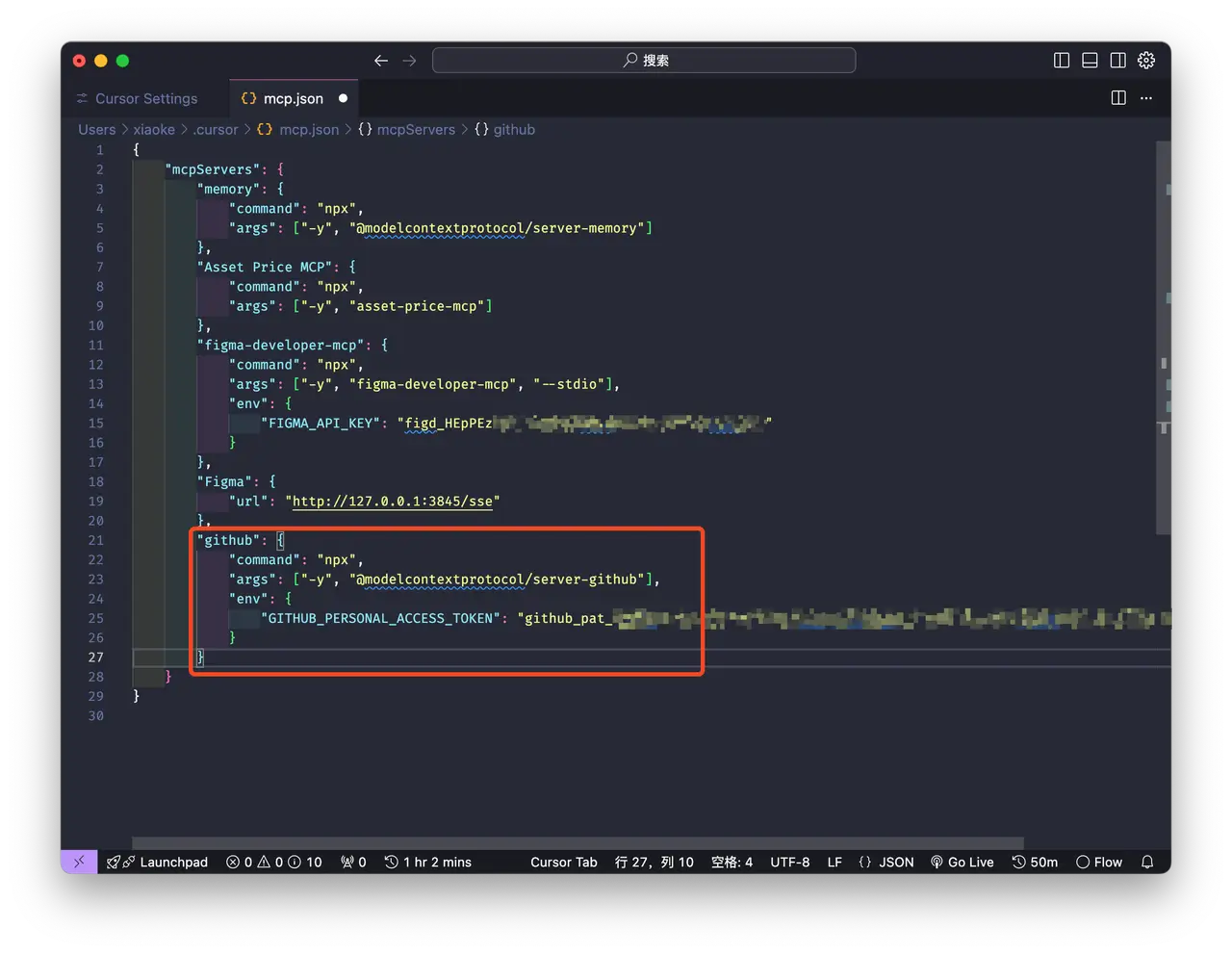
In Cursor, open the MCP configuration file:
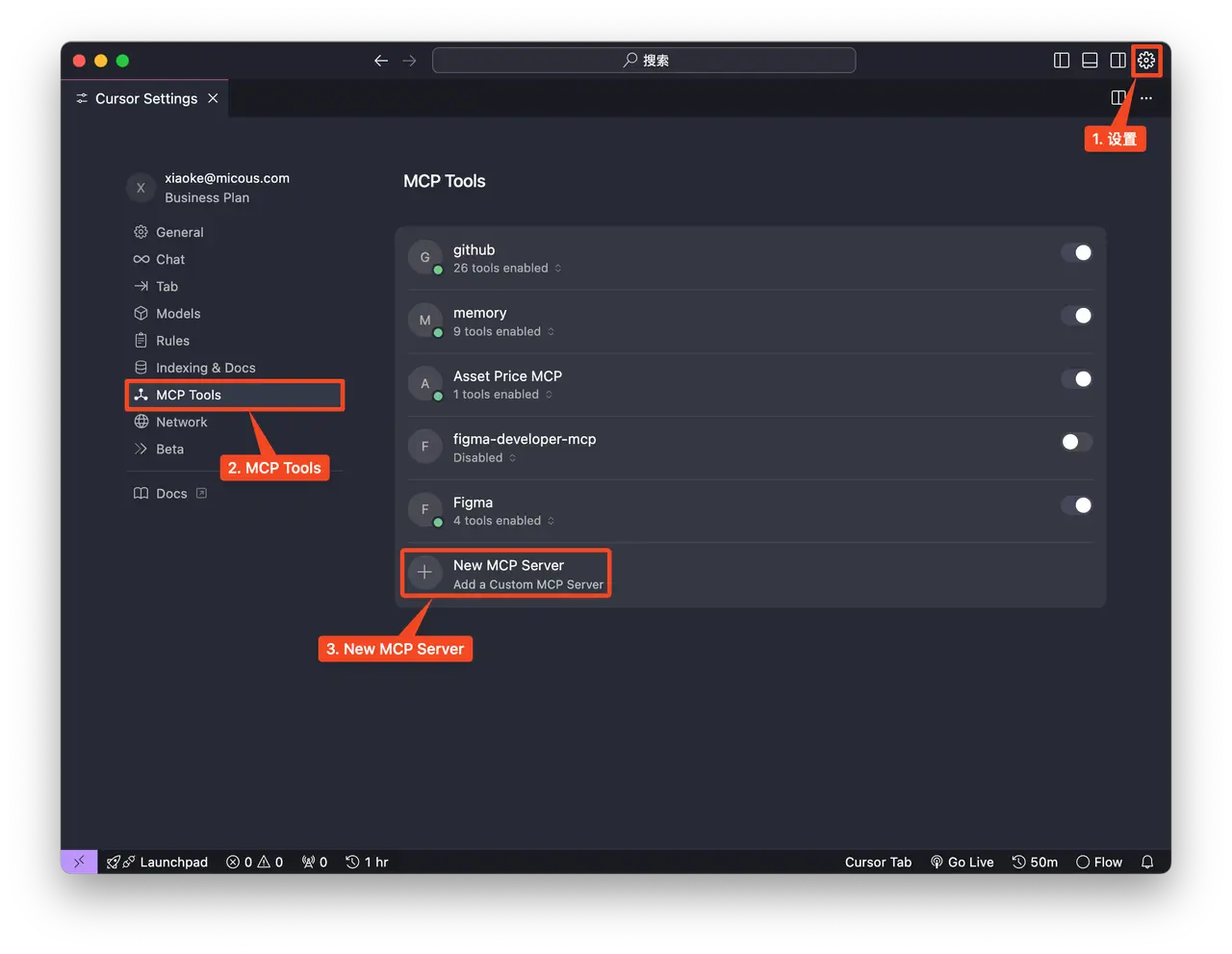
Enter the following configuration and replace <YOUR_GITHUB_PERSONAL_ACCESS_TOKEN> with your GitHub personal access token:
{
  "mcpServers": {
    "github": {
      "command": "npx",
      "args": ["-y", "@modelcontextprotocol/server-github"],
      "env": {
        "GITHUB_PERSONAL_ACCESS_TOKEN": "<YOUR_GITHUB_PERSONAL_ACCESS_TOKEN>"
      }
    }
  }
}
Step 3: Verify the connection
Once the status indicator turns green, try a natural-language instruction:
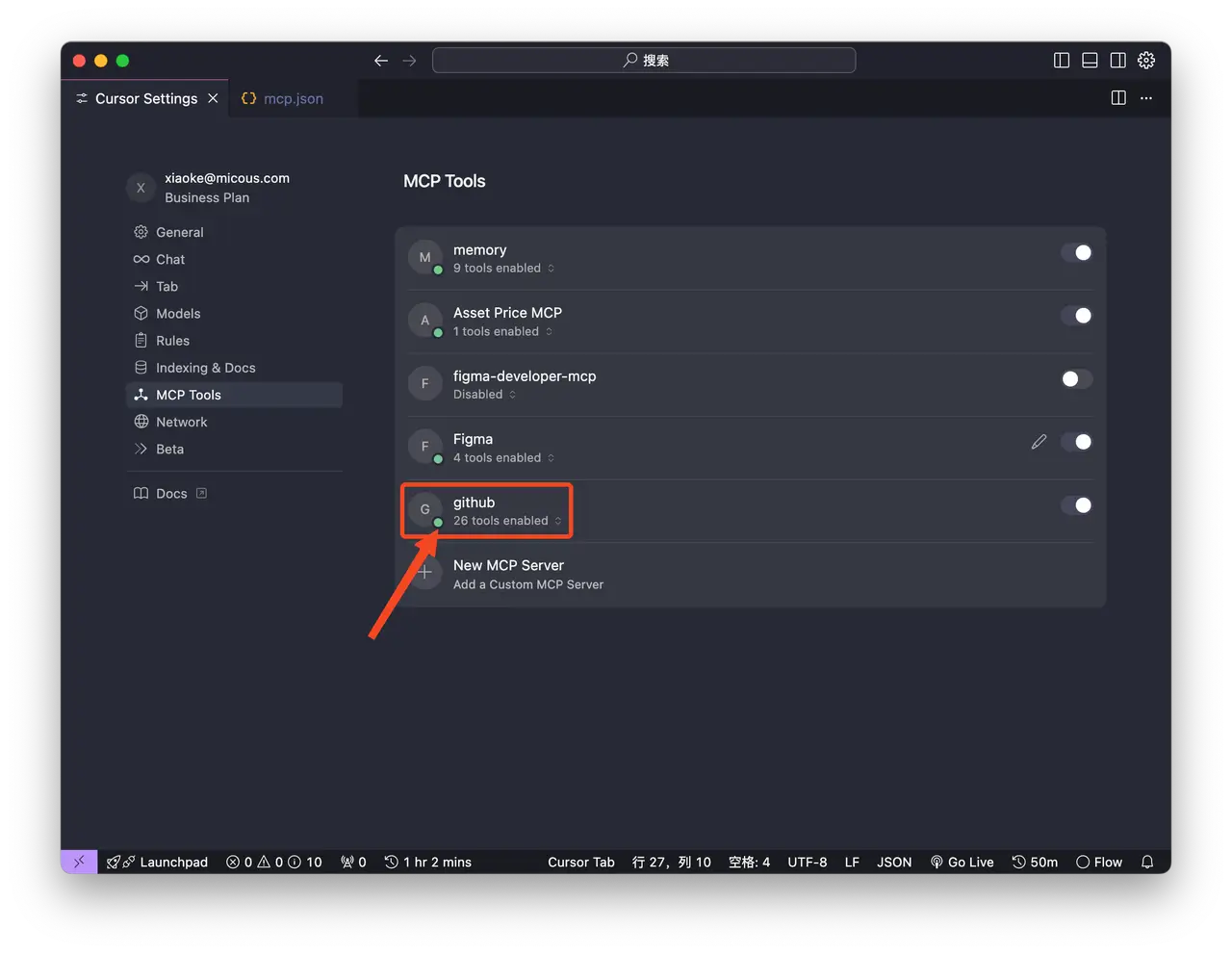
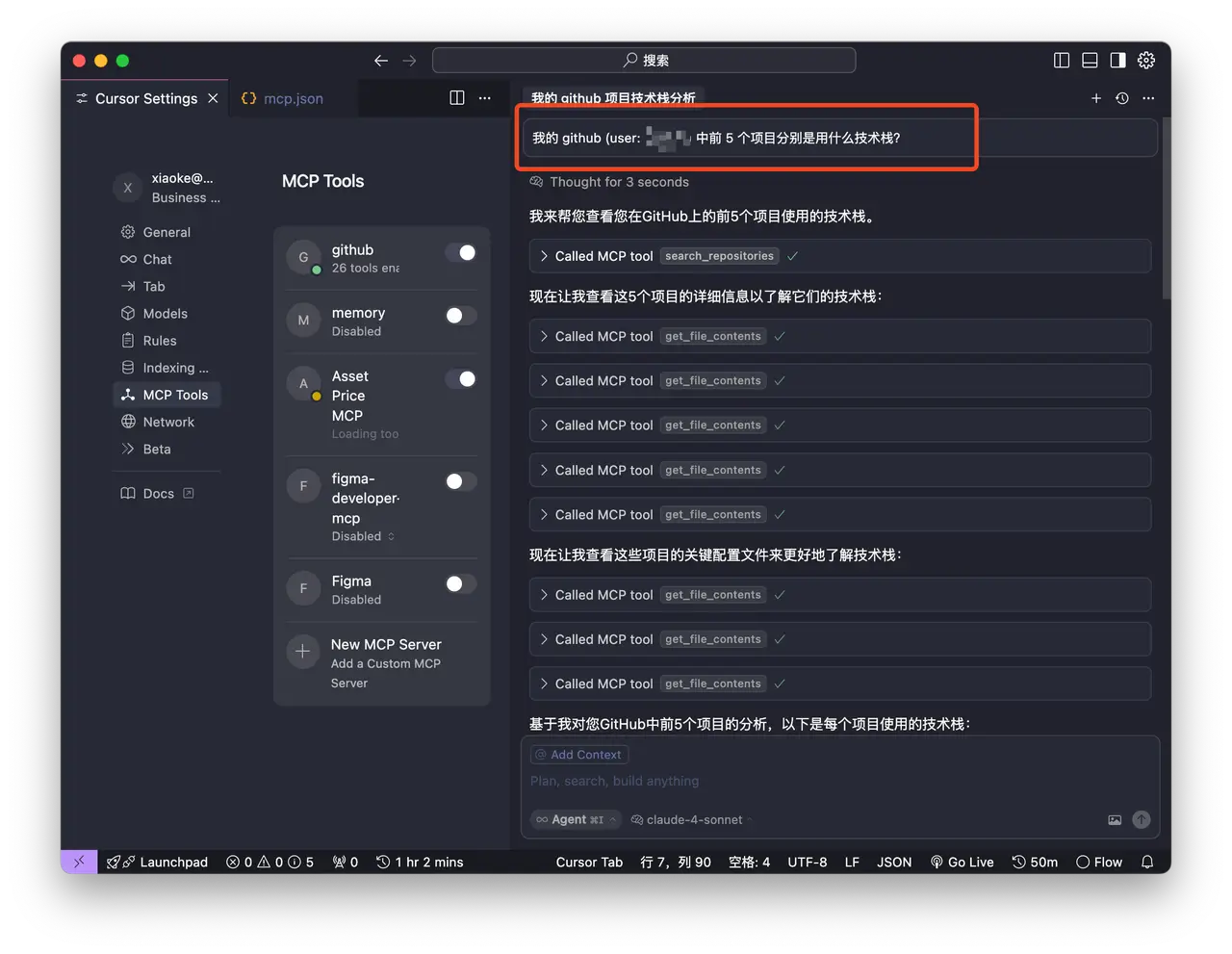
After the question is entered, Cursor automatically uses the GitHub MCP search_repositories tool to search GitHub repositories.
It then calls git_file_contents five times to retrieve file information for each project.
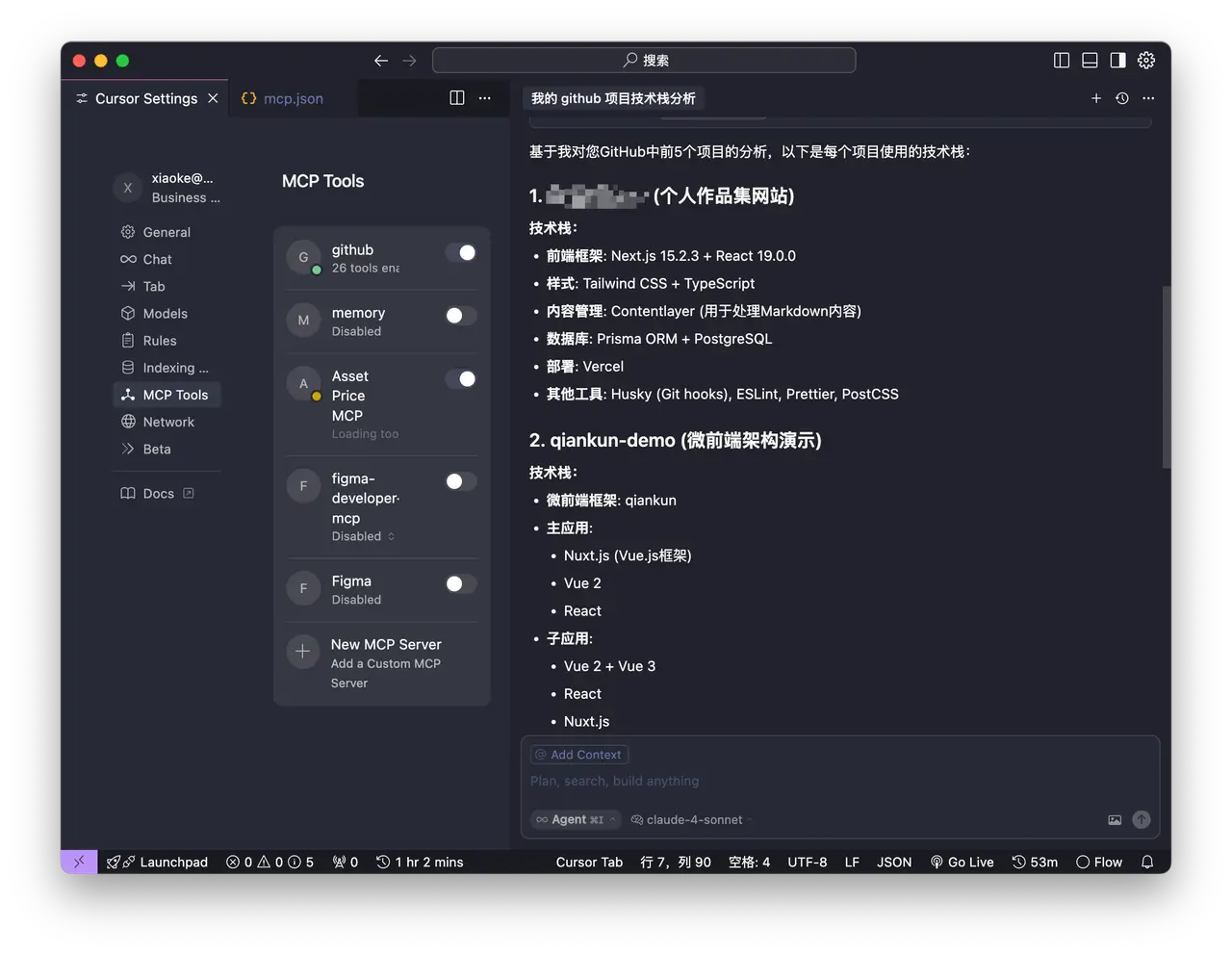
Finally, Cursor combines all the information and outputs the result:
Building an MCP server: weather lookup example
1. Create the project
# Create a new folder for the project
mkdir weather
cd weather

# Initialize a new npm project
npm init -y

# Install dependencies
pnpm add @modelcontextprotocol/sdk zod
pnpm add -D @types/node typescript

# Create code files
mkdir src
touch src/index.ts
Update package.json to add type: "module" and the build script:
{
  "type": "module",
  "bin": {
    "weather": "./build/index.js"
  },
  "scripts": {
    "build": "tsc && chmod 755 build/index.js"
  },
  "files": ["build"]
}
Create tsconfig.json in the project root:
{
  "compilerOptions": {
    "target": "ES2022",
    "module": "Node16",
    "moduleResolution": "Node16",
    "outDir": "./build",
    "rootDir": "./src",
    "strict": true,
    "esModuleInterop": true,
    "skipLibCheck": true,
    "forceConsistentCasingInFileNames": true
  },
  "include": ["src/**/*"],
  "exclude": ["node_modules"]
}
2. Build the server
import { McpServer } from '@modelcontextprotocol/sdk/server/mcp.js';
import { StdioServerTransport } from '@modelcontextprotocol/sdk/server/stdio.js';
import { z } from 'zod';

const NWS_API_BASE = 'https://api.weather.gov';
const USER_AGENT = 'weather-app/1.0';

// Create MCP server instance
const server =new McpServer({
    name: 'weather',
    version: '1.0.0',
    capabilities: {
        resources: {},
        tools: {},
    },
});

// Helper function to send requests to the NWS API
async function makeNWSRequest<T>(url:string):Promise<T |null> {
    const headers = {
        'User-Agent': USER_AGENT,
        Accept: 'application/geo+json',
    };

    try {
        const response = await fetch(url, { headers });
        if (!response.ok) {
            thrownewError(`HTTP error! status: ${response.status}`);
        }
        return (await response.json()) asT;
    } catch (error) {
        console.error('Error making NWS request:', error);
        return null;
    }
}

interfaceAlertFeature {
    properties: {
        event?:string;
        areaDesc?:string;
        severity?:string;
        status?:string;
        headline?:string;
    };
}

// Format alert data
function formatAlert(feature:AlertFeature):string {
    const props =feature.properties;
    return [
        `Event: ${props.event || 'Unknown'}`,
        `Area: ${props.areaDesc || 'Unknown'}`,
        `Severity: ${props.severity || 'Unknown'}`,
        `Status: ${props.status || 'Unknown'}`,
        `Headline: ${props.headline || 'No headline'}`,
        '---',
    ].join('\n');
}

interfaceForecastPeriod {
    name?:string;
    temperature?:number;
    temperatureUnit?:string;
    windSpeed?:string;
    windDirection?:string;
    shortForecast?:string;
}

interfaceAlertsResponse {
    features:AlertFeature[];
}

interfacePointsResponse {
    properties: {
        forecast?:string;
    };
}

interfaceForecastResponse {
    properties: {
        periods:ForecastPeriod[];
    };
}

// Register weather tools
server.tool(
    'get-alerts',
    'Get weather alerts for a state',
    {
        state: z.string().length(2).describe('Two-letter state code (e.g. CA, NY)'),
    },
    async ({state }) => {
        const stateCode =state.toUpperCase();
        const alertsUrl = `${NWS_API_BASE}/alerts?area=${stateCode}`;
        const alertsData = await makeNWSRequest<AlertsResponse>(alertsUrl);

        if (!alertsData) {
            return {
                content: [
                    {
                        type: 'text',
                        text: 'Failed to retrieve alerts data',
                    },
                ],
            };
        }

        const features = alertsData.features || [];
        if (features.length === 0) {
            return {
                content: [
                    {
                        type: 'text',
                        text: `No active alerts for ${stateCode}`,
                    },
                ],
            };
        }

        const formattedAlerts = features.map(formatAlert);
        const alertsText = `Active alerts for ${stateCode}:\n\n${formattedAlerts.join('\n')}`;

        return {
            content: [
                {
                    type: 'text',
                    text: alertsText,
                },
            ],
        };
    }
);

server.tool(
    'get-forecast',
    'Get weather forecast for a location',
    {
        latitude: z.number().min(-90).max(90).describe('Latitude of the location'),
        longitude: z.number().min(-180).max(180).describe('Longitude of the location'),
    },
    async ({latitude,longitude }) => {
        // Get grid point data
        const pointsUrl = `${NWS_API_BASE}/points/${latitude.toFixed(4)},${longitude.toFixed(4)}`;
        const pointsData = await makeNWSRequest<PointsResponse>(pointsUrl);

        if (!pointsData) {
            return {
                content: [
                    {
                        type: 'text',
                        text: `Failed to retrieve grid point data for coordinates: ${latitude}, ${longitude}. This location may not be supported by the NWS API (only US locations are supported).`,
                    },
                ],
            };
        }

        const forecastUrl = pointsData.properties?.forecast;
        if (!forecastUrl) {
            return {
                content: [
                    {
                        type: 'text',
                        text: 'Failed to get forecast URL from grid point data',
                    },
                ],
            };
        }

        // Get forecast data
        const forecastData = await makeNWSRequest<ForecastResponse>(forecastUrl);
        if (!forecastData) {
            return {
                content: [
                    {
                        type: 'text',
                        text: 'Failed to retrieve forecast data',
                    },
                ],
            };
        }

        const periods = forecastData.properties?.periods || [];
        if (periods.length === 0) {
            return {
                content: [
                    {
                        type: 'text',
                        text: 'No forecast periods available',
                    },
                ],
            };
        }

        // Format forecast periods
        const formattedForecast = periods.map((period:ForecastPeriod) =>
            [
                `${period.name || 'Unknown'}:`,
                `Temperature: ${period.temperature || 'Unknown'}°${period.temperatureUnit || 'F'}`,
                `Wind: ${period.windSpeed || 'Unknown'} ${period.windDirection || ''}`,
                `${period.shortForecast || 'No forecast available'}`,
                '---',
            ].join('\n')
        );

        const forecastText = `Forecast for ${latitude}, ${longitude}:\n\n${formattedForecast.join(
            '\n'
        )}`;

        return {
            content: [
                {
                    type: 'text',
                    text: forecastText,
                },
            ],
        };
    }
);

async function main() {
    const transport =new StdioServerTransport();
    await server.connect(transport);
    console.error('Weather MCP Server running on stdio');
}

main().catch(error => {
    console.error('Fatal error in main():',error);
    process.exit(1);
});
3. Debug
Use the official debugger:
npx @modelcontextprotocol/inspector node build/index.js