FIND_IN_SET is a MySQL function designed for searching within comma-separated strings. Its behavior is straightforward once the return values are clear.
According to the MySQL definition:
FIND_IN_SET(str, strlist)
It takes two arguments:
- str: the string you want to find
- strlist: a string made up of multiple values separated by English commas
,
Its return value depends on the match result:
- If str or strlist is
NULL, the function returnsNULL - If str does not appear in strlist, it returns
0 - If str is found in strlist, it returns a positive integer between
1andN, whereNis the number of comma-separated elements in strlist. That number indicates the position of str in the list.
One detail is easy to miss: if str itself contains a comma, FIND_IN_SET does not work correctly. In practice, it returns 0, which means “not found.”
There is also an optimization case in MySQL: when str is a constant string and strlist is a column of type SET, the database can optimize the lookup using bit arithmetic.
Here is the official-style example:
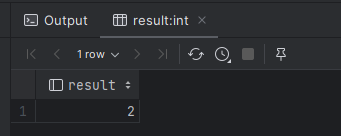
SELECT FIND_IN_SET('b', 'a,b,c,d') AS result;
This function is easy to read and practical in real projects, especially when a field stores hierarchical or multi-value data as a comma-separated string.
A typical case is querying all child regions under a given region. Suppose each region has:
- a parent_code field that stores its direct parent
- a path_code field that stores the full path of region codes from the top level down to the current node, joined by commas
Because the hierarchy is not limited to just two levels, filtering only by parent_code cannot retrieve all descendants. Using LIKE on path_code is not precise enough either. For example, if the search keyword is 1, values such as 11,111 may also match, which leads to incorrect results.
That is exactly the kind of situation where FIND_IN_SET is useful: it searches for a complete item inside a comma-separated list rather than doing a vague substring match.
The SQL can be written like this:
SELECT code, name, path_code
FROM sys_region_info
WHERE FIND_IN_SET(#{regionCode}, path_code);
If #{regionCode} is set to 26—for example, the code for Sichuan Province—this query returns all descendant regions under Sichuan.
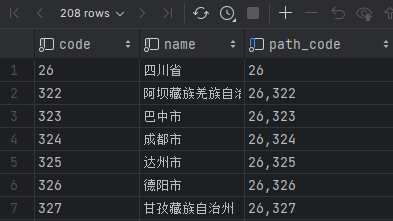
Because of the table design, the result set also includes the record where code = 26 itself. If that row should be excluded, the SQL can be adjusted slightly:
SELECT code, name, path_code
FROM sys_region_info
WHERE FIND_IN_SET(#{regionCode}, path_code)
AND path_code != #{regionCode}
In short, FIND_IN_SET is a convenient option when you need exact matching inside comma-separated values and want to avoid the false positives that often come with LIKE.