In day-to-day server operations, managing machines one by one is rarely practical. Once the number of servers grows, batch execution becomes essential, and shell scripts quickly turn into one of the most useful tools in routine maintenance work.
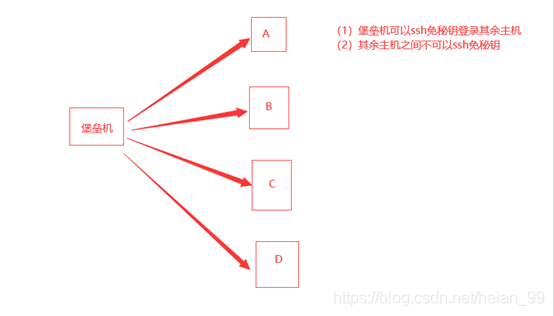
Before that, it helps to have a bastion host in place. It can handle passwordless logins, centralized task distribution, and the rest of the basic control flow for remote operations.
Preparing passwordless SSH from the bastion host
A standard ssh-keygen setup is needed between the bastion host and the target servers.
The common key-related files are:
authorized_keys: authorized public keysid_rsa: private keyid_rsa.pub: public keyknown_hosts: records information about machines that have already been connected to, so repeated connections do not keep asking foryes
These are part of the basic environment and groundwork.
The baseline script
The most straightforward version is a simple loop: connect to each host, run a command remotely, then print the result.
#/bin/bash
START_TIME=`date +%s`
for i in `cat /opt/wei/pam_ip.txt` #ip存放的文件

do
cc="ssh deployer@$i \"sudo cat /etc/ssh/sshd_config | grep -Ev '^#' | grep UsePAM\" "
kk=`echo $cc|bash`
if [ ! -n "$kk" ]; then
 echo "IP: $i UsePAM no seting"
 sudo echo "IP: $i UsePAM no seting" >> /opt/wei/pam_no.txt
else
 echo "IP: $i $kk"
 sudo echo "IP: $i $kk" >> /opt/wei/pam_yes.txt
fi
done
END_TIME=`date +%s`
EXECUTING_TIME=`expr $END_TIME - $START_TIME`
echo "================end====================="
echo "程序运行时长:$EXECUTING_TIME S"
This script reads target IPs from /opt/wei/pam_ip.txt, logs into each server as deployer, checks UsePAM in /etc/ssh/sshd_config, and then writes the result into either pam_no.txt or pam_yes.txt.
Adding concurrency with background jobs
The first optimization is simple: run each loop body in the background. In shell, that means adding & and then using wait.
#/bin/bash
START_TIME=`date +%s`
for i in `cat /opt/wei/pam_ip.txt`
do
 {
 cc="ssh deployer@$i \"sudo cat /etc/ssh/sshd_config | grep -Ev '^#' | grep UsePAM\" "
 kk=`echo $cc|bash`
 if [ ! -n "$kk" ]; then
 echo "IP: $i UsePAM no seting"
 sudo echo "IP: $i UsePAM no seting" >> /opt/wei/pam_no.txt
 else
 echo "IP: $i $kk"
 sudo echo "IP: $i $kk" >> /opt/we/pam_yes.txt
 fi
 }&
done
wait
END_TIME=`date +%s`
EXECUTING_TIME=`expr $END_TIME - $START_TIME`
echo "================end====================="
echo "程序运行:$EXECUTING_TIME S"
This approach uses & + wait to achieve a multi-process style of execution.
It runs much faster, but the output is no longer orderly. That is expected: once commands are pushed into the background, shell does not preserve first-in, first-out execution order for them. The subprocesses compete for resources, and the time spent by each command differs, so results appear in a mixed sequence.
About wait:
wait [n]Here,
nis the PID of a background command running in the current shell. If a PID is provided,waitpauses until that specific background process finishes. If nothing is specified, it waits for all background jobs in the current shell to complete.Without
wait, later shell statements do not wait for earlier background jobs, which can easily break commands that depend on those jobs being finished first.

Limiting the number of concurrent jobs
Launching everything at once is fast, but it is not always controlled. When the host list is large, it is better to define a maximum number of concurrent processes instead of letting the shell spawn an unlimited number of background jobs.
The script below simulates a queue to control concurrency.
#!/bin/bash
Nproc=20 #最大并发进程数
function PushQue { #将PID值追加到队列中
Que="$Que $1"
Nrun=$(($Nrun+1))
}
function GenQue { #更新队列信息,先清空队列信息,然后检索生成新的队列信息
OldQue=$Que
Que=""; Nrun=0
for PID in $OldQue; do
if [[ -d /proc/$PID ]]; then
PushQue $PID
fi
done
}
function ChkQue { #检查队列信息,如果有已经结束了的进程的PID,那么更新队列信息
OldQue=$Que
for PID in $OldQue; do
if [[ ! -d /proc/$PID ]]; then
GenQue; break
fi
done
}
for i in `cat /opt/wei/pam_ip.txt`
do
{
cc="ssh deployer@$i \"sudo cat /etc/ssh/sshd_config | grep -Ev '^#' | grep UsePAM\" "
kk=`echo $cc|bash`
if [ ! -n "$kk" ]; then
 echo "IP: $i UsePAM no seting"
 sudo echo "IP: $i UsePAM no seting" >> /opt/wei/pam_no.txt
else
 echo "IP: $i $kk"
 sudo echo "IP: $i $kk" >> /opt/wei/pam_yes.txt
fi
}&
sleep 0.1 #考虑有序,开启这个参数,速度优先,则注释掉
PID=$!
PushQue $PID
while [[ $Nrun -ge $Nproc ]]; do # 如果Nrun大于Nproc,就一直ChkQue
ChkQue
sleep 0.1
done
done
wait
echo -e "time-consuming: $SECONDS seconds" #显示脚本执行耗时#!/bin/bash
The idea is to manage the background processes with their PIDs:
- Each new subprocess PID is appended to a pseudo-queue.
- The queue is not a real queue structure, just a fixed-length list used to track running jobs.
- Every time a process is started, the running count increases.
- Once the count reaches the concurrency limit, the script stops creating new jobs and polls the queue.
- If all tracked processes are still running, it keeps waiting.
- As soon as one finishes, the queue is rebuilt, the running count drops, and the next pending task can start.
In this example, the concurrency level is set to 20. The execution time dropped from 311 seconds to 40 seconds, which is a major improvement in efficiency.