A simple case that already breaks intuition
Consider this code:
<table> <thead> <tr> <th>1 2 3 4 5 6 7 8 9 10 11 12</th>
<th>int value = 3; boolean isFinsh = false; void exeToCPUA(){ value = 10; isFinsh = true; } void exeToCPUB(){ if(isFinsh){ //value一定等于10?! assert value == 10; } }</th>
</tr>
</thead>
<tbody>
<tr>
<td></td>
<td></td>
</tr>
</tbody>
</table>
If two threads execute exeToCPUA and exeToCPUB separately—especially when they are scheduled on different CPU cores—the read of value inside exeToCPUB is not guaranteed to see 10.
That is exactly the kind of problem Java's volatile is meant to address. But to understand why, it helps to start much lower, at the level of CPUs, caches, and memory.
CPU speed and memory speed are not in the same league
The root of the issue is the gap between CPU execution speed and main memory access speed.
A CPU clock cycle is the inverse of CPU frequency: the higher the frequency, the shorter the cycle. Some simple instructions can complete in as little as two cycles.
Memory access is much slower. A single access to main memory often costs well over 100 CPU cycles. That means if the CPU had to read and write main memory directly for everything, it would spend a huge amount of time stalled, just waiting.
Modern computers avoid that waste by placing caches between CPU cores and main memory: L1, L2, and L3 cache.
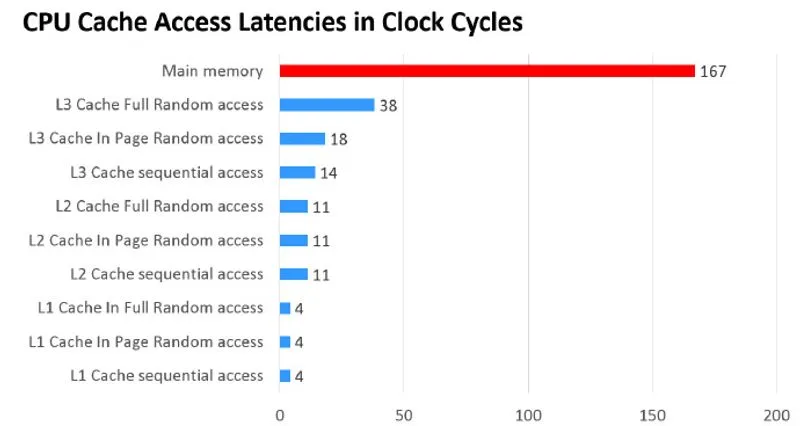
Accessing L1 cache may take around 4 cycles. L2 takes more, often in the low teens. L3 may take a few dozen cycles. All of them are still much faster than going to memory, so caches significantly improve overall efficiency.
Why cache is faster than memory
There are two main reasons.
1. Cache is physically closer and much smaller
Even in electronic hardware, physical distance matters. So does size. Searching through 10 KB of storage is obviously easier than searching through 10 GB.
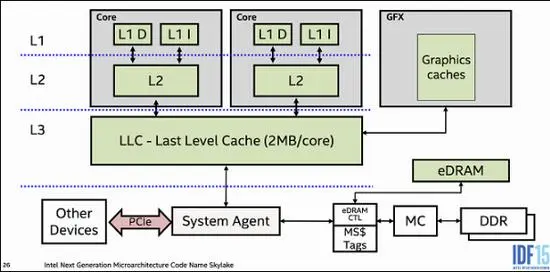
L1 cache is split into instruction cache and data cache, and it sits inside each CPU core. Every core has its own L1. A single L1 cache is usually around 64 KB, with total L1 across a CPU often around 512 KB.
L2 no longer separates instruction and data in the same way. It is also typically private to a core and packaged close to it. A single L2 cache is commonly around 512 KB, with total capacity in the range of 4 MB to 8 MB.
L3 is different: it is usually shared by all cores in the CPU package. It still sits on the chip, but it is farther from an individual core than L1 or L2. Its total capacity often ranges from 10 MB to 64 MB.
From L1 to L3, capacity gets larger, but the cache gets farther away from a given core. That is why access latency increases step by step.
2. Cache and memory are built differently
Main memory uses DRAM, or dynamic RAM. DRAM is built from capacitors and transistors and uses fewer components, which brings two advantages: lower cost and smaller size. That makes it possible to store more data in the same space for less money.
But DRAM leaks charge very quickly, so it cannot preserve data indefinitely on its own. It must be refreshed constantly. During refresh, memory cannot be accessed normally, which contributes to its high latency. Memory may be refreshed more than 1000M times per second.
Cache uses SRAM, or static RAM. SRAM is built from more transistors. Its key advantage is that it does not need refresh and does not suffer from the same leakage problem. The downside is cost and size: SRAM is more expensive and takes more space, so the same physical area stores much less data.
These differences are a big part of why cache can be roughly an order of magnitude faster than memory.
Why adding cache helps so much
Cache is effective because of locality.
When a CPU accesses memory—whether instructions or data—the accessed addresses tend to cluster in a small nearby region. In simpler terms, if the CPU reads one piece of data, there is a good chance it will soon read adjacent data or revisit the same area repeatedly.
That is easy to see in ordinary programs. Text is arranged sequentially. Code is mostly executed instruction by instruction. Data structures are often laid out contiguously or revisited in loops.
Because of that, cache does not just help with a single read. It helps with patterns of access.
Suppose the CPU needs to read four consecutive sentences, or four adjacent pieces of data. Without cache, the CPU would wait for memory four separate times, paying the full latency each time.
With cache, the first access may still take the cost of loading from memory, but the cache typically fetches not just the one requested value, but also nearby data. Then the second, third, and fourth reads may already hit in cache, which is much faster.
The same is true when reading and writing the same value repeatedly. A classic example is something like i++, where the same data is read and updated again and again.
Cache moves data in units called cache lines, typically 64 bytes at a time.
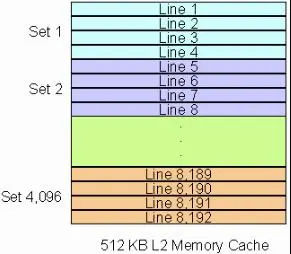
A single cache line can hold multiple int or long values. That is also why cache-line-level behavior can cause issues like false sharing, although that is a separate topic from visibility.
The problem cache introduces: inconsistency across cores
Caches improve speed, but private caches also create a new problem.
L1 and L2 are usually private to each core. That means different cores can end up holding their own copies of the same data. If one core modifies its copy, how do the others know that their copies are no longer valid?
To keep things simple, it helps to stop distinguishing between L1, L2, and L3, and instead think in this reduced model: a CPU core with its local cache, plus main memory outside the core.
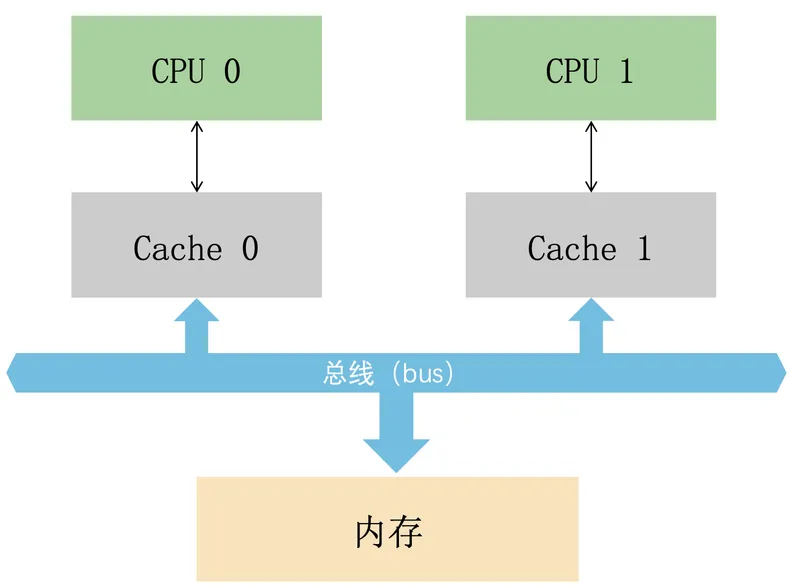
If two cores cache the same data, and one core changes it, the system needs a protocol to keep the caches coherent.
MESI: the common cache coherence protocol
MESI is an invalidate-based cache coherence protocol and one of the most widely used protocols for write-back caches. It relies on bus snooping and tracks each cache line with extra state bits so the hardware can transition lines between states and preserve coherence.
The name MESI comes from four cache-line states:
- M — Modified: the cache line has been changed and no longer matches main memory. If another CPU core needs that data, the modified line must be written back before becoming shared.
- E — Exclusive: the cache line exists only in the current cache and still matches main memory. If another cache reads it, it becomes shared. If the current core writes it, it becomes modified.
- S — Shared: the line may exist in other caches and is still clean. It can be discarded at any time.
- I — Invalid: the cache line is not valid.
A few MESI scenarios
One core reads a0
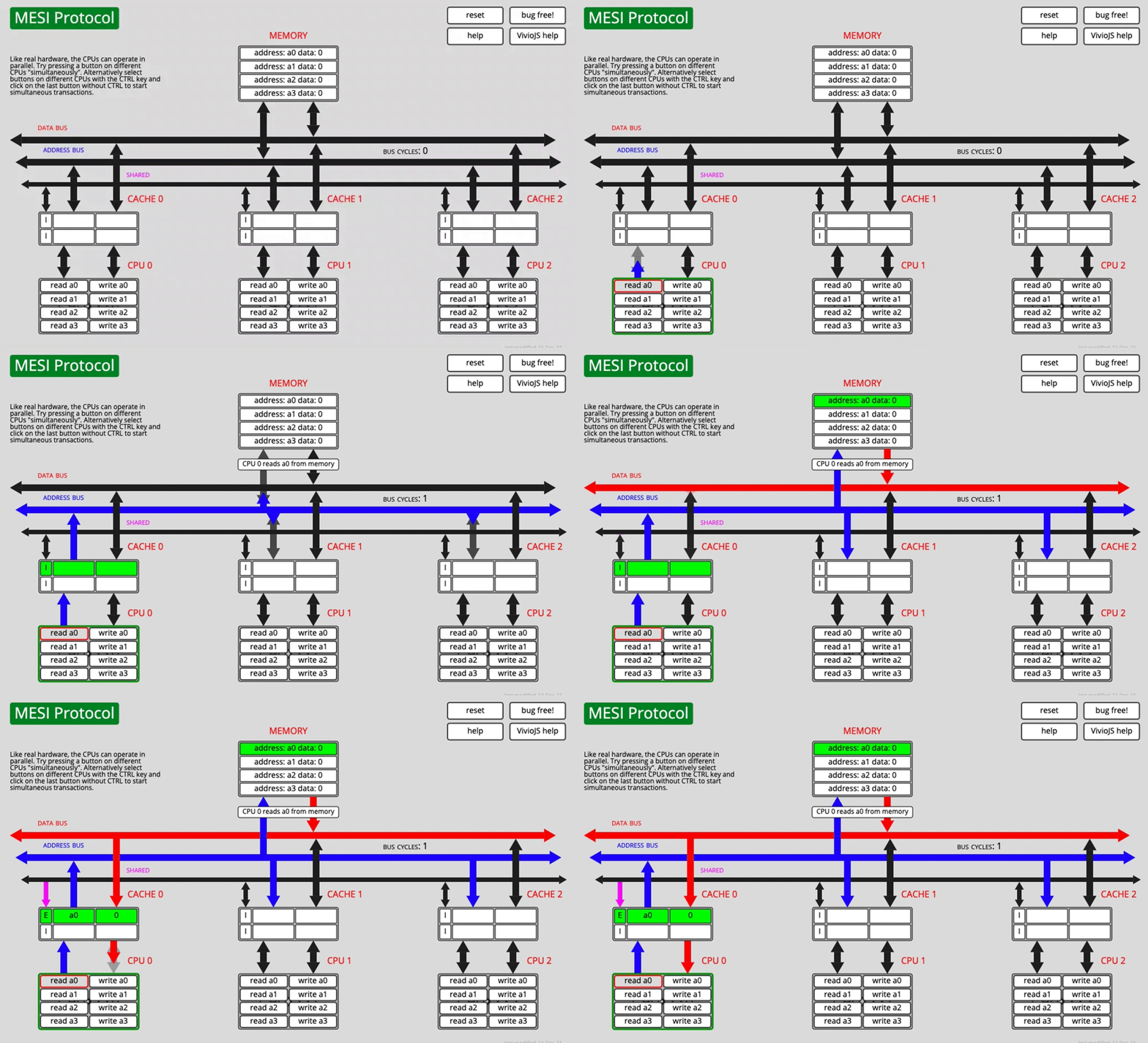
After fetching the data over the bus, CACHE0 marks a0 as E (exclusive).
Another core reads a0 after that
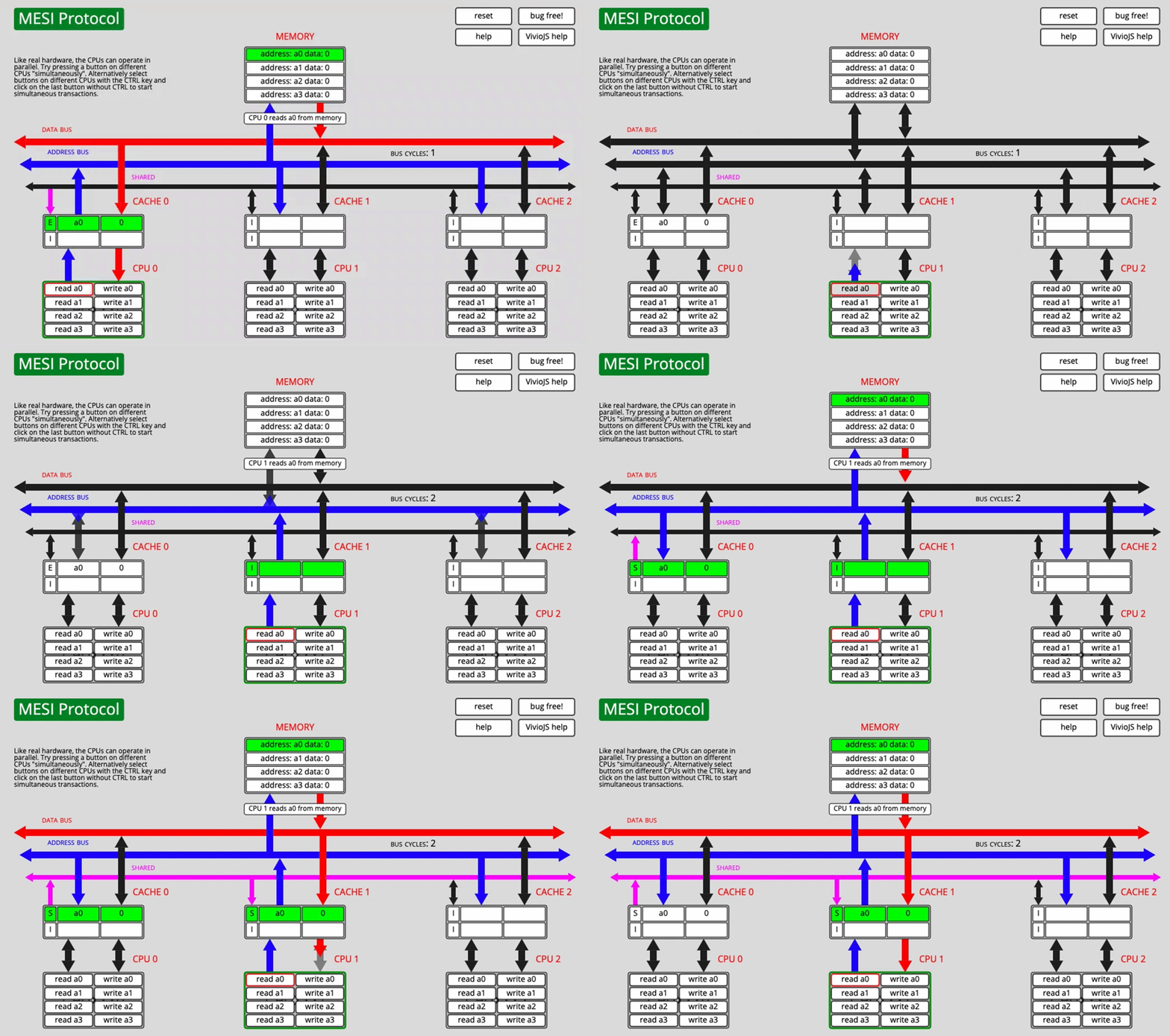
Now CPU0 changes its state from E to S, and CPU1 also marks the fetched line as S.
Both cores have a0, then one core writes it
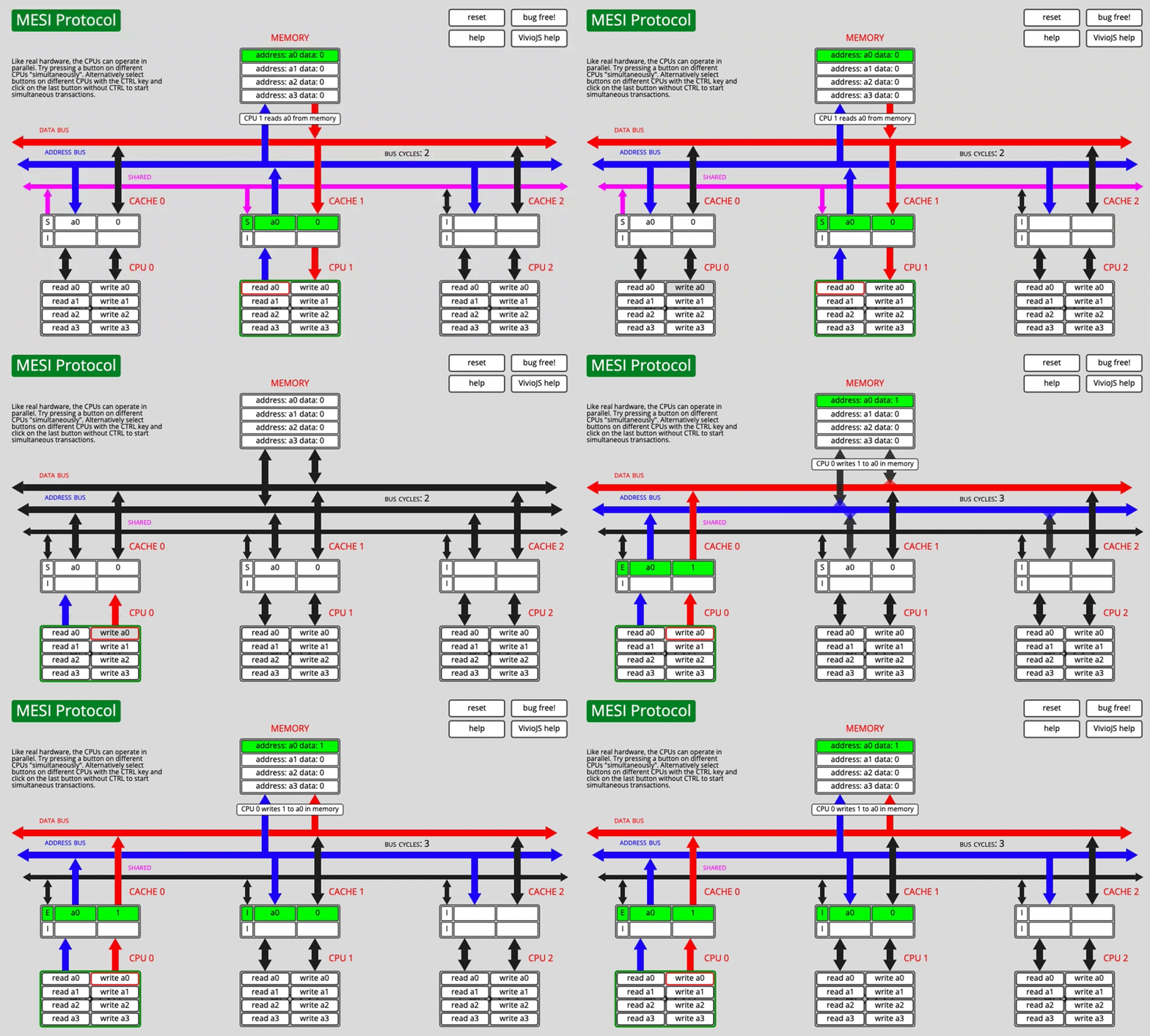
CPU0 changes the cache-line state and notifies the other CPU. CPU1 invalidates its own copy, switching that line to I.
The source text describes CPU0 changing to E here, but the important point is the invalidation behavior: once one core writes, other cached copies must no longer remain valid.
Store buffers: another layer that affects ordering and visibility
Now look at a different case.
Suppose CPU0 has cached a0, but CPU1 has not. What happens if CPU1 wants to write a0 directly?
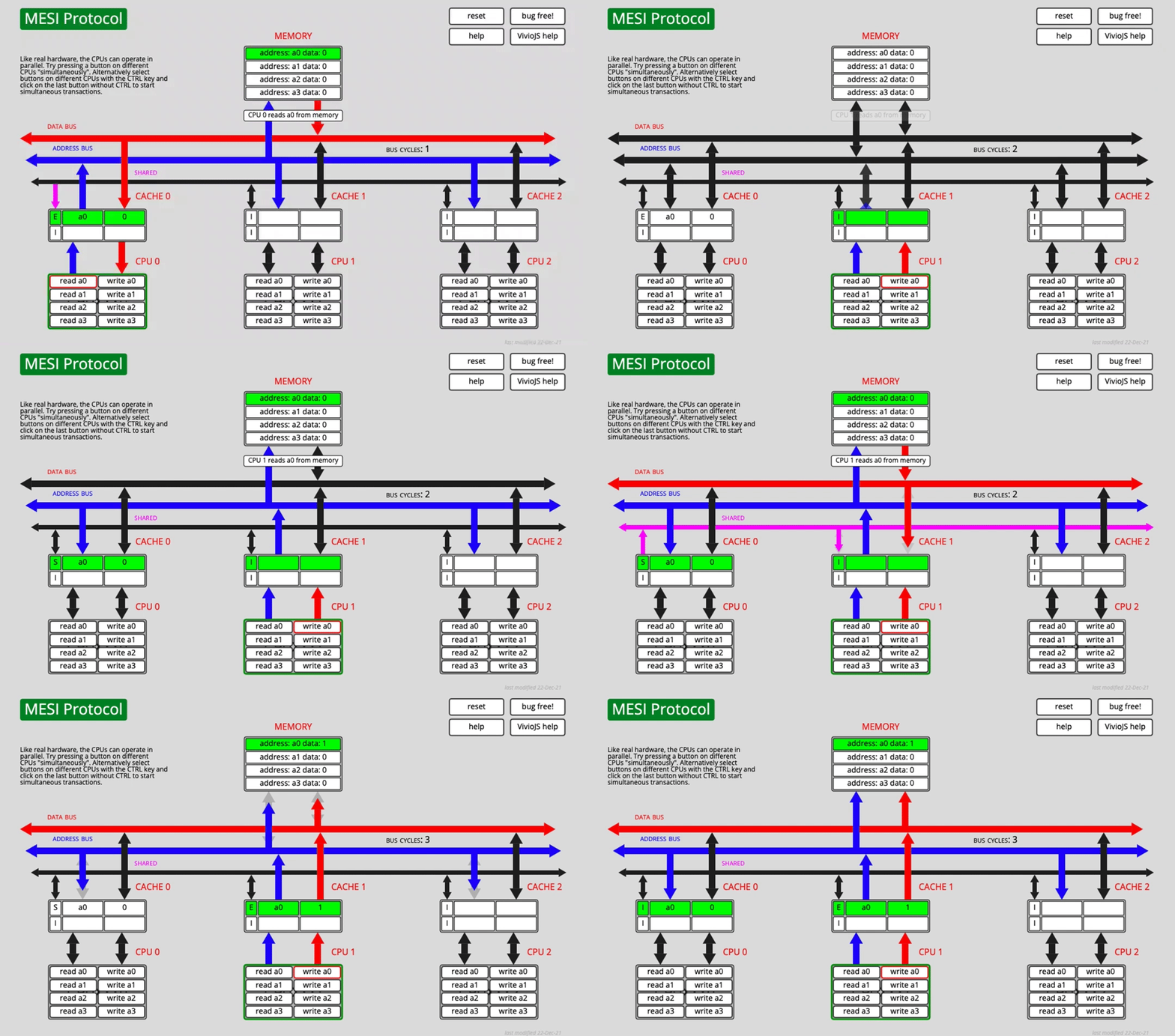
CPU1 must first send a Read Invalidate message so it can obtain the right to modify the line and force other copies to become invalid. But CPU1 has to wait until other cores respond to that invalidation request before it can complete the cache write.
Can the CPU do useful work while waiting? To improve efficiency, hardware introduces a store buffer.
After sending Read Invalidate, the CPU places the pending write into the store buffer and continues with other work. Once the necessary responses arrive, the buffered write is committed into cache.
This improves throughput, but it creates two important complications.
Problem 1: what if the same core reads the value again before the write reaches cache?
That part is manageable. Before reading L1, the CPU can check the store buffer first. This is called store forwarding.
Problem 2: the visibility bug from the opening example
Now we return to the original code:
<table> <thead> <tr> <th>1 2 3 4 5 6 7 8 9 10 11 12</th>
<th>int value = 3; boolean isFinsh = false; void exeToCPUA(){ value = 10; isFinsh = true; } void exeToCPUB(){ if(isFinsh){ //value一定等于10?! assert value == 10; } }</th>
</tr>
</thead>
<tbody>
<tr>
<td></td>
<td></td>
</tr>
</tbody>
</table>
Imagine CPUA executes value = 10. It sends a Read Invalidate to CPUB, then places value = 10 into the store buffer. Before that write has fully propagated, CPUA continues and executes the next write to isFinsh.
If isFinsh happens to already be in an exclusive state in CPUA's cache, then no invalidation is needed for that write. CPUA can update it directly in cache.
Now CPUB reads isFinsh and sees true. But CPUB may still not have processed the earlier invalidation related to value, so its visible value can still be 3.
That is why reading isFinsh == true does not automatically guarantee that value == 10 has become visible as well.
Memory barriers are the hardware-level fix
To prevent this kind of reordering effect from store buffers, hardware provides memory barrier instructions.
If a memory barrier such as smp_mb() is inserted after value = 10, then the later write to isFinsh cannot pass ahead of the earlier write in the way just described.
The barrier has two important effects here:
- It forces earlier buffered stores to become effective before later writes are considered complete.
- It makes later writes wait in order, rather than overtaking stores that are still sitting in the store buffer.
In short, the barrier prevents the visibility of isFinsh = true from racing ahead of the visibility of value = 10.
Invalidate queues: improving one bottleneck creates another
Store buffers are small. If other CPUs are busy and invalidation responses come back slowly, the store buffer can fill up and hurt CPU performance.
To reduce that pressure, hardware may use an invalidate queue.
With an invalidate queue, when a CPU receives an invalidate message, it does not have to invalidate the cache line immediately. It can enqueue the message, send back an Invalidate Acknowledge right away, and postpone the actual invalidation work.
Later, before sending out its own invalidation messages, the CPU checks whether that cache line already has a pending invalidate in the queue. If it does, the queued invalidation is processed then.
Like the store buffer, the invalidate queue also creates global ordering complications. The details go further than needed here, but the important takeaway is that modern hardware does not provide simple instantaneous visibility.
The common Linux memory barriers
Linux exposes a set of abstracted memory-barrier primitives for CPUs:
smp_rmb(): a read barrier. Reads after the barrier must wait until relevant invalidate-queue effects are drained.smp_wmb(): a write barrier. Writes after the barrier must wait until earlier store-buffered data has been flushed appropriately.smp_mb(): a full barrier, combining both read and write barrier behavior.
What volatile does for visibility
At the Java level, volatile is used to solve visibility problems like the one in the opening example.
The source explanation ties this to instructions with the lock prefix. The lock prefix is not the MESI protocol itself, but it can produce effects similar to a memory barrier.
Lock前缀,Lock不是一种内存屏障,但是它能完成类似内存屏障的功能。Lock会对CPU总线和高速缓存加锁,可以理解为CPU指令级的一种锁。它后面可以跟ADD, ADC, AND, BTC, BTR, BTS, CMPXCHG, CMPXCH8B, DEC, INC, NEG, NOT, OR, SBB, SUB, XOR, XADD, and XCHG等指令
The key idea is straightforward: volatile is not magic syntax for "shared variable." Its real value is that it establishes the visibility guarantees needed when multiple cores, private caches, store buffers, and memory ordering all interact.
Without that guarantee, a thread can observe a later flag update and still miss an earlier data write. That is the exact situation volatile is designed to prevent.