For many home NAS users, DDNS has long been the simplest way to reach devices from outside the house. Because residential broadband usually uses a dynamic public IP, the address can change at any time. DDNS maps that changing public IP to a fixed domain name, so remote access still works even when the IP changes.
In plain terms: your home public IP keeps changing, and DDNS keeps a domain pointed at the latest address, letting you connect to your NAS or other devices from the internet by domain name instead of memorizing an IP that never stays the same.
Reports of home broadband being flagged
Recently, users have shared cases in which carriers began investigating DDNS use on residential connections. One report described telecom staff visiting a subscriber in Shanghai, saying a server was being run from a home line, that this was not allowed, and requiring a rectification agreement to be signed. The listed items reportedly even included DDNS domains such as xxx.synology.me.
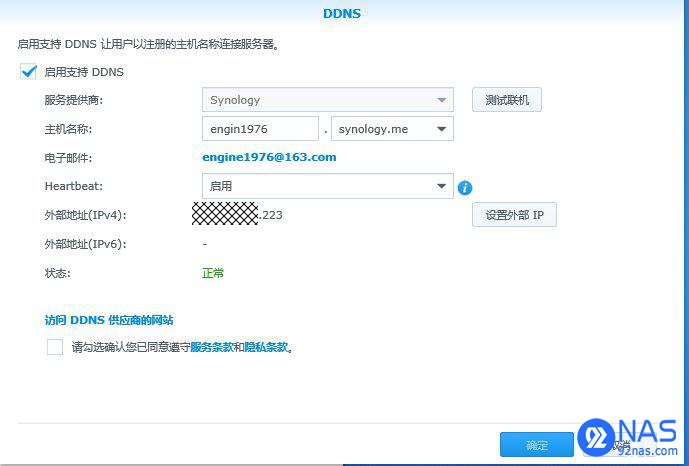
The concern is not limited to obvious public websites. According to the circulated claims, running a web service from a home broadband line or exposing services through port forwarding can result in service suspension. Re-enabling the line may require an on-site inspection by the carrier and a signed compliance statement. There is also speculation that carriers are not only checking port 80, but scanning for externally accessible web services more broadly and possibly judging from traffic behavior as well.

Another widely shared claim was that starting in September, DDNS services based on unregistered second-level domains would all be blocked.

Why this is happening
Under Chinese regulations, websites hosted domestically must complete ICP filing before they can be accessed legally by domain name. Telecom operators have also long restricted standard web access on residential lines, including blocking the default website port 80 for many home users.
Residential broadband agreements typically include a clause requiring customers to comply with laws, regulations, and industry rules when using telecom services. In the cases being discussed, the enforcement is described as coming directly from the Ministry of Industry and Information Technology and regional communications regulators. That means complaining to the ISP may not help much if the suspension is based on a regulatory compliance order. In some cases, users reportedly receive a service suspension notice and must sign a written commitment before the broadband line is restored.

The practical risk for NAS and router users
From a technical point of view, the web administration pages of a router or NAS can also be treated as privately hosted web services. So whether the DDNS entry comes from the NAS vendor or from the router, if the domain being used has not been properly filed, it may still be targeted.
That means using a domain name plus a forwarded port to access a device or self-hosted service at home can be considered non-compliant. The issue is broader than simply hosting a public homepage: remote management pages, NAS portals, and other browser-accessible services can all fall into the same category.
What can be done instead
1. Check whether the DDNS parent domain is properly filed
If you are using the DDNS service built into a router or NAS, the first thing to check is whether the parent domain has completed the required filing. A filed domain is safer; one without filing should be avoided.
Domains listed as filed:
qicp.viphicp.netdnspod.com
Domains listed as not filed:
myqnapcloud.comsynology.memyds.mei234.medscloud.measuscomm.com
If you use your own domain, one option is to complete ICP filing for it yourself. A common approach is to purchase the cheapest qualifying hosting product from a cloud provider, apply for filing under a personal name, and then use Aliyun DDNS to keep the domain updated.
2. Stop exposing web service ports and use VPN only
A more conservative method is to close the web service ports entirely and leave only a VPN port open. Instead of visiting the NAS directly through a public web address, you first connect to the home network over VPN and then access the NAS as if you were inside the LAN.
This avoids exposing NAS and router management pages directly to the public internet and greatly reduces the chance of being identified as running an external web service from a residential line.
One VPN option mentioned for this purpose is SoftEther:
http://www.softether-download.com/cn.aspx?product=softether
3. Use FRP for internal network tunneling
Another approach is to use frp for intranet penetration. This avoids the usual DDNS + direct web exposure pattern, though whether it is appropriate still depends on the exact way it is used and the network policy involved.
For users who mainly want stable remote access to a NAS, the key point is straightforward: direct browser-based exposure over an unfiled DDNS domain is becoming increasingly risky on home broadband lines. If remote access is necessary, VPN is generally the safer route.