Server: Oracle Cloud ARM | Stack: Halo 2.x + PostgreSQL 15 + Nginx | Notes recorded: 2026.05.21–22

An oddly ominous cover image
The strange part: only one site slowed down, and only at night
The issue was bizarre enough to feel almost supernatural: every night between 20:00 and 23:00, the blog would slow to a crawl like clockwork, while other sites on the same server kept working normally.
The machine was an Oracle Cloud ARM instance with 4 vCPUs and 24 GB RAM, running Docker Compose. Besides Halo, it hosted a few Typecho sites and some static pages. During the day everything was fast. At night, only Halo started misbehaving—pages spinning forever, the admin panel becoming inaccessible, and sometimes straight-up ERR_CONNECTION_CLOSED.
What made it especially painful was that it was intermittent. Sometimes a page would open, then the next click would hang. Sometimes the site would be unreachable for a few minutes, then suddenly recover. That kind of half-alive, half-dead slowdown is much harder to debug than a clean failure.
At first glance, Java seemed like an easy suspect. Halo 2.x runs on Spring Boot, and Java has a reputation for being memory-hungry, while Typecho uses PHP and tends to release resources more aggressively. But the Docker setup already gave the JVM a 5 GB heap, and G1 GC was enabled. On paper, that should not have been the problem.
Tip: when the slowdown is selective, resist the urge to immediately tweak application code or JVM flags.
The first step is to narrow the scope. If other sites on the same server are fine, then the issue is probably not overall CPU, memory, or disk pressure. If only one application is affected, the likely causes are the app itself, its database, or traffic unique to that domain.
Start with logs, then keep digging downward
Nginx error.log pointed to something noisy
The first useful clue came from Nginx error.log, which was full of lines like this:
2026/05/21 22:14:57 [error] 1234#1234: *45678 recv() failed (104: Connection reset by peer)
2026/05/21 22:14:57 [error] 1234#1234: *45678 upstream prematurely closed connection
They all pointed to the same path:
/apis/online-user.zyx2012.cn/v1alpha1/online-ws
That path belonged to an “online user count” plugin installed in Halo. Nginx was forwarding the request to Halo, but Halo was cutting the connection before returning response headers. Worse, these errors were happening at flood levels—dozens could appear within seconds.
dmesg exposed two deeper problems
Kernel logs showed two separate warning signs.
The first: Docker containers were restarting over and over.
vetha1b2c3d4: entered disabled state
vetha1b2c3d4: left promiscuous mode
docker0: port 2(vetha1b2c3d4) entered disabled state
Virtual interfaces were being torn down and recreated repeatedly. That usually means a container is crashing, Docker restarts it, and the cycle repeats.
The second: UFW was constantly blocking scans.
[UFW BLOCK] IN=eth0 OUT= MAC=... SRC=185.191.171.12 DST=... DPT=5432
[UFW BLOCK] IN=eth0 OUT= MAC=... SRC=194.165.16.73 DST=... DPT=5432
The screen was full of [UFW BLOCK] entries from external IPs probing ports like 5432 (PostgreSQL), 5985 (WinRM), and 3389 (Remote Desktop).
That raised a more serious question: why was port 5432 visible from the public internet at all?
Tip: dmesg is invaluable when an issue may involve the system layer.
A lot of people check only application logs and miss what the kernel is already telling them: container restart loops, veth interface churn, or the OOM killer. A quick filter like this helps:
dmesg -T | grep -E "(UFW|veth|docker0)"
Root cause #1: PostgreSQL was exposed to the internet
Opening docker-compose.yml explained it instantly:
services:
  halodb:
    image: postgres:15-alpine
    ports:
      - "5432:5432"
This had been left that way for convenience so DBeaver could connect directly. The forgotten detail was a nasty Linux gotcha: Docker can bypass UFW.
Why UFW did not save it
UFW is essentially a front end for iptables, and it inserts rules in the INPUT chain. Docker, however, creates its own rules in the DOCKER chain in nat and filter, and those take effect before UFW’s INPUT filtering matters for this traffic.
The rule looked like this:
sudo iptables -t nat -L DOCKER -n --line-numbers | grep 5432
Output:
DNAT tcp -- 0.0.0.0/0 0.0.0.0/0 tcp dpt:5432 to:172.18.0.2:5432
That means any traffic hitting port 5432 on the host gets DNATed straight into the container at 172.18.0.2:5432. By then, UFW is effectively too late to stop it.
The database logs showed brute-force traffic
PostgreSQL logs made the impact obvious:
2026-05-21 22:14:57.123 UTC [12345] FATAL: password authentication failed for user "postgres"
2026-05-21 22:14:57.123 UTC [12345] DETAIL: Role "postgres" does not exist.
2026-05-21 22:14:57.456 UTC [12346] FATAL: password authentication failed for user "postgres"
2026-05-21 22:14:57.789 UTC [12347] FATAL: password authentication failed for user "postgres"
Attackers were trying the default username postgres. In this setup, the actual database username had been changed, so there was no postgres role at all. Every attempt therefore ended in a FATAL error.
That also explained why the site was especially bad at night. Evening hours here overlap with daytime in Europe and North America, which is when internet-wide scanners tend to get busiest. Each malicious connection forced PostgreSQL to do real work:
- Fork a backend process, typically consuming around 5–10 MB memory.
- Perform SSL handshake and authentication work.
- Query system catalogs to validate the username.
- Write a
FATALlog entry on failure.
Those garbage requests burned CPU and I/O. When Halo needed a database query, it had to wait behind junk traffic.
The fix
The database port was rebound to localhost only:
services:
  halodb:
    image: postgres:15-alpine
    ports:
      - "127.0.0.1:5432:5432"
    environment:
      - POSTGRES_USER=halo
      - POSTGRES_PASSWORD=your_strong_password
      - POSTGRES_DB=halo
After restarting, the database logs became quiet almost immediately. The flood of FATAL entries disappeared.
Tip: for sensitive Docker services, write port mappings as 127.0.0.1:PORT:PORT unless external exposure is absolutely intentional.
If remote access is needed, SSH tunneling or WireGuard is much safer than opening database ports directly.
Root cause #2: Nginx was proxying with short-lived connections
Silencing the database noise helped, but the blog still stuttered occasionally. Looking further into access.log, a pattern appeared: every page load included not just the main request, but many /apis/... requests. All of them used:
proxy_pass http://127.0.0.1:8090;
That meant direct proxying to Halo, without an upstream block.
The missing piece was upstream keepalive.
Why short connections become a problem
Without keepalive, Nginx opens a new TCP connection to the backend for each proxied request, then throws it away. Once concurrency rises, the system accumulates thousands of TIME_WAIT sockets.
This can be checked with:
ss -tan state time-wait | wc -l
At peak, that count had risen above 8000.
TIME_WAIT is a normal part of TCP teardown, but large numbers of them still hurt:
- Ephemeral ports get exhausted. On Linux, the default ephemeral port range is often 32768–60999, about 28,000 ports total. If more than 8,000 are stuck in
TIME_WAIT, the available pool shrinks fast. - Kernel memory gets consumed. Each
TIME_WAITsocket still needs bookkeeping structures.
Once that pile builds up, the symptoms look exactly like random front-end slowness: spinning requests, blank pages, and failed new connections.
The fix
An upstream block was added at the top of the Nginx config:
upstream halo_backend {
    server 127.0.0.1:8090;
    keepalive 64;
}
Then every proxy_pass http://127.0.0.1:8090 was changed to proxy_pass http://halo_backend, with these directives added in the corresponding location blocks:
proxy_http_version 1.1;
proxy_set_header Connection "";
That let Nginx reuse 64 persistent connections to Halo instead of creating a fresh TCP handshake every time.
Two small details mattered here:
proxy_http_version 1.1is required, because HTTP/1.0 does not support keepalive by default.proxy_set_header Connection ""prevents Nginx from passing a client-sideConnection: closeupstream and causing the backend to close a connection that should stay reusable.
The result could be verified immediately:
ss -tan state established '( dport = :8090 or sport = :8090 )' | wc -l
The number of backend connections stabilized around 64 instead of fluctuating wildly, and the TIME_WAIT count fell back to a normal range.
Tip: use ss rather than netstat for connection inspection.
For a specific port, these checks are especially useful:
ss -tan state time-wait '( dport = :8090 )' | wc -l
ss -tan state established '( dport = :8090 )' | wc -l
If TIME_WAIT climbs past 5000, it deserves attention.
Root cause #3: a WebSocket plugin was stuck in a reconnect storm
That noisy plugin from the logs deserves its own section.
Its job was straightforward: the front end opens a WebSocket connection and reports online status in real time.
Why the WebSocket handshake failed
A WebSocket upgrade is not the same as a normal HTTP request. The flow is:
- The client sends an HTTP request with
Upgrade: websocketandConnection: Upgrade. - The server replies with
101 Switching Protocols. - The connection is upgraded into a bidirectional WebSocket channel.
The problem was in step two: Nginx was not forwarding the Upgrade header correctly.
Without the proper headers, Halo saw the request as an ordinary GET, processed it like a normal API call, and then closed the connection. The browser-side JavaScript, noticing the disconnect, automatically tried again. That created a loop of connect → disconnect → reconnect.
The logs showed the loop clearly
The Nginx access.log made the pattern obvious:
22:14:57 "GET /apis/online-user.../online-ws HTTP/1.1" 101 197
22:14:59 "GET /apis/online-user.../online-ws HTTP/1.1" 101 169  ← same IP reconnects 2 seconds later
22:16:04 "GET /apis/online-user.../online-ws HTTP/1.1" 101 0    ← 0 bytes transferred, empty connection
22:16:48 "GET /apis/online-user.../online-ws HTTP/1.1" 101 143
22:16:56 "GET /apis/online-user.../online-ws HTTP/1.1" 101 143  ← reconnect again after 8 seconds
A single visitor could trigger three or four WebSocket handshakes in a short time. Multiply that by several visitors and some bots, and Halo’s thread pool would spend time dealing with pointless handshakes instead of real page requests.
That was the real story behind the Nginx errors like Connection reset by peer and prematurely closed connection: Halo was getting overwhelmed and cutting connections to protect itself.
The fix
The plugin was not removed. After the keepalive changes, it was already behaving better, but the proper Nginx WebSocket support was still worth recording.
The location block should include:
location /apis/online-user.zyx2012.cn/ {
    proxy_pass http://halo_backend;
    proxy_http_version 1.1;
    proxy_set_header Upgrade $http_upgrade;
    proxy_set_header Connection "upgrade";
    proxy_read_timeout 60s;
    proxy_send_timeout 60s;
}
To verify the handshake directly:
curl -i -N -H "Connection: Upgrade" -H "Upgrade: websocket" -H "Host: wuqishi.com" -H "Origin: https://wuqishi.com" https://wuqishi.com/apis/online-user.zyx2012.cn/v1alpha1/online-ws
Expected result:
HTTP/2 101 Switching Protocols
upgrade: websocket
connection: upgrade
Once 101 Switching Protocols appears, the handshake is working. In the browser’s Network panel, the connection should stop constantly dropping and reconnecting.
At this point the plugin has been running stably, and the online user counter is functioning normally again.
Tip: when debugging WebSocket issues, don’t rely only on browser console errors.
Using curl to simulate the handshake is much faster. If the response is 200 OK instead of 101, then Nginx or the backend is not handling the upgrade properly. Also note that WebSocket over HTTP/2 has its own caveats, and Nginx only gained HTTP/2 WebSocket support in 1.25.1. If the version is older, testing with HTTP/1.1 is safer.
Another nuisance: aggressive bot traffic hitting nonsense paths
There was another class of requests in access.log that was both absurd and wasteful:
185.191.171.12 "GET /wp-content/themes/begin/inc/go.php?url=..." 404
85.208.96.196 "GET /wp-content/themes/begin/inc/go.php?url=..." 404
SemrushBot, a notorious SEO crawler, was repeatedly probing WordPress paths that did not even exist on the site. The blog had already moved past Typecho and was now on Halo, but the bot still behaved as if it were scanning a WordPress installation for old Begin theme redirect vulnerabilities.
Those requests all returned 404, but the waste was elsewhere: they were still reaching the Halo backend.
If Nginx cannot match a physical file, the request falls through to @halo_proxy, and Halo then has to initialize the full rendering flow just to produce a 404 page. If that happens dozens of times per second, thread pool capacity is burned on junk.
The mitigation
Instead of blocking these bots in Nginx, the filtering was moved to Cloudflare. Cloudflare firewall rules can block traffic by User-Agent or path pattern at the edge before it touches the origin.
That has several advantages:
- Bad traffic dies at the edge and never reaches the server.
- There is no need to maintain a local Nginx bot blacklist manually.
- Nginx logs stay cleaner and reflect real visitors more accurately.
Tip: if Cloudflare is already in front of the site, edge filtering is usually the better place to stop garbage traffic.
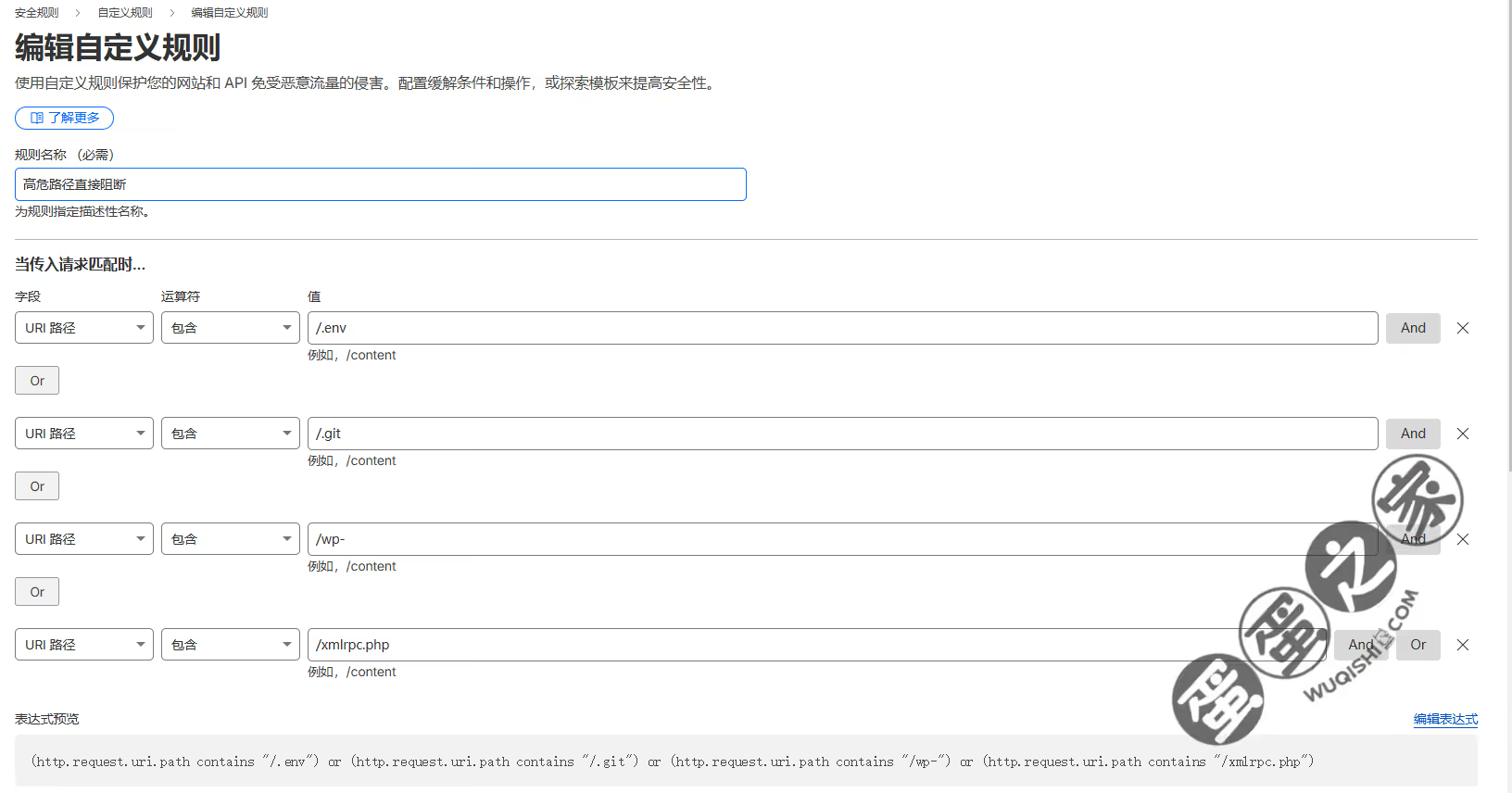
Custom rules on Cloudflare
Example expression:
(http.request.uri.path contains "/.env") or
(http.request.uri.path contains "/.git") or
(http.request.uri.path contains "/wp-") or
(http.request.uri.path contains "/xmlrpc.php")
Cloudflare firewall rules, Bot Fight Mode, and User-Agent filters are all more efficient than making the origin server waste effort on obviously malicious requests. If the site is not WordPress, blocking wp-content and wp-admin traffic at the edge is often worthwhile.
Other findings that still matter
RSS feed generation is expensive
Each request to /rss.xml dynamically generated about 115 KB of XML, and multiple aggregators such as FreshRSS, Inoreader, and AstraHub were polling it every few minutes. Static caching had not been added yet.
Tip: RSS fetch intervals vary a lot between aggregators.
Some poll every 5 minutes, others every 30. Reviewing access.log by User-Agent helps identify the noisiest clients. Since Halo generates the feed from the full post list, the work scales with the number of posts. With hundreds of posts, that becomes noticeably CPU-heavy. Paginated RSS or output limits may be worth considering.
The thumbnail proxy was creating extra 302s
Logs also contained many requests like:
GET /apis/api.storage.halo.run/v1alpha1/thumbnails/-/via-uri?uri=https://cdn.ssslove.com/...&size=m HTTP/2.0" 302 0
Halo’s thumbnail service was issuing a 302 redirect for externally hosted images. On pages with many images, that adds a lot of unnecessary round trips. A future cleanup would be to replace those with direct CDN image URLs including resize parameters, skipping Halo’s proxy layer.
Tip: Halo’s thumbnail proxy is more suitable for locally uploaded images.
If the images are already hosted on a CDN or object storage, it is often better to use the provider’s native image processing parameters directly on the front end.
HALO_EXTERNAL_URL was set wrong
In Docker Compose, HALO_EXTERNAL_URL had been set to http://localhost:8090/, which can cause plugins, callbacks, or RSS links to generate the wrong base URL.
It should be set to the real public domain:
environment:
  - HALO_EXTERNAL_URL=https://wuqishi.com/
This setting does not affect only visible page links. It can also affect:
- Open Graph tags for link previews
- RSS
<link>and[atom:link](atom:link)values - OAuth callback URLs in some plugins
- Links embedded in notification emails
If it is wrong, shared links may point to http://localhost:8090/..., which nobody else can open. At the time of these notes, that part had not been changed yet.
The troubleshooting path that actually worked
A lot of dead ends were possible here, but one method consistently paid off: move from the outside inward, and verify each layer before touching the next.
<table> <thead> <tr> <th>Step</th> <th>What was checked</th> <th>What it revealed</th> <th>Main tools / commands</th> </tr> </thead> <tbody> <tr> <td>1. Scope check</td> <td>Compared with other sites on the same server</td> <td>Only Halo was affected, so it was not a global resource shortage</td> <td>htop, free -h, df -h</td>
</tr>
<tr>
<td>2. Nginx error log</td>
<td>Looked for proxy/backend failures</td>
<td>Large numbers of Connection reset by peer</td>
<td>tail -f /var/log/nginx/error.log</td>
</tr>
<tr>
<td>3. dmesg</td>
<td>Looked for system-level abnormalities</td>
<td>Docker restarts and heavy UFW activity</td>
<td>dmesg -T | grep -E "(UFW|veth|docker0)"</td>
</tr>
<tr>
<td>4. Database logs</td>
<td>Checked DB pressure and auth failures</td>
<td>Public brute-force attempts against PostgreSQL</td>
<td>docker logs halodb</td>
</tr>
<tr>
<td>5. Nginx access log</td>
<td>Analyzed request distribution</td>
<td>Malicious crawlers and repeated WebSocket reconnects</td>
<td>awk '{print $6, $7}' access.log | sort | uniq -c | sort -rn</td>
</tr>
<tr>
<td>6. Browser dev tools</td>
<td>Distinguished front-end delay from back-end delay</td>
<td>High TTFB pointed to slow server response</td>
<td>Chrome DevTools → Network → Timing</td>
</tr>
<tr>
<td>7. Socket states</td>
<td>Verified TCP resource pressure</td>
<td>TIME_WAIT exceeded 8000</td>
<td>ss -tan state time-wait | wc -l</td>
</tr>
<tr>
<td>8. Simulated handshake</td>
<td>Tested WebSocket upgrade path directly</td>
<td>Got 200 instead of 101 before the fix</td>
<td>curl -H "Upgrade: websocket" ...</td>
</tr>
</tbody>
</table>
The principle behind all of it was simple: block junk traffic first, then fix internal configuration.
If the first move had been tuning JVM parameters or adding database indexes, the real causes might have been missed completely. The issue was not that the machine lacked performance. It was that resources were being wasted on traffic and connection patterns that should never have been allowed to consume them in the first place.
Current status after the fixes
After updating the configuration and restarting services, the system looked completely different:
- Database logs: quiet, apart from normal queries
- Nginx
error.log: no errors - Nginx
access.log: much cleaner, with Cloudflare blocking most bot junk before it reached the server - WebSocket plugin: handshake returns
101 Switching Protocols, the persistent connection stays up, and online count works normally - Page load: normal on iPad, Mac, and mobile over 4G
The 22:30–23:00 period that used to be the worst now feels just as smooth as daytime.
Six easy-to-miss traps this incident exposed
1. Docker port publishing exposes services more than many people think
Databases, Redis, and message queues should be bound to 127.0.0.1 unless there is a deliberate need for remote exposure. Trust iptables -t nat -L DOCKER more than assumptions about UFW.
2. Nginx reverse proxying is short-lived by default
Under concurrency, skipping keepalive can flood the host with TIME_WAIT sockets. If ss -tan state time-wait | wc -l passes 5000, it is time to take a closer look.
3. WebSockets are not “set and forget”
Upgrade and Connection headers both matter. A quick curl handshake test is often the fastest truth serum. If you do not get 101, the upgrade path is not configured correctly. And if HTTP/2 is involved, Nginx version matters.
4. Third-party plugins deserve caution, not blind blame
The online user plugin turned out not to be inherently broken. The real issue was missing proxy configuration. Once Nginx was fixed, the plugin became stable. Before uninstalling a plugin, it is worth checking the surrounding infrastructure first.
5. Logs are still the best debugger
Not a single line of Java had to be changed to find these problems. The answers were already in the logs. Habitually reading them is far more valuable than random parameter tuning.
A more informative Nginx log format also helps separate front-end delay from back-end delay at a glance:
log_format main '$remote_addr - $remote_user [$time_local] "$request" '
                '$status $body_bytes_sent "$http_referer" '
                '"$http_user_agent" '
                'rt=$request_time urt=$upstream_response_time';
rt(request_time): total time from the client-facing perspectiveurt(upstream_response_time): time spent waiting on the backend
If rt is large but urt is small, the problem is probably in networking or Nginx. If urt is large, the backend is the bottleneck.
6. Crawlers can waste real capacity even when they only get 404s
Bots like SemrushBot and DotBot are aggressive, often ignore robots.txt, and love probing old WordPress vulnerability paths. If the site is not WordPress, stopping those requests at Cloudflare or Nginx is a better use of resources than letting the application generate endless 404 pages.
One final complaint is deserved here: SemrushBot was relentlessly scanning from 21:00 to 23:00 for two straight hours, getting blocked by Cloudflare over and over and still coming back. If that level of persistence were applied to something useful, it could probably become a systems architect.