A couple of days ago someone asked me an interview question about Unix fork(). It happened to be the same one a company asked me about ten years ago when I was job hunting, and I’ve always found it interesting enough to share.
The question was simple:
How many - characters does the following program print in total?
#include <stdio.h>
#include <sys/types.h>
#include <unistd.h>

int main(void)
{
   int i;
   for(i=0; i<2; i++){
      fork();
      printf("-");
   }

   wait(NULL);
   wait(NULL);

   return 0;
}
If you know fork() well, the obvious answer seems to be 6. But in practice, this program will very sneakily print 8 dashes.
To understand why, it helps to remember two properties of fork():
fork()creates a child process from the current process. It returns twice:0in the child, and a positive value in the parent, which is the child’s PID.- At the moment
fork()is called, the entire address space of the parent is copied into the child as-is: instructions, variable values, stack, environment variables, buffers, and so on.
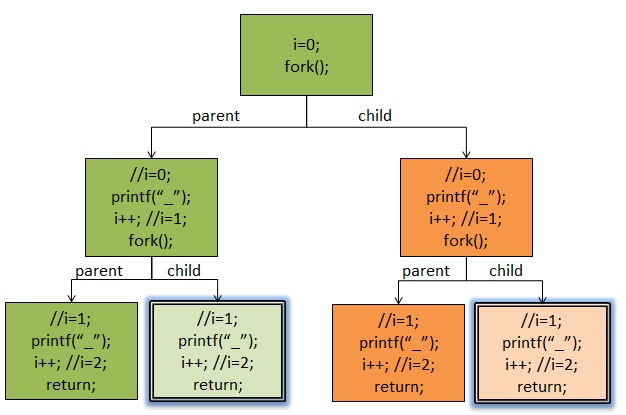
That second point is the key. printf("-"); does not necessarily write immediately to the terminal. It first goes into the standard output buffer. When fork() happens, that buffer is copied too. So the child inherits whatever was already sitting in the parent’s output buffer, and that is how the program ends up producing 8 dashes instead of 6.
There’s another detail worth mentioning. Unix devices are often discussed as either block devices or character devices. Block devices store and read data in chunks; character devices handle one character at a time. Disks and memory are typically treated as block devices, while keyboards and serial ports are character devices. Block devices usually have buffering, while character devices usually do not.
If we change the output line to either:
printf("-\n");
or:
 printf("-");
fflush(stdout);
then the problem disappears and the program prints 6 dashes as expected. That is because data is flushed when the program sees \n, EOF, a full buffer, a closed file descriptor, an explicit flush, or when the program exits. Standard output is line-buffered, so \n triggers a flush there. But for a disk, which is a block device, \n does not magically force an immediate write in the same way; that is full buffering. You can use setvbuf to adjust buffering, or fflush to force it out.
If fork() still feels abstract, it helps to look at a slightly more verbose version:
#include <stdio.h>
#include <sys/types.h>
#include <unistd.h>
int main(void)
{
   int i;
   for(i=0; i<2; i++){
      fork();
      //注意:下面的printf有“\n”
      printf("ppid=%d, pid=%d, i=%d \n", getppid(), getpid(), i);
   }
   sleep(10); //让进程停留十秒,这样我们可以用pstree查看一下进程树
   return 0;
}
This version produces output like this, assuming the executable is named fork:
ppid=8858, pid=8518, i=0
ppid=8858, pid=8518, i=1
ppid=8518, pid=8519, i=0
ppid=8518, pid=8519, i=1
ppid=8518, pid=8520, i=1
ppid=8519, pid=8521, i=1

$ pstree -p | grep fork
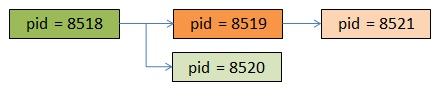
|-bash(8858)-+-fork(8518)-+-fork(8519)---fork(8521)
|            |            `-fork(8520)
At first glance that tree can still be hard to follow, so here is a visual way to think about it:
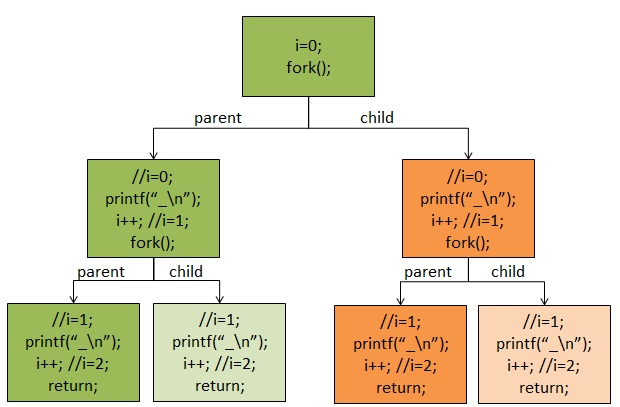
In the diagram, each color represents one process. With that in mind, the pstree output becomes easier to read:
Now the earlier printf("-"); problem is much easier to see. The two shaded, double-bordered child processes are the ones that inherited the parent’s standard output buffer content, which is why the dash gets printed more than once:
So yes, the answer is not just about process creation. It is also about buffering, and about remembering that fork() copies more than just code and variables—it copies the state of the runtime as well.
Now it should make sense.