Samba configuration reference
Version
The Samba service used for this configuration is:
Version 4.17.12-Debian

Configuration file
The main configuration file is located at /etc/samba/smb.conf.
The default settings from lines 1–235 are omitted below; only the custom share definitions are shown:
[home]
comment = 用户目录
path = /home/
read only = no
guest ok = no
browseable = yes
create mask = 0755
directory mask = 0755
writable = yes
valid users = mkbk @mkbk
forceuser = root
forcegroup = root

[www]
comment = Web目录
path = /var/www/
read only = no
guest ok = no
browseable = yes
create mask = 0755
directory mask = 0755
writable = yes
valid users = mkbk @mkbk
forceuser = root
forcegroup = root

[mnt]
comment = 挂载点
path = /mnt/
read only = no
guest ok = no
browseable = yes
create mask = 0755
directory mask = 0755
writable = yes
valid users = mkbk @mkbk
forceuser = root
forcegroup = root

[tmp]
comment = 临时目录,允许匿名登录
path = /tmp/
read only = no
guest ok = yes
browseable = yes
create mask = 0755
directory mask = 0755
writable = yes
forceuser = root
forcegroup = root
The home, www, and mnt shares require an authenticated Samba user. The tmp share allows guest access and does not define valid users.
User authentication and service checks
valid users controls which users or groups may access a share. The @ prefix identifies a group, and multiple users or groups are separated with spaces. Every listed user must already exist as a real system account. In addition, that account needs a separate Samba password created with sudo smbpasswd -a <用户名>; a normal system password alone is not sufficient for Samba login.
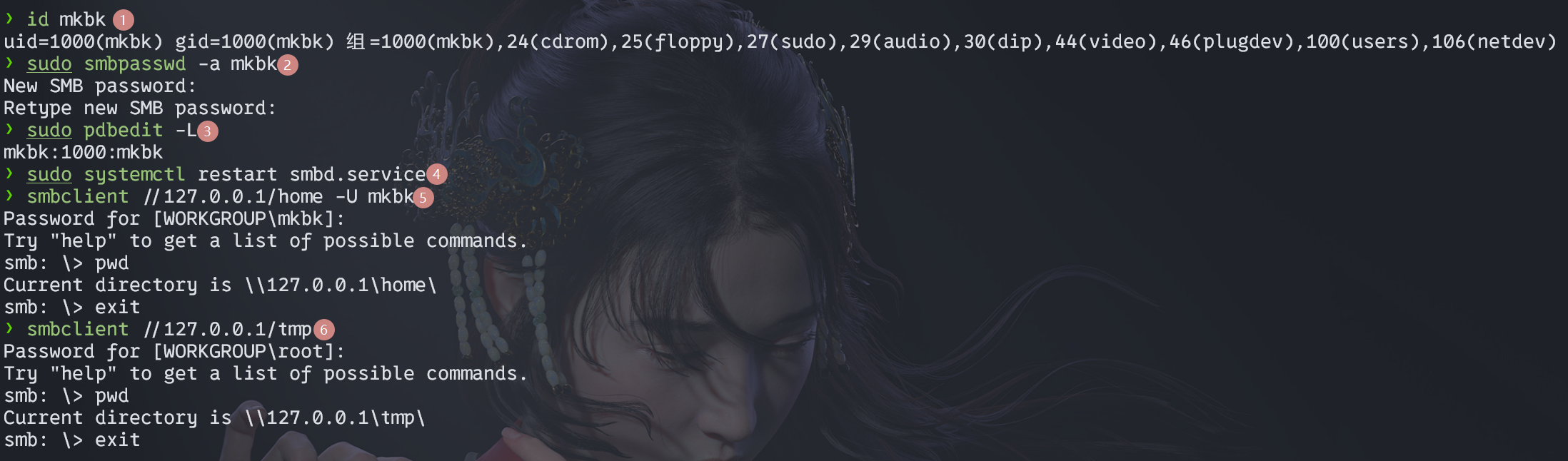
The following commands verify the account, create its Samba password, inspect known Samba users, reload the service, and test both authenticated and anonymous access:
id mkbk # 确保mkbk用户存在
sudo smbpasswd -a mkbk # 为mkbk用户设置samba独立密码
sudo pdbedit -L # 查看samba已知的用户
sudo systemctl restart smbd.service # 重启samba服务,使配置生效
smbclient //127.0.0.1/home -U mkbk # 使用smbclient测试访问
smbclient //127.0.0.1/tmp # 使用smbclient测试匿名访问(提示输入密码时直接回车)
sudo pdbedit -x -u mkbk # 删除samba已知的用户
The forceuser and forcegroup settings determine the user and group used for file operations through Samba. When they are not specified, Samba uses the account that connected to the share. For guest connections, the default account is nobody.
Windows 11 24H2 compatibility
Windows 11 24H2 enables SMB security signing by default. Depending on the Samba setup, this can prevent the client from connecting to the shares. Security signing can be disabled from an elevated PowerShell session with the following commands:
Set-SmbClientConfiguration -EnableSecuritySignature $false
Set-SmbClientConfiguration -RequireSecuritySignature $false
Get-SmbClientConfiguration | findstr EnableSecuritySignature
Get-SmbClientConfiguration | findstr RequireSecuritySignature
A share can then be mapped from the Windows command line as follows:
net use z: \\IP地址\home
dir z:
net use * /delete
If Windows reports that one user cannot establish multiple connections to the same server or shared resource under different usernames, disconnect the existing connections by restarting the Workstation service from an administrator terminal:
net stop LanmanWorkstation && net start LanmanWorkstation
After the service restarts, try connecting to the Samba share again.