Overview
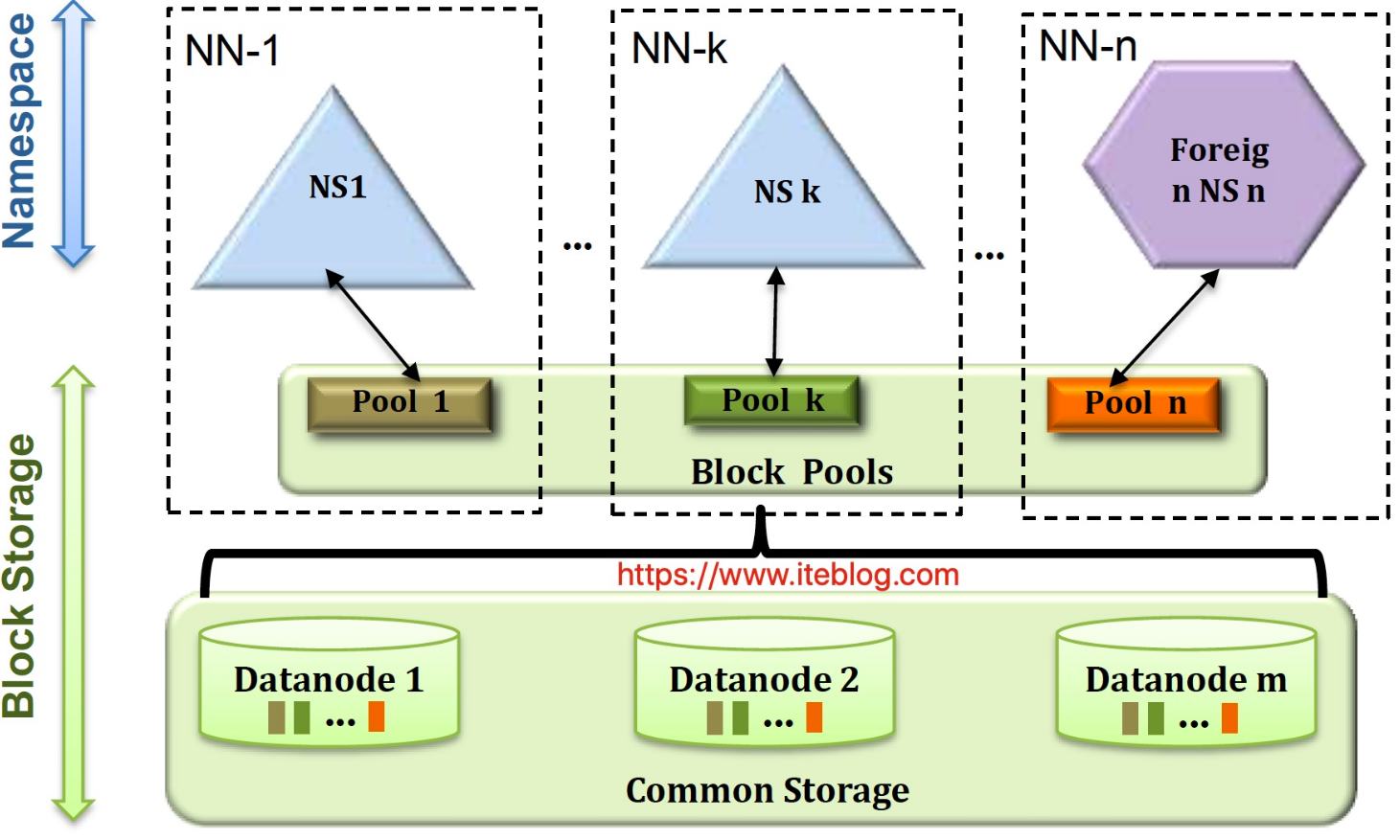
HDFS Federation was introduced starting with Apache Hadoop 0.23.0 to address HDFS horizontal scalability. In a federated HDFS deployment, a single cluster can host multiple NameNodes and multiple namespaces at the same time, and each namespace is isolated from the others.
Within one namespace, there can be multiple NameNodes: one active and the rest standby, which follows the same high-availability pattern used in a single-namespace setup. Together, these namespaces manage the data of the whole cluster, but each namespace is only responsible for part of that data and does not interfere with the others.
DataNodes register with every NameNode in the cluster. They periodically send heartbeats and block reports to all of them, and they also execute commands issued by those NameNodes. In this model, all NameNodes share the storage resources provided by the full set of DataNodes.
State Store module
The State Store initialization begins in the serviceInit method of the Router class.
A switch is provided through dfs.federation.router.store.enable, and it is enabled by default. The central implementation is StateStoreService.
During serviceInit, the Router prepares the store driver first. The driver class is selected through dfs.federation.router.store.driver.class, and the default is StateStoreZooKeeperImpl.class, created through reflection. The currently supported implementations are:
StateStoreFileImplStateStoreFileSystemImplStateStoreMySQLImplStateStoreZooKeeperImpl
After that, the Router registers the record stores. The supported record store implementations are:
MembershipStoreImplMountTableStoreImplRouterStoreImplDisabledNameserviceStoreImpl
All of them are kept in recordStores.
// Add supported record stores
addRecordStore(MembershipStoreImpl.class);
addRecordStore(MountTableStoreImpl.class);
addRecordStore(RouterStoreImpl.class);
addRecordStore(DisabledNameserviceStoreImpl.class);
The next step is setting up the periodic connection check task:
// Check the connection to the State Store periodicallythis
this.monitorService = new StateStoreConnectionMonitorService(this);
this.addService(monitorService);
Then the cache refresh service is initialized:
// Cache update service
this.cacheUpdater = new StateStoreCacheUpdateService(this);
addService(this.cacheUpdater);
Finally, monitoring is initialized. The main monitoring bean here is StateStoreMBean.
What happens at startup
Startup is mainly triggered from Router.serviceStart, which eventually calls StateStoreDriver.init to initialize the selected driver. The main work is split between initDriver and initRecordStorage.
initRecordStorage must be invoked for every registered record store:
for (Class<? extends BaseRecord> cls : records) {
  String recordString = StateStoreUtils.getRecordName(cls);
  if (!initRecordStorage(recordString, cls)) {
    LOG.error("Cannot initialize record store for {}", cls.getSimpleName());
    return false;
  }
}
File-based State Store: StateStoreFileImpl and StateStoreFileSystemImpl
initDriver
For the current file-based State Store implementations, initialization is relatively straightforward. The main task is to verify whether the local root directory exists, and create it if it does not. The logic looks roughly like this:
public boolean initDriver() {
    String rootDir = getRootDir();
      if (rootDir == null) {
        LOG.error("Invalid root directory, unable to initialize driver.");
        return false;
      }

      // Check root path
      if (!exists(rootDir)) {
        if (!mkdir(rootDir)) {
          LOG.error("Cannot create State Store root directory {}", rootDir);
          return false;
        }
      }
    // ... 省略 ...
    int threads = getConcurrentFilesAccessNumThreads();
      this.concurrentStoreAccessPool =
          new ThreadPoolExecutor(threads, threads, 0L, TimeUnit.MILLISECONDS,
              new LinkedBlockingQueue<>(),
              new ThreadFactoryBuilder()
                  .setNameFormat("state-store-file-based-concurrent-%d")
                  .setDaemon(true).build());
    return true;
  }
Besides directory checks, a thread pool is also created for concurrent file access.
initRecordStorage
The per-record-store initialization follows the same pattern. A dedicated directory is created for each State Store record type, and the directory name uses the state store class name.
public <T extends BaseRecord> boolean initRecordStorage(
      String className, Class<T> recordClass) {
    String dataDirPath = getRootDir() + "/" + className;
    // Create data directories for files
    if (!exists(dataDirPath)) {
      LOG.info("{} data directory doesn't exist, creating it", dataDirPath);
      if (!mkdir(dataDirPath)) {
        LOG.error("Cannot create data directory {}", dataDirPath);
        return false;
      }
    }
    return true;
  }
MySQL-backed State Store: StateStoreMySQLImpl
initDriver
The key step here is establishing the MySQL connection. That connection is wrapped by MySQLStateStoreHikariDataSourceConnectionFactory.
MySQLStateStoreHikariDataSourceConnectionFactory(Configuration conf) {
    Properties properties = new Properties();
    properties.setProperty("jdbcUrl", conf.get(StateStoreMySQLImpl.CONNECTION_URL));
    properties.setProperty("username", conf.get(StateStoreMySQLImpl.CONNECTION_USERNAME));
    properties.setProperty("password", conf.get(StateStoreMySQLImpl.CONNECTION_PASSWORD));
    properties.setProperty("driverClassName", conf.get(StateStoreMySQLImpl.CONNECTION_DRIVER));

    // Include hikari connection properties
    properties.putAll(conf.getPropsWithPrefix(HIKARI_PROPS));

    HikariConfig hikariConfig = new HikariConfig(properties);
    this.dataSource = new HikariDataSource(hikariConfig);
}
initRecordStorage
In StateStoreMySQLImpl, each state store maps to a separate table. The table definition is:
CREATE TABLE <className> (
   recordKey VARCHAR (255) NOT NULL,
   recordValue VARCHAR (2047) NOT NULL,
   PRIMARY KEY(recordKey))
)