RAID, short for a disk array, is a way to combine multiple drives into one storage system. Its basic idea is simple: give up part of the total raw capacity of several disks in exchange for fault tolerance, performance, or both.
The most common RAID levels are RAID0, RAID1, RAID5, and RAID6. From these, combined layouts such as RAID10 and RAID50 are built for more specific needs.
The three building blocks behind RAID
RAID relies on three core techniques:
- Mirroring: writing identical copies of data to multiple disks to create redundancy.
- Striping: splitting data into blocks and writing them across several disks in parallel to improve read and write speed.
- Parity: storing additional verification information so that if a disk fails, the missing data can be reconstructed from the remaining disks.
RAID0: speed first, no protection
RAID0 uses striping only.
With two disks, data is split into slices and written across both drives. That parallelism gives RAID0 very strong performance. For example, if a 2 GB file is written to a single disk, that disk must handle the entire 2 GB alone. In a two-disk RAID0 array, each disk writes only 1 GB, so in theory total throughput can double.
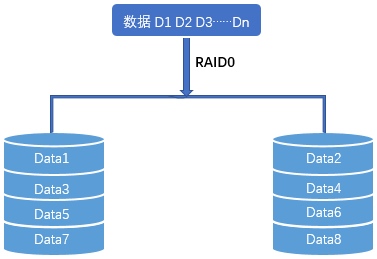
The trade-off is that RAID0 has no redundancy at all. Every file is spread across the array, so if just one disk fails, part of every file is lost and the entire array becomes unreadable.
So RAID0 offers one clear advantage and one equally clear drawback:
- Pros: very fast reads and writes
- Cons: no fault tolerance
RAID1: the safest basic option, but only half the capacity
RAID1 uses mirroring.
All data written to one disk is copied exactly to another. If you build RAID1 from two 1 TB disks, usable capacity is only 1 TB, because the second disk is storing the same content as the first.
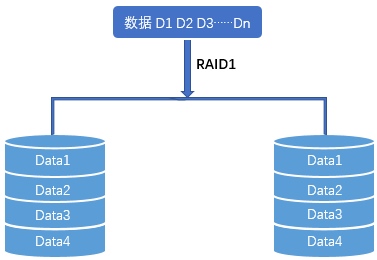
Performance behaves differently for reads and writes:
- Read speed depends on the faster disk, because the system can read from either copy.
- Write speed depends on the slower disk, because both disks must finish writing before the operation completes.
That makes RAID1 highly reliable, but inefficient in terms of space:
- Pros: strong data safety
- Cons: only 50% capacity utilization
RAID5: parity-based protection with a better balance of space and safety
To understand RAID5, it helps to first understand parity, and before that, XOR.
In binary systems, XOR is an operation with a very simple rule: same gives 0, different gives 1.
<table> <thead> <tr> <th>A</th> <th>B</th> <th>XOR result</th> </tr> </thead> <tbody> <tr> <td>0</td> <td>0</td> <td>0</td> </tr> <tr> <td>0</td> <td>1</td> <td>1</td> </tr> <tr> <td>1</td> <td>0</td> <td>1</td> </tr> <tr> <td>1</td> <td>1</td> <td>0</td> </tr> </tbody> </table>A useful property of XOR is that if you know the result and one of the inputs, you can infer the other input. That is the basis of parity encoding and recovery.
XOR can also tell whether a binary string contains an odd or even number of 1s. XOR all bits together:
- result 1 → odd number of 1s
- result 0 → even number of 1s
That final value is the parity value.
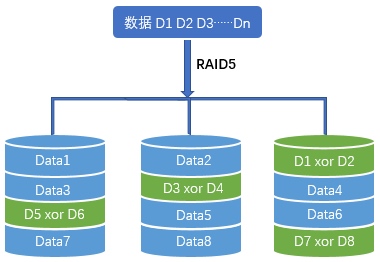
RAID5 requires at least three disks. Alongside normal data, each disk stores part of the parity information. If any one disk fails, the missing content can be rebuilt by performing XOR calculations on the surviving disks. Because of this design, RAID5 can tolerate one disk failure.
There is a commonly repeated claim that once one RAID5 disk has failed, the probability of a second disk failing during rebuild is greater than 70%.
That claim is not necessarily correct.
A more grounded explanation is operational rather than mathematical: imagine a RAID5 array that has been running continuously for three years. The remaining disks may already have accumulated bad sectors. When one failed drive is replaced and the array begins rebuilding, those latent problems on the other drives can cause the rebuild to fail. In that sense, what looks like “a second disk failure” may really reflect weak monitoring and maintenance.
This risk can be reduced by paying close attention to array health: checking RAID controller logs, reviewing patrol read logs, and watching drive media error counts so disks with warning signs can be replaced before they cause array failure.
That said, even this explanation should not be treated as absolute. If RAID5 still feels too risky, RAID6 is the usual next step.
RAID6: more protection, slower writes
RAID6 extends RAID5 by storing an additional parity block, using more advanced calculations based on Galois field arithmetic. It requires at least four disks.
In practical terms, RAID6 uses the equivalent of two disks’ worth of space for redundancy, and it can survive up to two disk failures.
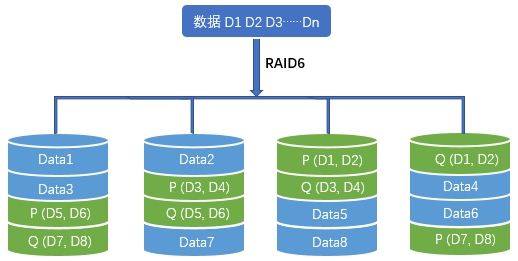
Read performance is similar to RAID5. Write performance is worse, because generating RAID6 parity is more computationally complex than XOR-based RAID5 parity.
RAID10: combining speed and redundancy in a safer way than RAID01
RAID0 is fast but unsafe. RAID1 is safe but wasteful. That is why combined layouts such as RAID01 and RAID10 were created.
Both aim to combine RAID0 performance with RAID1 redundancy, but RAID10 offers better fault tolerance than RAID01 at the same capacity and performance level, which is why RAID01 has largely fallen out of favor.
The difference is in the order:
- RAID01 = stripe first, then mirror
- RAID10 = mirror first, then stripe
To see why this matters, assume there are 10 disks of 1 TB each.
RAID01
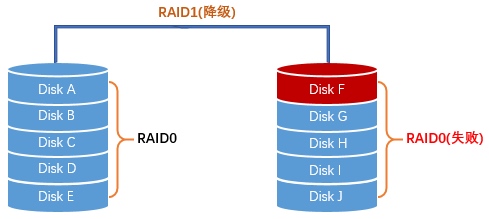
Disks A-B-C-D-E form one RAID0 group with 5 TB capacity. Disks F-G-H-I-J form another RAID0 group with 5 TB capacity. Then those two RAID0 groups are mirrored as RAID1, giving 5 TB usable capacity.
Now suppose disk F fails. The entire F-G-H-I-J RAID0 side is now invalid, so the whole mirrored array is degraded. If any one disk in A-B-C-D-E fails before rebuild completes, that RAID0 side also fails, and the whole array is lost.
In this scenario, after one disk has failed, the chance of a second failure causing total array loss is 5/9, which is over 50%.
RAID10
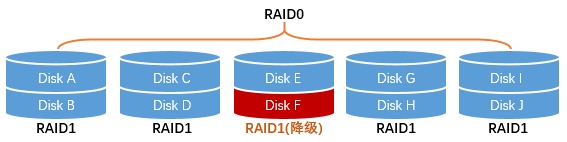
Now pair the disks as mirrored sets: A-B, C-D, E-F, and so on. That gives five RAID1 pairs, each with 1 TB usable capacity. Then those five mirrored pairs are striped together as RAID0, again giving 5 TB usable capacity.
Suppose disk F fails. Only the E-F mirror is degraded. The overall RAID0 layer remains functional because the mirrored pair still provides the missing data. If a second disk fails, the array only collapses if that second disk is E, the surviving partner in the same mirror pair.
That means the failure probability during rebuild is only 1/9, one-fifth of RAID01 under the same assumptions.
RAID50: RAID5 groups striped together
RAID10 is built from mirrored pairs and then striped. RAID50 works differently: it builds several RAID5 groups first, then stripes across those RAID5 groups.
A common example is to use three disks per RAID5 set, then combine multiple such sets as RAID0.
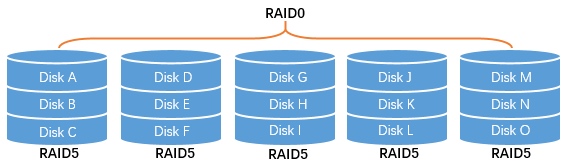
RAID50 requires at least six disks, and the disk count must be a multiple of three. Its usable capacity reaches about two-thirds of raw space, while fault tolerance is also relatively balanced, making it a practical option for larger storage pools.
Quick comparison of common RAID levels
<table> <thead> <tr> <th>RAID level</th> <th>RAID0</th> <th>RAID1</th> <th>RAID5</th> <th>RAID6</th> <th>RAID10</th> <th>RAID50</th> </tr> </thead> <tbody> <tr> <td>Fault tolerance</td> <td>No</td> <td>Yes</td> <td>Yes</td> <td>Yes</td> <td>Yes</td> <td>Yes</td> </tr> <tr> <td>Redundancy type</td> <td>None</td> <td>Mirroring</td> <td>Parity</td> <td>Parity</td> <td>Mirroring</td> <td>Parity</td> </tr> <tr> <td>Read performance</td> <td>High</td> <td>Low</td> <td>High</td> <td>High</td> <td>Medium</td> <td>High</td> </tr> <tr> <td>Random write performance</td> <td>High</td> <td>Low</td> <td>Low</td> <td>Low</td> <td>Medium</td> <td>Medium</td> </tr> <tr> <td>Sequential write performance</td> <td>High</td> <td>Low</td> <td>Low</td> <td>Low</td> <td>Medium</td> <td>Medium</td> </tr> <tr> <td>Required disks</td> <td>≥2</td> <td>2N (N≥1)</td> <td>≥3</td> <td>≥4</td> <td>2N (N≥2)</td> <td>6N (N≥1)</td> </tr> <tr> <td>Max tolerated failed disks</td> <td>0</td> <td>N</td> <td>1</td> <td>2</td> <td>N</td> <td>2N</td> </tr> <tr> <td>Usable capacity</td> <td>100%</td> <td>50%</td> <td>>66%</td> <td>>50%</td> <td>50%</td> <td>>66%</td> </tr> </tbody> </table>In practical terms:
- If data protection requirements are especially strict, RAID10 is a strong recommendation.
- For ordinary workloads, RAID5 is often the standard choice.
- If you are uncomfortable with RAID5 rebuild risk, RAID6 is the safer alternative.
Hot spares and cold spares
What happens when a fault-tolerant RAID array loses a disk?
Take a two-disk RAID1 array as an example. If one disk fails, the array can still run using the remaining disk, but it enters a degraded state. That means service continues, yet there is no longer any redundancy. The data is still accessible, but it is no longer safe.
To repair the array, the failed disk is replaced with a healthy disk of the same capacity. The RAID system then starts a rebuild automatically by copying data from the surviving disk to the new one. Depending on drive size, that rebuild may take anywhere from more than ten hours to several dozen hours.
If the replacement disk is a spare sitting unpowered in a drawer until someone installs it manually, that disk is a cold spare.
But RAID can also recover more quickly through a hot spare.
A hot spare is one or more same-capacity disks installed in the system in advance and configured specifically for standby use. Under normal conditions, those disks do not store active array data and are not involved in reads or writes. Once a drive in the array fails and the array becomes degraded, the RAID controller can immediately activate the hot spare and begin rebuilding.
The advantage is obvious: recovery starts right away, without waiting for an administrator to notice the failure and replace hardware manually. That reduces the amount of time the array spends running in a degraded state. The downside, of course, is additional cost.
A server specification that lists something like 4×6 TB (RAID5+1) usually means there are four 6 TB drives in total: three are used to build RAID5, and the remaining one is configured as a hot spare.
One detail is worth noting: some materials distinguish RAID51 from RAID5+1. In that usage, RAID51 means six or more disks where one RAID5 group is mirrored by another set of disks, while RAID5+1 refers to RAID5 with one hot spare.
Hardware RAID and software RAID
RAID can be implemented in two ways: hardware RAID and software RAID.
Hardware RAID
Hardware RAID uses a dedicated RAID controller card installed in the server, similar in concept to adding a separate expansion card. These controllers have dedicated RAID processing, I/O chips, and often cache.
Advantages:
- better performance
- no RAID computation burden on the server CPU
- cached controllers can improve random I/O performance
Disadvantages:
- less flexible
- drives from a hardware RAID array usually cannot just be moved to another machine and mounted directly unless the array is properly removed first
- extra hardware cost
- replacing a failed array enclosure or controller may require caution, especially across different models or brands
Software RAID
Software RAID is implemented by the operating system or software stack rather than a dedicated controller. Disk reads and writes are handled by the CPU, and the system can see all member disks directly.
Advantages:
- flexible
- lower cost
- simpler to operate
- disks are easier to move to another machine
Disadvantages:
- uses server CPU resources
- generally lower performance than hardware RAID
In production environments, hardware RAID is commonly preferred, especially for levels such as RAID5 and RAID6 where parity work is more demanding.
A few practical questions
RAID10 vs RAID5: how do you choose between efficiency and safety?
If you need better capacity utilization, do not require extremely high fault tolerance, and mainly store large files, RAID5 is often a better fit. The main caution is rebuild time: rebuilding RAID5 can take a long time and places heavy stress on the remaining disks. If another disk fails during that window, the whole array can be lost.
If safety matters much more than cost, and the workload involves relatively small amounts of data with frequent writes, RAID10 is usually the better choice.
There are also practical side effects to consider when adding more disks: higher power requirements, more energy consumption, and louder cooling fans.
Can disks of different sizes be used in one RAID array?
Yes. But the usable capacity is limited by the smallest disk in the group.
How does software-defined storage differ from traditional disk arrays?
The main differences are in scalability, compatibility, and ease of use.
One last point matters more than people sometimes realize: RAID is mainly a redundancy solution, not a backup strategy. Backups still need to be planned separately.