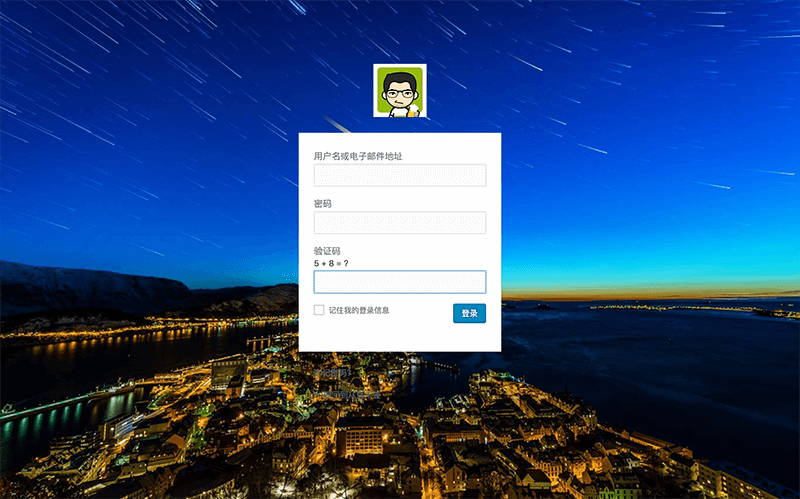
Bing’s homepage backgrounds are often some of the most striking nature images on the web: lush green forests, cascading waterfalls, vivid underwater scenes, misty sunrises, dramatic cliffs, wide blue seas, and sudden flashes of rainbow color. These images are crisp, polished, and full of atmosphere, which makes them a great fit for a WordPress login page as well.
If you like that style, you can pull Bing’s background image directly into the WordPress login screen. One nice touch is that the image updates automatically every day, so the login page doesn’t stay visually static.
Just add the following code to your theme’s functions.php file:
//调用bing美图作为登录页背景图function custom_login_head(){$str=file_get_contents('http://cn.bing.com/HPImageArchive.aspx?idx=0&n=1');if(preg_match("/<url>(.+?)<\/url>/ies",$str,$matches)){$imgurl='http://cn.bing.com'.$matches[1]; echo'<style type="text/css">body{background: url('.$imgurl.');width:100%;height:100%;background-image:url('.$imgurl.');-moz-background-size: 100% 100%;-o-background-size: 100% 100%;-webkit-background-size: 100% 100%;background-size: 100% 100%;-moz-border-image: url('.$imgurl.') 0;background-repeat:no-repeat\9;background-image:none\9;}</style>';}}add_action('login_head', 'custom_login_head');
After adding it, your login page background will use Bing’s image feed, giving the page a more refined look with no need to manually replace wallpapers.