Before looking at CDN routing, it helps to separate two stages of DNS resolution: recursive queries and iterative queries. The source IP address seen by each DNS server is not always the IP address of the original client, and that detail has a direct impact on how CDN nodes are selected.
Source IP changes during DNS resolution
During DNS resolution, the source IP address changes depending on which part of the lookup is taking place:
- In the recursive query stage, the DNS request is sent from the client or from the recursive resolver currently handling the request.
- In the iterative query stage, the DNS request source IP becomes the IP address of the recursive DNS server that is querying root, TLD, and authoritative name servers.
For example, suppose a host at 192.168.1.1 wants to look up the IP address of blog.lololowe.com, and it uses the default gateway 192.168.1.254 as its DNS server. The source IP changes roughly like this:
- The host first sends a recursive DNS query to the default gateway. At this point, the source IP of the DNS request is the host address:
192.168.1.1. - After receiving the request, the router continues the recursive lookup by querying an upstream DNS server, such as
114.114.114.114. Now the source IP is the router’s public IP address, for example175.1.1.1. - The upstream DNS server then performs iterative queries to the root name servers, top-level domain name servers, and authoritative name servers. Throughout this iterative process, the source IP remains the upstream DNS server’s IP address:
114.114.114.114.
The result is then returned step by step: the upstream DNS server sends the answer back to the default gateway, and the default gateway returns it to the host.
The important point is that the final answer comes from the authoritative DNS server, but the authoritative DNS server does not see the original host IP 192.168.1.1, nor does it see the router’s public IP 175.1.1.1. What it sees is the IP address of the upstream recursive DNS server that initiated the iterative lookup, such as 114.114.114.114.
How CDN DNS routing uses the query source IP
Once the source IP behavior in DNS resolution is clear, it becomes easier to understand why DNS choice affects CDN scheduling.
CDN intelligent routing commonly relies on the source IP address of the DNS query to perform geographic traffic steering. If a device uses an upstream DNS server located overseas, the CDN may treat that overseas DNS resolver IP as the user’s location and return a CDN node close to that resolver instead of close to the real user. For users in mainland China, this can noticeably slow down access.
Take blog.lololowe.com as an example. When the host queries this domain, the authoritative DNS server may first return a CDN CNAME, such as 286fb6f9.blog.lololowe.com.dnsoe2.com. This step itself does not necessarily perform geographic routing. But when the resolver continues resolving that CNAME, the authoritative DNS server operated by the CDN provider determines the user’s approximate location based on the source IP of the iterative DNS query, and then returns the IP address of a nearby CDN node.
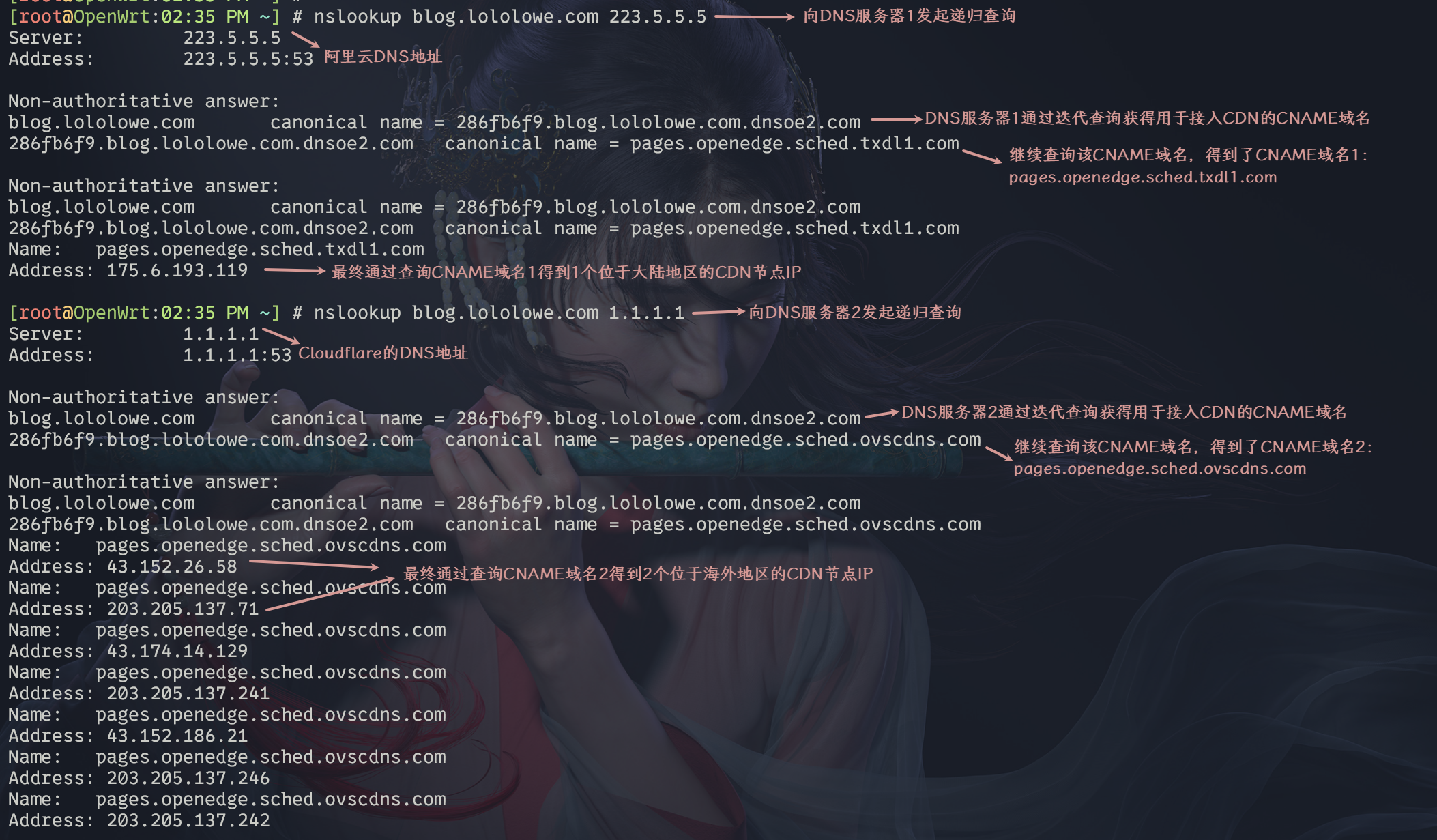
For users in mainland China, it is usually better to prioritize domestic DNS servers. Domestic DNS resolvers may carry a risk of pollution when resolving some foreign websites, but DNS queries are transmitted in plaintext by default, so simply switching to an overseas DNS server does not fully prevent hijacking or pollution. In some regions, even Google’s 8.8.8.8 DNS service may be affected by ISP interception of UDP port 53 and forged early replies.
When choosing a DNS provider, resolution speed should often be considered first. In practice, the fastest option is usually the DNS service provided by the user’s own ISP. The next choice is a domestic public DNS service, often with filtering. Overseas DNS is generally the last option if the priority is avoiding local censorship rather than optimizing speed. If resolution speed is not the main concern, domestic public DoH or DoT services can be a better choice for improving security.
CDN routing problems caused by CNAME flattening
The DNS protocol does not allow a zone apex, or root domain, to have a CNAME record. This is to avoid breaking records such as MX. For example, lololowe.com cannot directly use a CNAME record pointing to another domain such as qq.com.
CNAME Flattening works around this limitation. In effect, the authoritative DNS server performs the DNS lookup on behalf of the client, resolves the target domain such as qq.com, and then returns the resolved IP address directly as an A record instead of returning qq.com as a CNAME to the client. This makes it possible for an apex domain to behave like it is using a CNAME, while also improving client-side resolution speed because the client receives the final IP address directly.
However, CNAME flattening introduces a new CDN routing problem. If the authoritative DNS server performing the flattening is located overseas, then when it queries the CNAME target, the source IP of that query is also overseas. The authoritative DNS server for the CNAME target may therefore return an overseas CDN node close to that DNS server, not a node close to the real user. As a result, the geographic scheduling benefit of the CDN may be lost.
For this reason, if a subdomain is already using a CDN, it is generally better not to enable CNAME flattening for it.
Cloudflare’s CNAME Flattening is enabled by default only for domains proxied through the orange cloud. For DNS-only records, CNAME Flattening requires a paid plan. To check whether CNAME flattening is actually taking effect, use the following command:
dig 目标域名 +trace
Then check whether the authoritative DNS server returns the resolved IP address of the CNAME target directly, or returns the CNAME domain name itself.